



Price history
Dell
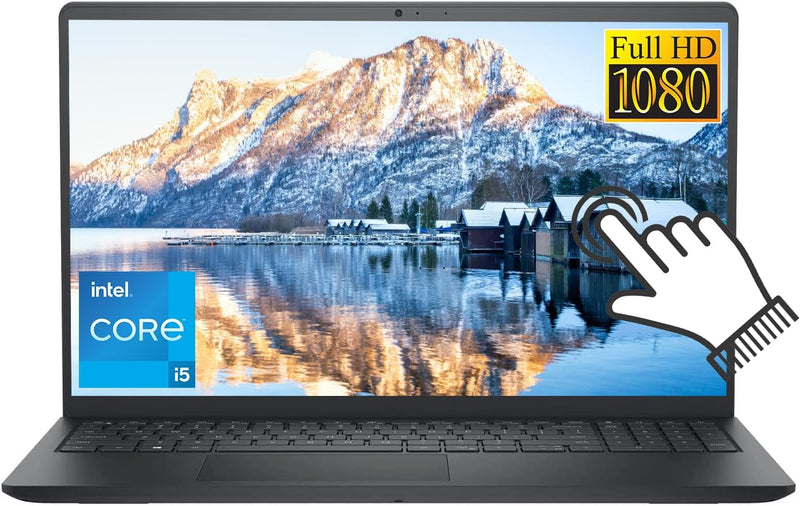
Dell 3520 i5 Touchscreen Laptop 1TB SSD
★★★★★
FHD1920 x 1080i5-1135G716GB RAM1TB SSD
Experience Versatile Computing with Touchscreen TechnologyIntroducing the Dell Inspiron 15 3520 Laptop. Perfect for business and students alike, this computer combines the portability of a laptop with the functionality of a touchscreen, all powered by Windows 11... Processor: Intel Core i5-1135G...
$655.43*
View on Amazon
✓ In Stock on Amazon.com
*Price sourced from Amazon.com. Last updated:Jul 16, 2026.Price and availability are subject to change.
Affiliate Disclosure: Studio Supplies may earn a commission from qualifying purchases made through links on this page, at no additional cost to you. This helps support our editorial team.
Notice a mistake? Let Us Know
Overview
Experience Versatile Computing with Touchscreen Technology
Introducing the Dell Inspiron 15 3520 Laptop. Perfect for business and students alike, this computer combines the portability of a laptop with the functionality of a touchscreen, all powered by Windows 11...
- Processor: Intel Core i5-1135G7, 4 Cores, Total 8 Threads, Up to 4.20GHz, 8MB Cache
- Graphics: Intel Iris Xe Graphics
- Display: 15.6" FHD (1920 x 1080) Anti-glare LED Backlight Touchscreen Narrow Border Display
- Operating System: Windows 11 Home
- Memory: 16GB RAM
- Storage: 1TB NVMe SSD
- Ports: 1 x USB-A 2.0, 2 x USB-A 3.2 Gen 1, 1 x HDMI 1.4, 1 x Headphone & Microphone Audio Jack, 1 x SD Card Reader, 1 x Power jack
- Webcam: Yes
- Dimensions: 14.11" x 9.27" x 0.74"
- Weight: 3.82 Pounds
- Color: Carbon Black
Key Features
✅4 Cores Processor:Intel Core i5-1135G7, 4 Cores, Total 8 Threads, Up to 4.20GHz, 8MB Cache, Intel Iris Xe Graphics. Smart quad-core, eight-way processing performance. Intel Turbo Boost Technology delivers dynamic extra power when you need it, while increasing energy efficiency when you don't.
✅15.6" FHD Touchscreen:15.6" FHD (1920 x 1080) Anti-glare LED Backlight Touchscreen Narrow Border Display, Equipped with a FHD IPS touch screen, the border-less visual effect minimizes distractions offering better cinema, document and web browsing experience.
✅Upgraded to 16GB RAM: Substantial high-bandwidth RAM to smoothly run your games and photo- and video-editing applications, as well as multiple programs and browser tabs all at once.
✅Upgraded to 1TB NVMe SSD: Get up to 15x faster performance than a traditional hard drive. Give you a long-lasting and smooth experience, both system boot up and application start are very fast.
✅Windows 11 Home in S mode: You may switch to regular windows 11: Press "Start button" bottom left of the screen; Select "Settings" icon above "power" icon;Select Update & Security and Activation, then Go to Store; Select "Get" option under "Switch out of S mode"; Hit Install. (If you also see an "Upgrade your edition of Windows" section, be careful not to click the "Go to the Store" link that appears there.)
Specifications
Processor
Intel Core i5-1135G7
Cores
4
Threads
8
Max Boost Clock
4.20GHz
Cache
8MB
Graphics
Intel Iris Xe Graphics
Display Size
15.6 inches
Display Resolution
FHD (1920 x 1080)
Display Type
Anti-glare LED Backlight Touchscreen
RAM
16GB
Storage
1TB NVMe SSD
Operating System
Windows 11 Home in S mode
Frequently Asked Questions
What processor is in the Dell 3520 i5 Touchscreen Laptop?
The Dell 3520 i5 Touchscreen Laptop features an Intel Core i5-1135G7 processor with 4 Cores and 8 Threads, capable of boosting up to 4.20GHz.
Can I install applications from outside the Microsoft Store on this laptop?
Yes, the laptop comes with Windows 11 Home in S mode, but you can switch to regular Windows 11 by following the provided steps in the settings.
What kind of display does this laptop have?
It has a 15.6" FHD (1920 x 1080) Anti-glare LED Backlight Touchscreen Narrow Border Display, designed for an enhanced viewing experience.
How much RAM and storage does the laptop offer?
The laptop is equipped with 16GB of RAM for smooth multitasking and a 1TB NVMe SSD for fast storage and rapid boot-ups.
Does the Dell 3520 have a touchscreen?
Yes, it features a 15.6" FHD (1920 x 1080) touchscreen display, allowing for interactive use.
What are the benefits of the Intel Turbo Boost Technology mentioned?
Intel Turbo Boost Technology provides dynamic extra power when needed, while also increasing energy efficiency when not under heavy load.
Is this laptop suitable for intensive gaming or video editing?
With 16GB RAM and a 1TB NVMe SSD, it can smoothly run photo- and video-editing applications. The Intel Iris Xe Graphics are integrated, suitable for many tasks, but performance in very demanding games or specialized video rendering might vary compared to dedicated graphics solutions.
Related Products


