

Dell
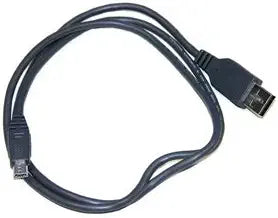
Dell J2711 USB Floppy Drive Cable
The Dell J2711 USB floppy drive cable provides a simple plug-and-play connection for accessing legacy floppy disks on Dell Latitude D series laptops.
View price on Amazon
Affiliate Disclosure: Studio Supplies may earn a commission from qualifying purchases made through links on this page, at no additional cost to you. This helps support our editorial team.
Notice a mistake? Let Us Know
Overview
Connect with Legacy Data Using the Dell USB FDD Cable
The Dell USB FDD Cable allows you to connect an external USB floppy disk drive to your Dell Latitude D series laptop. This cable provides a convenient way to access and transfer data from legacy floppy disks.
Specifications:
- Brand: Dell
- Compatibility: Dell Latitude D series laptops
- Type: External USB Floppy Drive Cable
- Model: J2711
Pros & Cons
👍 Pros
- Enables access to legacy floppy disk data without opening or modifying the laptop
- Dell OEM part ensures proper fit and compatibility with Latitude D series laptops
- Simple USB connection with no external power required
- Compact and lightweight cable that is easy to store or transport
👎 Cons
- Compatibility is limited exclusively to Dell Latitude D series laptops
- Cable only — the external floppy drive unit must be purchased separately
- Serves a very narrow use case since floppy disks are largely obsolete
- Proprietary Dell connector means it cannot be repurposed for other USB peripherals
Frequently Asked Questions
Which laptops is this cable compatible with?
This cable is designed specifically for Dell Latitude D series laptops. It may not work with other Dell models or non-Dell machines.
Does this cable include a floppy disk drive?
No, this is the cable only. You need a compatible Dell external USB floppy disk drive to use it.
Can I use this cable to connect any USB floppy drive?
No, this cable is a proprietary Dell connector designed for Dell's external floppy drive modules — it is not a standard USB cable.
Does the cable require driver installation?
On most Dell Latitude D series laptops with standard Dell drivers, the cable should work without additional driver installation.
Related Products


