



Dell
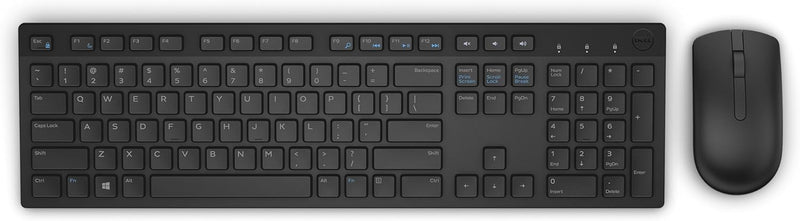
Dell KM636 Black Wireless Keyboard and Mouse Combo
★★★★★
Cut the cable clutter without cutting performance — the Dell KM636 delivers reliable 2.4GHz wireless input for everyday Dell desktop and laptop workflows.
$72.99*$82.98Save 12%
View on Amazon
✓ In Stock on Amazon.com
*Price sourced from Amazon.com. Last updated:Jul 14, 2026.Price and availability are subject to change.
Affiliate Disclosure: Studio Supplies may earn a commission from qualifying purchases made through links on this page, at no additional cost to you. This helps support our editorial team.
Notice a mistake? Let Us Know
Overview
Key Features
Contemporary design
Wireless convenience and performance
Designed for: Inspiron 11 3179, 32XX, 3459, 3668; latitude 12 5289, 13 7350, 7370, E5270, E5460, E5470, E5570, E7270, E7470; Optiplex 30XX, 3240, 50XX, 5250, 70XX, 7440; Precision mobile workstation 3510, 55XX, 7510, 7710; Precision tower 3420, 3620, 5810; Vostro 15 35XX, 32XX, 3668; Dell wyse 30XX, 50XX, 7010. Long, efficient battery life
Elevated and spacious chiclet keys, multimedia keys, plus optical tracking for precise mouse movement Humidity Range Operating 90% (non-condensing)
Refer user guide below
Specifications
Keyboard Layout
QWERTY
Number of Keys
104
Mouse Hand Orientation
Ambidextrous
Wireless Connectivity
2.4GHz RF (unified nano-receiver)
Batteries Required
4 AA (included)
Color
Black
Operating Humidity
Up to 90% (non-condensing)
Item Weight
15.04 oz
Compatible Devices
Personal Computer (Dell validated: Inspiron, Latitude, OptiPlex, Precision, Vostro, Wyse)
Pros & Cons
👍 Pros
- 104-key QWERTY layout with dedicated multimedia keys covers the full range of office input tasks without requiring a separate numpad or media controller.
- Single nano-receiver for both devices eliminates the need for two USB ports, a tangible advantage on space-constrained thin clients and small-form-factor desktops.
- Ambidextrous mouse design accommodates both left- and right-handed users without requiring a separate SKU.
- Chiclet key spacing reduces accidental adjacent-key presses compared to traditional stepped keycap profiles, which translates to fewer typos during extended data entry sessions.
- Validated compatibility with a broad range of Dell Inspiron, Latitude, OptiPlex, and Wyse platforms reduces driver and pairing friction in managed enterprise environments.
👎 Cons
- No rechargeable battery support means ongoing AA battery cost and replacement overhead — a maintenance consideration in large deployments.
- 28AWG-equivalent RF link offers no latency specification; users sensitive to input lag (fast typists above 100 WPM) may notice occasional dropout under heavy RF congestion.
- Mouse has no stated DPI figure or adjustable sensitivity — limiting for any workflow beyond standard office navigation.
- No backlighting on the keyboard, making it impractical in low-light environments such as home theater PCs or dimly lit workstations.
- Compatibility is formally validated only against specific Dell models; behavior on third-party or legacy systems is not guaranteed.
Frequently Asked Questions
What wireless technology does the KM636 use, and what's the effective range?
The KM636 uses a 2.4GHz RF wireless connection via a single USB nano-receiver that handles both the keyboard and mouse. Typical effective range is around 30 feet in open environments, though walls and RF interference can reduce that in practice.
Does this combo use a single USB receiver for both devices?
Yes. Dell's unified nano-receiver handles both the keyboard and the mouse simultaneously, consuming only one USB-A port — a practical advantage on thin clients and small-form-factor systems where ports are scarce.
What batteries does the KM636 require, and how long do they last?
The combo requires 4 AA batteries total — 2 for the keyboard, 2 for the mouse. Dell rates battery life as long-lasting under typical office use, though exact duration depends on usage intensity. No rechargeable battery option is built in.
Is this keyboard compatible with systems outside the Dell ecosystem?
Functionally, yes — it uses standard HID drivers and will work on any Windows PC as a basic keyboard and mouse. However, the multimedia keys and any Dell-specific function key behaviors may not operate correctly outside of Dell systems or without Dell software.
What is the mouse sensor type, and is it suitable for precision work?
The mouse uses optical tracking, which is adequate for general office navigation and web use. It is not a high-DPI gaming or CAD-grade sensor — users who need fine cursor precision for design or photo editing should consider a dedicated peripheral.
Related Products


