



Dell
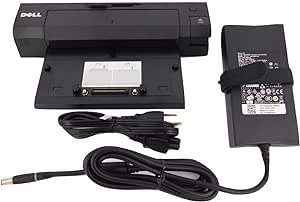
Dell T0J21 E-Port Plus Advanced Port Replicator USB 3.0
★★★★★
USB 3.0USB 2.0
The Dell E-Port Plus replicator breaks a single docking connector into dual DVI-D, dual DisplayPort, USB 3.0, gigabit Ethernet, and legacy serial/parallel — all through the E Series proprietary port.
$54.83*
View on Amazon
✓ In Stock on Amazon.com
*Price sourced from Amazon.com. Last updated:Jun 04, 2026.Price and availability are subject to change.
Affiliate Disclosure: Studio Supplies may earn a commission from qualifying purchases made through links on this page, at no additional cost to you. This helps support our editorial team.
Notice a mistake? Let Us Know
Overview
Key Features
2x USB 3.0, 3x USB 2.0, 1x VGA, 2x DVI D, 2x Display Port
1x Serial, 2 x PS/2 Connectors, 1 x Parallel Connector, 1x mouse
1x Keyboard, RJ 45 Ethernet Port, Microphone in, 3.5 millimeter Headphone Jack
Security Cable Slot, Lock/Unlock Switch, easy removal with eject button
240 Watt AC Adapter, See Full Description for Compatible Dell Models
Specifications
USB 3.0 Ports
2
USB 2.0 Ports
3 (front) + 4 (rear) = up to 7 total
Video Outputs
2x DVI-D, 2x DisplayPort, 1x VGA
Network
1x RJ-45 Ethernet
Legacy Ports
1x Serial, 1x Parallel, 2x PS/2
Audio
Microphone In, 3.5mm Headphone Jack
Security
Kensington Security Lock Slot, Lock/Unlock Switch
Power Supply
240W AC Adapter (included)
Compatibility
Dell Latitude E Series (proprietary dock connector)
Pros & Cons
👍 Pros
- Dual DVI-D and dual DisplayPort outputs provide up to four video outputs from a single dock connection, covering most multi-monitor workstation configurations without additional adapters.
- 2x USB 3.0 ports at 5 Gbps enable fast external storage access — transferring large project files to a USB 3.0 drive is 10x faster than the USB 2.0 ports on the same unit.
- Included 240W AC adapter charges the laptop and powers the dock simultaneously through the single proprietary connector, eliminating the need for a separate laptop charger while docked.
- Legacy serial, parallel, and PS/2 ports accommodate enterprise environments running older hardware — barcode scanners, serial printers, and PS/2 keyboards connect directly without USB adapters.
- The eject button and lock/unlock switch enable clean undocking without data corruption, a critical feature in shared hot-desk environments where the dock may be used by multiple users.
👎 Cons
- Proprietary Dell E-Series docking connector locks this replicator to a specific generation of Dell Latitude E Series — incompatible with newer Latitude models using USB-C or WiGig docking.
- Maximum simultaneous display count is limited by the connected laptop's GPU display pipeline, not the dock's four video outputs — most E Series Intel GPUs cap at two to three active displays total.
- No USB 3.1 or USB-C ports — the USB 3.0 maximum of 5 Gbps is a bottleneck compared to modern docking stations offering 10 Gbps USB 3.2 or Thunderbolt connectivity.
- The large 240W power brick required by this dock adds desk cable bulk compared to modern USB-C docks that can manage lower power loads with a compact adapter.
- No audio output beyond the 3.5mm headphone jack, and no optical audio — users with professional audio setups require a separate USB audio interface.
Frequently Asked Questions
Which Dell laptop models are compatible with the E-Port Plus Advanced Port Replicator?
The E-Port Plus is designed for Dell Latitude E Series laptops (E-Series Latitudes) that have the proprietary docking connector on the bottom of the device. Specific compatible models should be verified against Dell's official compatibility list, as the E-Port docking connector is not present on all Dell laptop lines — non-E-Series Latitudes, Inspirons, and XPS models use different docking mechanisms.
How many external monitors can the E-Port Plus drive simultaneously, and at what resolutions?
The E-Port Plus provides 2x DVI-D and 2x DisplayPort outputs — up to four video outputs total. In practice, maximum simultaneous display count and resolution depend on the Intel GPU in the connected laptop, which typically supports two to three active displays (including the laptop's built-in screen). Confirm the specific Latitude model's GPU display output limit before planning a four-monitor configuration.
What does the USB 3.0 inclusion mean for data transfer compared to the USB 2.0 ports on this replicator?
The 2x USB 3.0 ports support up to 5 Gbps theoretical transfer speed — approximately 10x faster than the 3x USB 2.0 ports' 480 Mbps ceiling. For external hard drives, USB 3.0 flash drives, and USB 3.0 hubs, connecting to the USB 3.0 ports will deliver noticeably faster file transfers. USB 2.0 ports are adequate for peripherals like keyboards, mice, and low-bandwidth devices.
Does the E-Port Plus require a driver installation, or is it plug-and-dock?
Dell docking stations for E Series laptops typically use the Dell E-Port hardware interface which is recognized by Windows without separate driver installation for basic functionality. However, for full display output functionality — especially at higher resolutions — installing Dell's docking station drivers or the latest Intel graphics drivers from Dell's support portal is recommended. Some display configurations may not initialize correctly without the appropriate graphics driver stack.
What is the 240W AC adapter included for, and do I still need my laptop's own charger?
The included 240W AC adapter powers both the port replicator and charges the connected laptop simultaneously through the docking connector — you do not need to plug in the laptop's own AC adapter when docked. The 240W supply provides enough headroom to charge the laptop at full rate while powering connected USB peripherals and displays.
Related Products


