

Epson
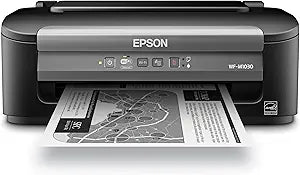
Epson C11CC82201 WorkForce WF-M1030 Wireless Monochrome Printer
★★★★★
Achieve Cost-Effective Printing with Epson WorkForce WF-M1030 The Epson WorkForce WF-M1030 Wireless Monochrome Printer offers the lowest black printing cost in its class, making it an economical choice for everyday use. This high-performance printer delivers sharp, laser-quality text while using...
Check availability
Affiliate Disclosure: Studio Supplies may earn a commission from qualifying purchases made through links on this page, at no additional cost to you. This helps support our editorial team.
Notice a mistake? Let Us Know
Overview
Achieve Cost-Effective Printing with Epson WorkForce WF-M1030
The Epson WorkForce WF-M1030 Wireless Monochrome Printer offers the lowest black printing cost in its class, making it an economical choice for everyday use. This high-performance printer delivers sharp, laser-quality text while using less power than laser printers.
Key Features
- Low Printing Cost: Up to 60% lower black printing cost than monochrome laser printers.
- Economical Ink Cartridges: High-capacity ink cartridges produce up to 2400 pages.
- Fast Print Speeds
Key Features
Up to 60% less printing costs than mono lasers
Up to 34 ppm print speed
Extra High-capacity cartridges, up to 2400 pages
Wireless and Ethernet networking
Laser sharp documents. Please refer the User Guide before use.
Specifications
Model
WorkForce WF-M1030
Printer Type
Monochrome Printer
Printing Technology
Wireless
Print Speed
Up to 34 ppm
Cartridge Yield
Up to 2400 pages (Extra High-capacity)
Connectivity
Wireless, Ethernet
Document Quality
Laser sharp
Pros & Cons
👍 Pros
- Offers up to 60% less printing costs compared to mono lasers, representing significant long-term savings.
- Achieves a print speed of up to 34 ppm, allowing for quick completion of large printing tasks.
- Utilizes Extra High-capacity cartridges, which can print up to 2400 pages, reducing the frequency of replacements.
- Provides both Wireless and Ethernet networking, offering flexible connectivity options for various office environments.
- Delivers laser-sharp documents, ensuring high-quality text and graphics for professional output.
👎 Cons
- As a monochrome printer, it is not capable of printing in color, limiting its utility for tasks requiring full-color output.
- The initial purchase price might be a consideration, even with the promise of lower running costs.
- Print speed of 34 ppm, while efficient, may still be slower than some high-end laser printers in very busy environments.
- Relying on inkjet technology, it may have different maintenance requirements than laser printers, such as potential for printhead clogs if unused.
- The "Please refer the User Guide before use" note suggests there may be specific setup or operational nuances to understand.
Frequently Asked Questions
What is the estimated cost saving for printing with the Epson WorkForce WF-M1030?
The Epson WorkForce WF-M1030 offers up to 60% less printing costs compared to mono lasers.
What is the maximum print speed of this printer?
This printer is capable of achieving a print speed of up to 34 pages per minute (ppm).
How many pages can the extra high-capacity cartridges print?
The extra high-capacity cartridges for the WF-M1030 can print up to 2400 pages, reducing the need for frequent replacements.
What connectivity options are available for the Epson WF-M1030?
The Epson WorkForce WF-M1030 supports both Wireless and Ethernet networking for versatile connection to your office setup.
Is this printer capable of printing in color?
No, the Epson WorkForce WF-M1030 is a monochrome printer, meaning it is designed only for black and white printing.
Related Products


