



Epson
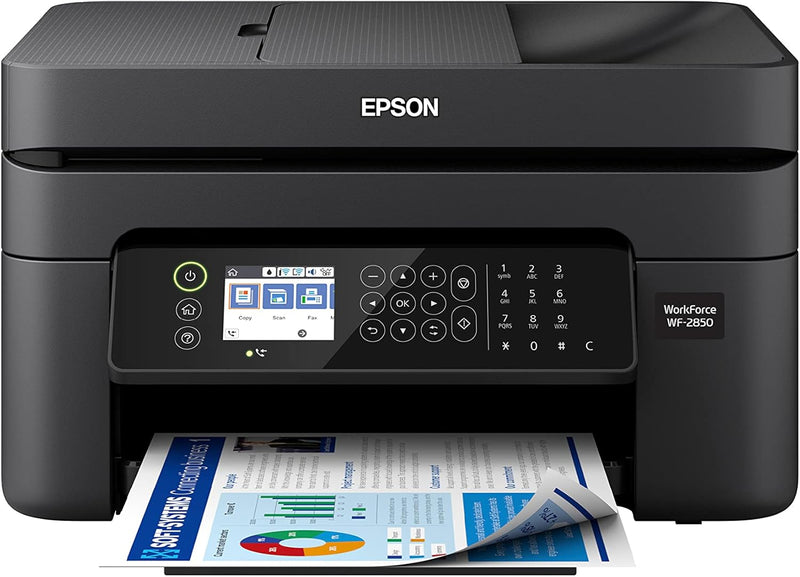
Epson C11CG31201 Workforce WF-2850 Wireless All-in-One Printer
★★★★★
Achieve Efficient Printing with this Wireless All-in-One PrinterThe Epson Workforce WF-2850 is a wireless all-in-one printer designed for streamlined workflow. This device offers scanning, copying, and fax capabilities along with wireless connectivity, making it an ideal choice for home offices. ...
$129.00*$138.95Save 7%
View on Amazon
✓ In Stock on Amazon.com
*Price sourced from Amazon.com. Last updated:Jun 28, 2026.Price and availability are subject to change.
Affiliate Disclosure: Studio Supplies may earn a commission from qualifying purchases made through links on this page, at no additional cost to you. This helps support our editorial team.
Notice a mistake? Let Us Know
Overview
Achieve Efficient Printing with this Wireless All-in-One Printer
The Epson Workforce WF-2850 is a wireless all-in-one printer designed for streamlined workflow. This device offers scanning, copying, and fax capabilities along with wireless connectivity, making it an ideal choice for home offices.
Specifications:
- Functions: Print, Scan, Copy, Fax
- Connectivity: Wi-Fi, USB
- Printing Technology: Inkjet
- Maximum Color Print Resolution: 5760 x 1440 DPI
- Maximum Black and White Print Resolution: 5760 x 1440 DPI
- Max Print Speed (Monochrome): 10 ppm
- Max Print Speed (Color): 4.5 ppm
- Duplex Printing: Automatic
- Scanner Type: Flatbed, Sheetfed
- Display Type: LCD
- Maximum Input Sheet Capacity: 100 sheets
- Compatible Devices: Smartphones, PC, Tablets, Laptops
Key Features
Professional-Quality Home Office Printing — Epson’s leading-edge printing technology delivers sharp text and vibrant color graphics
Stress-Free Setup and Operation — Features a color display for effortless navigation, plus easy installation and operation through your smartphone or tablet using the Epson Smart Panel app (1)
Engineered for Reliability — Consistently delivers high-quality prints with heat-free technology and a permanent printhead designed to last the life of the printer
Convenient Connectivity — Supports easy wireless connections and printing from Android or iOS devices (2)
Efficient, Economical Design — Automatic 2-sided printing helps you save paper and reduce paper waste
Easy, Affordable Color Printing — Individual ink cartridges make it easy to only replace the ink you need
Hands-Free, Voice-Activated Printing — Easily print on-the-go using Alexa, Siri and Google Assistant (3)
Versatile Functionality — Create searchable PDFs and more with included Epson ScanSmart scanning software
Epson Printing System Is Designed to Be Used Exclusively with Epson Genuine Cartridges — Use of non-genuine ink could cause damage not covered under the printer’s limited warranty
Specifications
Printer Type
All-in-One
Display
Color display
Connectivity
Wireless, Android, iOS
Printing Technology
Heat-free technology
Printhead Type
Permanent
Duplex Printing
Automatic 2-sided printing
Ink System
Individual ink cartridges
Voice Assistant Compatibility
Alexa, Siri, Google Assistant
Scanning Software
Epson ScanSmart
Ink Compatibility
Epson Genuine Cartridges only
Pros & Cons
👍 Pros
- Delivers professional-quality printing with sharp text and vibrant color graphics suitable for home office use.
- Features a color display for straightforward navigation and stress-free setup and operation via the Epson Smart Panel app.
- Engineered with heat-free technology and a permanent printhead, contributing to long-term reliability and print consistency.
- Offers convenient wireless connectivity, supporting printing directly from Android or iOS devices for enhanced flexibility.
- Includes automatic 2-sided printing, which helps to conserve paper and reduce overall waste.
- Utilizes individual ink cartridges, allowing users to replace only the specific color that has run out, which can be economical.
- Supports hands-free, voice-activated printing through integration with Alexa, Siri, and Google Assistant for added convenience.
- Comes with Epson ScanSmart scanning software, enabling versatile functionality such as creating searchable PDFs.
👎 Cons
- The printer is designed exclusively for use with Epson Genuine Cartridges, limiting options for third-party ink.
- Use of non-genuine ink could potentially void the printer’s limited warranty, posing a risk to the user.
- Voice-activated printing requires integration with external smart assistants (Alexa, Siri, Google Assistant), not a built-in feature.
- While it offers wireless printing, specific network configurations might be required for optimal setup.
- The automatic 2-sided printing is a paper-saving feature but may not always be as fast as single-sided printing for some tasks.
Frequently Asked Questions
What kind of print quality can I expect from the Epson Workforce WF-2850?
The Epson Workforce WF-2850 is designed to deliver professional-quality home office printing, producing sharp text and vibrant color graphics.
How easy is it to set up and operate this printer?
It offers stress-free setup and operation, featuring a color display for navigation and easy installation and control through the Epson Smart Panel app on your smartphone or tablet.
Does this printer support wireless printing from mobile devices?
Yes, the Epson Workforce WF-2850 provides convenient wireless connectivity, allowing you to print from both Android and iOS devices.
Can this printer save paper by printing on both sides?
Yes, it includes efficient and economical automatic 2-sided printing functionality to help you reduce paper consumption and waste.
What is the policy regarding ink cartridges for this printer?
The Epson Printing System is designed to be used exclusively with Epson Genuine Cartridges, and using non-genuine ink could potentially void the printer’s limited warranty.
Does the printer offer any voice-activated printing capabilities?
Yes, for added convenience, you can easily print hands-free using voice commands through compatible services like Alexa, Siri, and Google Assistant.
Related Products


