



Epson
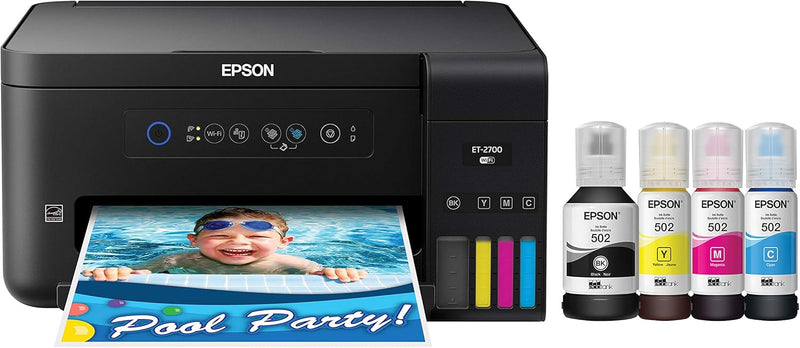
Epson ET-2700 EcoTank Wireless All-in-One Supertank Printer
★★★★★
The Epson ET-2700 eliminates per-page ink cost at the source — supertank refills replace roughly 30 cartridge sets before you need to buy ink again.
$430.00*
Check availability
*Price sourced from Amazon.com. Last updated:Jun 27, 2026.Price and availability are subject to change.
Affiliate Disclosure: Studio Supplies may earn a commission from qualifying purchases made through links on this page, at no additional cost to you. This helps support our editorial team.
Notice a mistake? Let Us Know
Overview
Key Features
Epson strongly recommends the use of Genuine Epson inks for a quality printing experience Non Epson inks and inks not formulated for your specific printer may cause damage that is not covered by the Epson
Epson EcoTank is the #1 Best Selling Supertank Printer
Cartridge-free printing - comes with up to 2 years of ink in the box (1)
Includes enough ink to Print up to 6 500 pages black/5 200 color (2) - equivalent to about 30 ink cartridge sets (3)
Wireless - easily Print from tablets and smartphones (5)
User-friendly control panel - with intuitive buttons for fast easy navigation
Form Factor: All In One
Connectivity Technology: Wi-Fi
Resolution: 9600
Specifications
Brand
Epson
Model
ET-2700
Form Factor
All-in-One (Print, Copy, Scan)
Printing Technology
Inkjet (EcoTank)
Resolution
9,600 x 2,400 dpi
Max Print Speed (Mono)
1 ppm
Max Print Speed (Color)
1 ppm
Connectivity
Wi-Fi (802.11 b/g/n), USB
Max Media Size
8.5 x 14 in
Input Capacity
100 sheets
Duplex Printing
Automatic
Scanner Type
Sheetfed
Memory
64 MB
Display
LCD
Power Consumption
12 watts
Ink Colors
Black (127 mL), Cyan, Magenta, Yellow (70 mL each)
Estimated Page Yield (Black)
6,500 pages
Estimated Page Yield (Color)
5,200 pages
Pros & Cons
👍 Pros
- Included ink supply covers approximately 6,500 black and 5,200 color pages — most users won't need to buy ink for two years or more under typical home use.
- Visible, refillable tanks eliminate the guesswork of cartridge ink levels and the waste of half-used cartridges.
- Auto duplex printing reduces paper consumption on multi-page documents without manual intervention.
- Wireless printing from phones and tablets works without a computer in the loop.
- 64 MB onboard memory and a 100-sheet input tray handle multi-page jobs without babysitting the printer.
👎 Cons
- Maximum print speed of 1 page per minute in both mono and color is slow — not suited for high-volume office printing under time pressure.
- Sheetfed scanner means you cannot scan bound books or thick documents; flatbed scanning is not available on this model.
- The ET-2700 is a home/light-office device — it tops out at 8.5 x 14 inch media with no envelope feeder or specialty media handling.
- Initial tank-filling process at first setup can be time-consuming and requires care to avoid spills.
- No touchscreen — navigation uses physical push buttons on the control panel, which is functional but slower for menu-heavy tasks.
Frequently Asked Questions
How much ink does the ET-2700 actually ship with, and what does that translate to in pages?
The included bottles deliver up to 6,500 black pages and 5,200 color pages per Epson's yield ratings — equivalent to approximately 30 conventional ink cartridge sets. The 127 mL black bottle and 70 mL cyan/magenta/yellow bottles fill the visible tanks at first setup.
What's the print resolution and how does it affect output quality?
The ET-2700 prints at up to 9,600 x 2,400 dpi optical resolution, which is sufficient for photo-quality output on compatible media and produces sharp, clean text on plain paper. For home and small office use, output quality matches or exceeds inkjet competitors at this price tier.
Is the wireless setup straightforward, and what devices does it support?
Wireless setup uses WPS push-button or the included setup CD and works with Windows and macOS. The printer also supports printing from iOS and Android devices via the Epson iPrint app, and is compatible with Apple AirPrint and Google Cloud Print-era standards.
Does this printer handle automatic two-sided printing?
Yes — the ET-2700 supports auto duplex printing, which saves paper on multi-page documents without manual page flipping. Max input capacity is 100 sheets of plain paper.
What's the catch with the ink tank system — can I use third-party inks?
Epson strongly advises against third-party inks in EcoTank printers, citing potential nozzle clogging and hardware damage not covered under warranty. The EcoTank bottles are widely available and priced to reflect the high-yield design, making the OEM ink the practical choice here.
Related Products


