

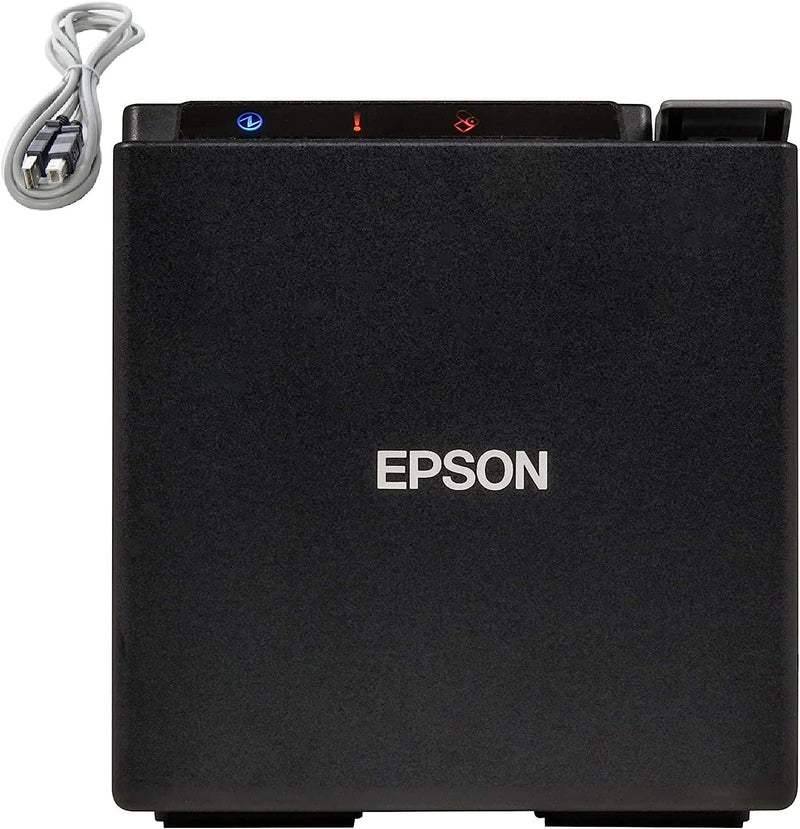
Epson
Epson TM-M10-002 Thermal USB POS Receipt Printer
★★★★★
The Epson TM-M10 fits a full-featured 2" thermal receipt printer into a 4"×4"×4" footprint — the smallest POS printer in its class for tight counter environments.
$149.82*
View on Amazon
✓ In Stock on Amazon.com
*Price sourced from Amazon.com. Last updated:Jun 28, 2026.Price and availability are subject to change.
Affiliate Disclosure: Studio Supplies may earn a commission from qualifying purchases made through links on this page, at no additional cost to you. This helps support our editorial team.
Notice a mistake? Let Us Know
Overview
Key Features
The industry’s smallest POS 2" receipt printer in its class, the TM-m10 saves valuable counter space, while offering the freedom to print receipts from virtually any mobile device and/or desktop PC. Ideal for most environments, its modular casing can be easily switched from a top-load to front-load configuration.
This versatile printer ensures simple integration with existing mobile POS environments, intuitive functionality and advanced connectivity. The TM-m10 is the first of its kind designed exclusively for small businesses. Featuring ePOS print technology, it works with iOS, Android and Windows mobile devices and desktop PCs, and offers fast, easy setup.
Printing Technology: Thermal; Print Resolution: 203 dpi; Print Speed: 150mm/s; Print Direction: Vertical and horizontal.
Connectivity: Built-in USB.
What's in the box: Epson TM-M10-002 Compact Pos 2" Receipt Printer; Power Supply - Adapter C With AC Cable; Roll Paper(For Checking Initial Movement Of The Printer); Setup Guide; Power Switch Cover; Usb Cable; Locking Wire Saddle.
Specifications
Brand
Epson
Model
TM-M10-002
Printing Technology
Thermal
Print Resolution
203 dpi
Print Speed
150mm/s
Print Direction
Vertical and horizontal
Media Width
2.26" / 57.5mm
Connectivity
Built-in USB
Auto Cutter
Yes
Platform Compatibility
iOS, Android, Windows (via ePOS print)
Dimensions
4" x 4" x 4" (102 x 102 x 102 mm)
Weight
1.98 lbs / 900g
Color
Black
Pros & Cons
👍 Pros
- 4"×4"×4" cubic footprint is genuinely compact — it occupies less counter real estate than most power adapters in cramped small-business POS setups.
- Switchable top-load / front-load paper configuration adapts the printer to different counter orientations without purchasing a different model.
- ePOS print technology provides broad cross-platform compatibility with iOS, Android, and Windows POS applications out of the box.
- Auto-cutter is built in at this price and size class — clean, automatic receipt separation without an add-on module.
- Complete out-of-box bundle includes USB cable, power supply, and mounting hardware, reducing installation friction.
👎 Cons
- 2" / 58mm paper format is narrower than the 80mm industry standard, limiting receipt layout flexibility and creating a separate paper SKU to stock alongside any 80mm printers in the same operation.
- USB-only connectivity means this printer cannot be shared across multiple POS terminals on a network — each register requires its own dedicated unit.
- 203 dpi print resolution is functional for receipts but produces noticeably coarser barcode and logo output compared to 300 dpi alternatives in the same form factor category.
- 150mm/s print speed is adequate for low-to-medium transaction volume but may create perceptible delay during high-frequency receipt printing in busy service environments.
Frequently Asked Questions
Does the TM-M10-002 work with both iOS and Android POS systems over USB?
Yes — the TM-M10 uses Epson's ePOS print technology, which supports iOS, Android, and Windows devices over its built-in USB connection, making it compatible with most mobile and desktop POS software environments without additional drivers.
What paper roll width does this printer require?
The TM-M10 uses 2.26" / 57.5mm thermal paper rolls — standard 58mm thermal paper rolls are the correct media for this printer. This is a narrower format than the common 80mm rolls used in larger receipt printers.
Can the paper loading configuration be changed?
Yes — the modular casing design allows the TM-M10 to be switched between top-load and front-load paper configurations without tools, which is useful when counter space or cabinetry constrains access direction.
What print speed does this printer deliver, and does it create a bottleneck at high transaction volume?
The TM-M10 prints at 150mm per second. At 2" media width this is adequate for single-transaction retail and food service environments, but high-volume counter operations with long itemized receipts may find the narrower media and speed limiting compared to 80mm alternatives.
Does the TM-M10 include an auto-cutter?
Yes — an auto-cutter is built in, producing clean, consistent receipt cuts automatically after each print job without manual tearing.
Related Products


