



Epson
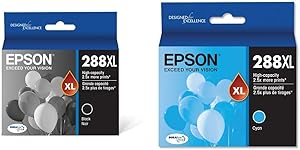
Epson T288XL120 Black & T288XL220 Cyan Ink Cartridge Combo
DURABrite Ultra pigment ink delivers smudge-proof, fade-resistant prints that outperform dye-based cartridges right out of the box.
$52.78*$57.00Save 7%
View on Amazon
✓ In Stock on Amazon.com
*Price sourced from Amazon.com. Last updated:Oct 07, 2026.Price and availability are subject to change — details.
Affiliate Disclosure: As an Amazon Associate, Studio Supplies earns from qualifying purchases made through links on this page, at no additional cost to you. This helps support our editorial team.
Notice a mistake? Let Us Know
Overview
Key Features
Product 1: Worry-free handling - smudge, fade and water resistant prints
Product 1: Convenient individual ink cartridges
Product 1: Works with XP-330, XP-430, XP-434
Product 1: Contains Pigment Ink.
Product 2: Worry-free handling - smudge, fade and water resistant prints
Product 2: Convenient individual ink cartridges
Product 2: Contains Pigment Ink.
Specifications
Cartridge Series
Epson T288XL
Included Cartridges
T288XL120 (Black), T288XL220 (Cyan)
Ink Type
DURABrite Ultra Pigment Ink
Yield Type
High Yield (XL)
Compatible Models
Epson Expression Home XP-330, XP-340, XP-430, XP-434, XP-440, XP-446
Smudge Resistance
Yes
Fade Resistance
Yes
Water Resistance
Yes
Cartridge Format
Individual (sold as combo pack)
Frequently Asked Questions
Which Epson printer models are compatible with the T288XL120 and T288XL220 cartridges?
These cartridges are compatible with the Epson Expression Home XP-330, XP-340, XP-430, XP-434, XP-440, and XP-446. They are not cross-compatible with other Epson series — the T288 series is specific to this Expression Home lineup.
What is the difference between the T288 standard and T288XL cartridges?
The XL designation indicates a high-yield cartridge containing more ink than the standard-capacity T288 counterpart. The XL black and cyan cartridges are physically larger and deliver more pages per cartridge, reducing the cost-per-page and the frequency of replacements.
Why does pigment ink matter compared to dye-based ink?
Pigment ink, which DURABrite Ultra uses, bonds to paper fibers rather than being absorbed into them. This makes prints more resistant to smudging immediately after printing, fading over time, and water damage — particularly relevant for documents and graphics that will be handled, filed, or stored. Dye inks tend to produce more vibrant colors initially but degrade faster.
Can I use just the black or just the cyan cartridge independently?
Yes. These are sold as individual cartridges, not a combined unit. Epson's Expression Home printers use a separate-cartridge system, so you can replace only the color that runs out rather than replacing a combined color pack.
Will these cartridges work with third-party or refilled ink systems in the same printer?
These are OEM Epson T288XL cartridges. Switching between OEM and third-party cartridges in the same printer can trigger chip-recognition issues on Epson printers; Epson's firmware updates have historically restricted third-party ink functionality on these models.
Related Products


