

G.Skill
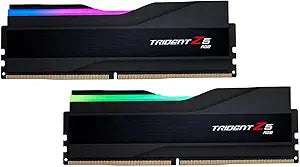
G.Skill Trident Z5 RGB 32GB DDR5 5600MHz RAM
★★★★★
32GB DDR5
Elevate Your System's Performance with G.Skill Trident Z5 RGB DDR5 Memory Experience the pinnacle of DDR5 performance with the G.Skill Trident Z5 RGB Series. Designed for Intel XMP compatibility, this 32GB (2 x 16GB) kit delivers blazing-fast speeds and stunning RGB aesthetics. Built with hand-s...
$109.99*
Check availability
*Price sourced from Amazon.com. Last updated:Jun 04, 2026.Price and availability are subject to change.
Affiliate Disclosure: Studio Supplies may earn a commission from qualifying purchases made through links on this page, at no additional cost to you. This helps support our editorial team.
Notice a mistake? Let Us Know
Overview
Elevate Your System's Performance with G.Skill Trident Z5 RGB DDR5 Memory
Experience the pinnacle of DDR5 performance with the G.Skill Trident Z5 RGB Series. Designed for Intel XMP compatibility, this 32GB (2 x 16GB) kit delivers blazing-fast speeds and stunning RGB aesthetics. Built with hand-screened ICs and premium components, the Trident Z5 RGB is the perfect upgrade for gamers, content creators, and PC enthusiasts seeking unparalleled performance and style.
- Series: Trident Z5 RGB
- Memory Size: 32GB (2 x 16GB)
- Memory Type: DDR5
- Pin Count: 288-Pin
- Speed: 5600 MHz
- CAS Latency: CL28-34-34-89
- Voltage: 1.35V
- Channel: Dual Channel
- Color: Matte Black
Key Features
G.SKILL Trident Z5 RGB Series DDR5 U-DIMM Memory Kit, Model: F5-5600J2834F16GX2-TZ5RK
32GB total capacity kit containing 2x16GB modules, rated for up to DDR5-5600 CL28-34-34-89 at 1.35V
Non-ECC, DDR5 U-DIMM, 288-pin, for Desktop PC & Gaming
Includes JEDEC default profile, and Intel XMP 3.0 memory overclock profile
Do not mix memory kits. Memory kits are sold in matched kits that are designed to run together as a set. Mixing memory kits will result in stability issues or system failure.
For Intel Z890, Intel Z790, Intel Z690, Intel H610, Intel B860, Intel B760, Intel B660 platforms. Refer to G.SKILL memory QVL or RAM Configurator tool on the G.SKILL website for more details on validated motherboard and hardware.
Usage in any manner inconsistent with manufacturer specifications, warnings, designs, or recommendations will result in lower speeds, system instability, or damage to the system or its components.
Memory kits will boot at JEDEC default SPD speed at default BIOS settings with compatible hardware.
For memory kits with XMP and/or EXPO overclock profile, enable XMP/EXPO/DOCP/A-XMP profile in BIOS to reach up to the rated potential XMP or EXPO overclock speed of the memory kit, subject to the use of compatible hardware. Enabling XMP or EXPO is an act of overclocking and requires BIOS setting adjustments.
Reaching the rated XMP or EXPO overclock speed and system stability will depend on the compatibility and capability of the motherboard and CPU used.
Specifications
Model
F5-5600J2834F16GX2-TZ5RK
Total Capacity
32GB (2x16GB)
Memory Type
DDR5 U-DIMM
Memory Speed
5600MHz
CAS Latency (CL)
28
Timings
28-34-34-89
Voltage
1.35V
Pin Count
288-pin
Error Correction
Non-ECC
Features
RGB, Intel XMP 3.0 Profile, JEDEC Default Profile
Platform Compatibility
Intel Z890, Z790, Z690, H610, B860, B760, B660
Pros & Cons
👍 Pros
- Offers a total capacity of 32GB, configured as two 16GB modules, providing ample memory for demanding applications and multitasking.
- Rated for DDR5-5600MHz, delivering high-speed performance ideal for gaming and professional workloads on compatible platforms.
- Features tight timings of CL28-34-34-89 at 1.35V, contributing to responsive system performance.
- Equipped with RGB lighting, allowing users to customize aesthetics and synchronize with other system components for a cohesive look.
- Includes both JEDEC default and Intel XMP 3.0 memory overclock profiles, simplifying setup for optimal performance on Intel platforms.
- Designed as Non-ECC, DDR5 U-DIMM, 288-pin memory, specifically for desktop PCs and gaming systems.
- Compatible with modern Intel Z890, Z790, Z690, H610, B860, B760, B660 platforms, ensuring broad compatibility with current generation motherboards.
👎 Cons
- The RAM is explicitly stated to be incompatible with mixing memory kits, requiring users to purchase and use complete, matched kits for stability.
- Achieving the rated XMP or EXPO overclock speed depends heavily on the compatibility and capability of the specific motherboard and CPU used.
- Enabling XMP/EXPO profiles is considered an act of overclocking and requires BIOS setting adjustments, which may intimidate less experienced users.
- Usage inconsistent with manufacturer specifications could lead to lower speeds, system instability, or even damage to components.
- The RGB lighting, while a pro for aesthetics, might be an unnecessary feature for users prioritizing pure performance or a minimalist build.
Frequently Asked Questions
Can I mix this G.Skill Trident Z5 RGB memory kit with other RAM modules?
No, it is strongly advised not to mix memory kits. This kit is sold as a matched set designed to run together, and mixing them can lead to stability issues or system failure.
What platforms is this DDR5 RAM compatible with?
This memory kit is compatible with Intel Z890, Z790, Z690, H610, B860, B760, and B660 platforms. It's recommended to check the G.SKILL website for a detailed QVL (Qualified Vendor List).
How do I achieve the advertised 5600MHz speed?
To reach the rated DDR5-5600MHz speed, you will need to enable the Intel XMP 3.0 overclock profile in your motherboard's BIOS, as memory kits typically boot at JEDEC default SPD speed with default BIOS settings.
What are the benefits of the RGB lighting on these RAM modules?
The RGB lighting allows for customizable aesthetics, enabling you to personalize your PC build and synchronize the lighting effects with other RGB components in your system.
What happens if I don't enable the XMP profile?
If you do not enable the XMP profile in your BIOS, the memory kit will boot at its JEDEC default SPD speed, which will be lower than the advertised 5600MHz overclock speed.
Related Products


