



HP
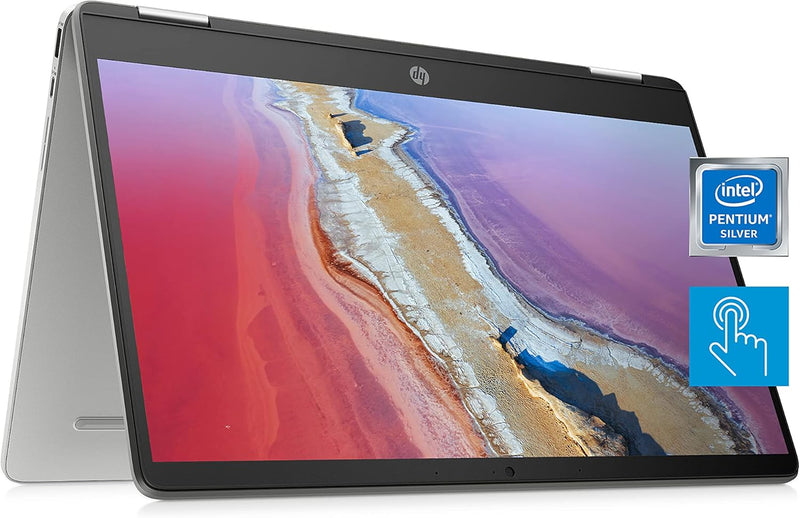
HP 14a-ca0023nr Chromebook x360 2-in-1 Touchscreen Laptop
★★★★★
4KUHD1366 x 768Bluetooth 5.0
A flexible 2-in-1 Chromebook with a 360-degree hinge and all-day battery life for work, school, and entertainment.
$269.00*
View on Amazon
✓ In Stock on Amazon.com
*Price sourced from Amazon.com. Last updated:Jun 04, 2026.Price and availability are subject to change.
Affiliate Disclosure: Studio Supplies may earn a commission from qualifying purchases made through links on this page, at no additional cost to you. This helps support our editorial team.
Notice a mistake? Let Us Know
Overview
Key Features
SLIM AND SUPREMELY FLEXIBLE – The HP Chromebook x360 convertible laptop has entertaining views in four different positions and the power to tackle work or play all day with long battery life, ample storage, and an Intel processor.
HD TOUCHSCREEN WITH 4K GRAPHICS – Intuitively control your PC with the 14-inch HD (1366 x 768) touchscreen (1), perfect for smoothly streaming 4K content in tandem with the Intel UHD Graphics 605 (2).
RELIABLE PERFORMANCE – Seamlessly click between multiple windows without a drop in speed thanks to the quad-core Intel Pentium Silver processor—the perfect mixture of performance, power consumption, and value (3).
MEMORY AND STORAGE – Enjoy a boost to your system’s performance with 4 GB of RAM while saving more of your favorite memories with 64 GB of reliable flash-based eMMC storage (4).
ALL-DAY POWER – Tackle all your work/school assignments with up to 12 hours and 15 minutes of battery life (5). Then when you’re ready to unwind and watch your show, use HP Fast Charge to power your x360 laptop to 50% power in a mere 45 minutes (6).
CHROME OS AND WARRANTY – Experience a more connected digital life with the always secure and up-to-date Chrome browser. Add in millions of your favorite Android apps (7) and a 1-year limited hardware warranty and you’re ready to go!
ROCK SOLID CONNECTIVITY – Experience powerful connectivity with the Wi-Fi 5 (2x2) and Bluetooth 5.0 combo—ideal for working/learning from home, next-gen games, or streaming your favorite show (8) (9).
WEBCAM AND SOUND – Keep in touch with your favorite people thanks to the HP Wide Vision 720p HD camera with integrated dual array digital microphones (10), plus enjoy exceptional sound quality from the custom-tuned dual speaker setup.
MULTI-TOUCH TOUCHPAD – Your device’s keyboard features the Imagepad, a true multi-touch touchpad that supports four-finger gestures for more precise scrolling, zooming, and navigation.
SUSTAINABLE DESIGN – HP is committed to global citizenship and environmental responsibility—that’s why this touchscreen laptop is ENERGY STAR certified (11) and EPEAT Silver registered (12).
Specifications
Processor
Intel Pentium Silver N5030
RAM
4 GB
Storage
64 GB eMMC
Display
14" HD (1366 x 768) Micro-Edge Touchscreen
Graphics
Intel UHD Graphics 605
Operating System
Chrome OS
Webcam
720p
Wireless
Wi-Fi 5 (2x2), Bluetooth 5.0
Battery Life
Up to 12 hours 15 minutes
Convertible
360-degree hinge
Audio
Dual Speakers
Touchpad
HP Imagepad
Pros & Cons
👍 Pros
- 360-degree hinge provides versatile laptop, tablet, tent, and stand modes
- Up to 12 hours and 15 minutes of battery life supports all-day use without charging
- Chrome OS boots quickly, stays up to date automatically, and is resistant to traditional malware
- 14-inch touchscreen makes the tablet and tent modes genuinely useful for interaction
- Lightweight and portable form factor suited for students and mobile professionals
👎 Cons
- 1366x768 HD resolution is noticeably lower than the Full HD screens found on many competing laptops
- 4GB of RAM limits heavy multitasking with many browser tabs or demanding Android apps
- 64GB eMMC storage fills up quickly and is significantly slower than SSD-based storage
- Intel Pentium Silver N5030 processor is adequate for basic tasks but struggles with demanding workloads
- Cannot run traditional Windows or macOS applications natively
Frequently Asked Questions
What modes can the HP Chromebook x360 be used in?
The 360-degree hinge allows four modes: traditional laptop, tablet (screen folded all the way back), tent (propped like an inverted V), and stand (keyboard face-down with the screen facing you).
How much storage does the 64GB eMMC provide in practice?
Chrome OS takes up a portion of the 64GB, leaving roughly 45-50GB for apps, downloads, and offline files. The Chromebook is designed to rely heavily on cloud storage through Google Drive.
Can this Chromebook run Android apps?
Yes, Chrome OS supports Android apps from the Google Play Store, expanding the software available beyond web-based applications.
Is the 14-inch display good for media consumption?
The 14-inch HD touchscreen works well for casual video streaming and browsing, though the 1366x768 resolution is lower than Full HD, so fine text and detailed content may appear less sharp.
How long does the battery actually last?
HP rates the battery at up to 12 hours and 15 minutes, though real-world usage with video streaming and active browsing typically falls somewhat shorter depending on screen brightness and workload.
Related Products


