



HP
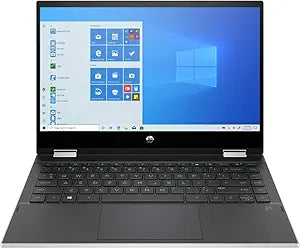
HP 14m-dw1013dx Pavilion x360 2-in-1 Touchscreen Laptop
★★★★★
i3-1115G4Bluetooth 5.0
The HP Pavilion x360 14 delivers 11th-gen Tiger Lake processing and a 360° touchscreen in a convertible that handles everyday multitasking without compromise.
$441.43*$499.00Save 11%
View on Amazon
✓ In Stock on Amazon.com
*Price sourced from Amazon.com. Last updated:Jun 07, 2026.Price and availability are subject to change.
Affiliate Disclosure: Studio Supplies may earn a commission from qualifying purchases made through links on this page, at no additional cost to you. This helps support our editorial team.
Notice a mistake? Let Us Know
Overview
Key Features
11th Generation Intel i3-1115G4 Core processor Brings the perfect combination of features to make you unstoppable. Get things done fast with high performance, instant responsiveness and best-in-class connectivity.
128GB PCIe NVMe SSD storage Get up to 30x faster performance than a traditional hard drive.
Wi-Fi 5 (1x1) (802.11a/b/g/n/ac) & Bluetooth 5.0 Stay connected to Wi-Fi and to Bluetooth accessories with wireless technology.
14" HD touchscreen Pinch, zoom, and swipe to intuitively control your PC right from the screen.
8GB system memory for advanced multitasking Substantial high-bandwidth RAM to smoothly run your games and photo- and video-editing applications, as well as multiple programs and browser tabs all at once.
Specifications
Processor
11th Gen Intel Core i3-1115G4
Memory
8GB
Storage
128GB PCIe NVMe SSD
Display
14" HD Touchscreen (1366x768)
Hinge
360-degree 2-in-1 convertible
Wireless
Wi-Fi 5 (802.11a/b/g/n/ac) 1x1
Bluetooth
5.0
Operating System
Windows 10 Home
Color
Natural Silver
Pros & Cons
👍 Pros
- The 128GB PCIe NVMe SSD delivers read speeds up to 30x faster than a traditional hard drive — Windows startup, app launches, and file transfers all feel responsive in a way that no HDD-based laptop at this price tier can match.
- 11th Gen Tiger Lake i3-1115G4 delivers noticeably faster single-threaded performance than comparable 10th-gen budget laptops
- PCIe NVMe SSD provides dramatically faster boot and app launch times compared to eMMC or SATA SSD alternatives at this price tier
- 11th-gen Intel Core i3-1115G4 on 10nm SuperFin delivers meaningfully better power efficiency than previous 14nm i3 designs, translating to longer battery life and reduced heat buildup during typical productivity sessions.
- Wi-Fi 5 (802.11ac) with Bluetooth 5.0 covers all current wireless needs for home, campus, and office environments without requiring an external wireless adapter or USB dongle.
- 360° hinge enables tablet, tent, and stand modes without carrying separate hardware
- 8GB RAM handles standard office and productivity multitasking without paging under typical loads
- The 360-degree hinge enables four use modes — laptop, tent, stand, and tablet — giving this device legitimate multi-context flexibility for students and professionals who move between desk and on-the-go use throughout the day.
- 8GB of system RAM handles everyday multitasking — multiple browser tabs, a document editor, and a video call simultaneously — without the memory-related slowdowns that 4GB configurations produce under load.
- Bluetooth 5.0 ensures stable, low-latency connections to wireless peripherals up to spec
👎 Cons
- 128GB NVMe storage fills quickly under real-world Windows use — after OS installation and typical application suite, available user storage is often below 80GB, requiring cloud reliance or external storage within the first year of ownership.
- 128GB NVMe SSD fills quickly — Windows and core apps alone consume roughly half the available capacity out of the box
- HD (1366×768) display resolution is below FHD standard, resulting in lower pixel density and visible pixelation on fine text at 14"
- The 14-inch HD (1366x768) display resolution is below the 1080p threshold that is now standard at this price tier — text and images appear noticeably less sharp than a Full HD screen at the same panel size, which is visible in daily use.
- 8GB RAM is soldered and non-upgradeable on most configurations at this tier — as browser and application memory demands grow over the laptop's lifespan, 8GB becomes a ceiling with no upgrade path.
- Wi-Fi 5 with a 1×1 antenna is a notable bottleneck on fast routers; no Wi-Fi 6 support limits peak wireless throughput
- RAM is not user-upgradeable — the 8GB soldered configuration is a permanent ceiling for this unit
- HD display limits the quality of video playback and visual work — streaming services deliver 1080p content that will be downscaled to the panel's 1366x768 native resolution, losing half the resolution of the source material.
- The i3-1115G4 is an entry-level dual-core processor — video editing, large image batch processing, or heavy multitasking with resource-intensive applications will push it to its performance ceiling and introduce sustained thermal throttling.
- Intel UHD integrated graphics cannot handle GPU-accelerated workloads like video editing or even moderate gaming above entry settings
Frequently Asked Questions
How fast is the 128GB NVMe SSD compared to a traditional hard drive, and will I notice the difference daily?
Yes — the 128GB PCIe NVMe SSD is up to 30x faster than a spinning hard drive for sequential reads, which translates to Windows booting in under 15 seconds, applications launching near-instantly, and browser tabs loading without delay. The speed difference is immediately perceptible compared to any HDD-based laptop, even at this entry-level NVMe capacity tier.
What processor is inside the HP Pavilion x360 14m-dw1013dx, and what does that mean for day-to-day performance?
It runs an 11th Gen Intel Core i3-1115G4, a dual-core Tiger Lake chip clocked up to 4.1GHz with Intel UHD Graphics. That architecture is a significant step up from 10th-gen in per-core throughput, meaning web browsing, Office apps, and video calls stay snappy — but it's not built for sustained CPU-heavy workloads like video encoding.
Is 128GB NVMe SSD enough storage, and can it be upgraded?
128GB is genuinely tight for a primary machine once Windows, apps, and a few months of files accumulate. The PCIe NVMe interface is fast — up to 30x over a spinning drive — but the capacity is the constraint. Many users pair this with a microSD card or cloud storage. Upgradeability depends on the specific motherboard slot access, which HP has not publicly confirmed as user-serviceable on this SKU.
Is 128GB of storage enough, and can it be expanded?
128GB is tight for Windows 10 plus applications plus personal files over time — Windows itself consumes 20–40GB after updates, leaving 88–108GB for everything else. A microSD card slot (if present) can extend storage for media files, but is slower than the NVMe for active applications. Cloud storage for documents and media is the practical solution for managing the 128GB ceiling without hardware replacement.
Does the i3-1115G4 processor support Windows 11 upgrade, and does this laptop meet the TPM 2.0 requirement?
Yes — the 11th-generation Intel Core i3-1115G4 is on Microsoft's supported CPU list for Windows 11. The laptop must also have TPM 2.0 enabled; most 11th-gen systems shipped with TPM 2.0 hardware. Check the BIOS/UEFI settings to confirm TPM is enabled if the Windows 11 upgrade checker flags it as unsupported on your unit.
Can the 14m-dw1013dx run in tablet mode, and how responsive is the touchscreen?
Yes — the 360° hinge lets it fold flat into tablet mode, tent mode, or stand mode. The 14" HD (1366×768) touchscreen is capacitive and supports standard Windows touch gestures. At HD resolution on a 14" panel the pixel density is lower than FHD, which you'll notice when reading small text.
Does this laptop support Wi-Fi 6?
No. The 14m-dw1013dx ships with Wi-Fi 5 (802.11ac, 1×1 antenna configuration). That single-stream antenna limits theoretical throughput versus a 2×2 or Wi-Fi 6 setup — real-world speeds on a congested network may show the gap. Bluetooth 5.0 is included.
In tablet mode with the screen folded back 360°, does the keyboard automatically disable to prevent accidental key presses?
Yes — the HP Pavilion x360 detects when the hinge is rotated past approximately 180° and automatically disables the keyboard and trackpad in tablet mode. This is a standard feature of 360-degree hinge 2-in-1 designs to prevent input interference when the keyboard is folded behind the screen.
What is the battery life under mixed use, and does the i3-1115G4 help efficiency compared to older Intel generations?
The i3-1115G4 is built on Intel's 10nm SuperFin process, which is significantly more power-efficient than the 14nm+ i3 designs it replaced. Under mixed productivity use (web browsing, document editing, occasional video), a full charge at this TDP tier typically delivers 6–8 hours of actual use — enough for a full school or workday. Heavy video playback or extended screen-on time will reduce that range.
How much RAM does it have, and is it upgradeable?
8GB of system RAM is soldered to the board on this model. It handles light-to-moderate multitasking — a dozen browser tabs plus an Office app — but the fixed nature means there's no upgrade path if your needs grow.
Related Products


