



HP
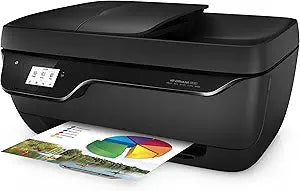
HP 3830 OfficeJet Wireless All-in-One Inkjet Printer
★★★★★
Compact wireless all-in-one printer with print, scan, copy, and fax capabilities for home and small office use.
$339.00*$356.00Save 4%
Check availability
*Price sourced from Amazon.com. Last updated:Jun 28, 2026.Price and availability are subject to change.
Affiliate Disclosure: Studio Supplies may earn a commission from qualifying purchases made through links on this page, at no additional cost to you. This helps support our editorial team.
Notice a mistake? Let Us Know
Overview
Key Features
8-222018-205
Specifications
Functions
Print, Copy, Scan, Fax
Print Speed
Up to 8.5 ppm black (ISO), up to 6 ppm color (ISO)
Print Resolution
Up to 1200x1200 dpi black, up to 4800x1200 optimized dpi color
Borderless Printing
Yes
Cartridges
2 (1 black, 1 tri-color)
Scanner
Flatbed + ADF, up to 1200 dpi
ADF Capacity
35 sheets
Copy Speed
Up to 7 cpm black (ISO), up to 3.5 cpm color (ISO)
Fax Resolution
Standard 203x98 dpi, Fine 203x196 dpi
Display
5.5 cm (2.2-inch) Touch Mono
Connectivity
Wi-Fi 802.11b/g/n, Hi-Speed USB 2.0
Mobile Printing
HP ePrint, Apple AirPrint, Wireless Direct
Memory
512MB DDR1, 128MB Flash
Input Capacity
Up to 60 sheets paper, 20 sheets photo/cards
Output Capacity
Up to 25 sheets paper, 20 sheets photo/cards
Duplex Printing
Manual
Media Sizes
A4, B5, A6, DL Envelope
Dimensions
17.72 x 14.33 x 8.54 inches
Weight
12.37 lb
Pros & Cons
👍 Pros
- True 4-in-1 functionality with print, scan, copy, and fax in a single compact unit
- Built-in Wi-Fi with mobile printing support via AirPrint, HP ePrint, and Wireless Direct
- 35-sheet automatic document feeder streamlines multi-page scanning and copying
- Borderless printing capability for photo and marketing materials
- 2.2-inch touch display makes setup and operation straightforward without a computer
👎 Cons
- Manual duplex printing requires you to flip pages by hand rather than printing both sides automatically
- 60-sheet input tray capacity is low for offices with moderate print volumes
- Print speeds of 8.5 ppm black and 6 ppm color are slow compared to laser printers
- 720p scanning and standard fax resolution may not satisfy users needing high-detail document capture
- Two-cartridge system means replacing the entire tri-color cartridge when one color runs out
Frequently Asked Questions
Can I print from my phone or tablet with the HP OfficeJet 3830?
Yes. The printer supports HP ePrint, Apple AirPrint, and Wireless Direct Printing, so you can print from iOS and Android devices without needing to install drivers on your mobile device.
Does this printer support automatic two-sided printing?
The OfficeJet 3830 supports manual duplex printing with driver assistance. The printer will prompt you to flip the pages manually rather than duplexing automatically.
What ink cartridges does the HP OfficeJet 3830 use?
It uses a two-cartridge system: one black and one tri-color cartridge. HP 63 series cartridges are typically compatible with this model.
Does the printer have an automatic document feeder?
Yes. The built-in ADF holds up to 35 sheets, which is useful for multi-page scanning, copying, and faxing without manually feeding each page.
What paper sizes can this printer handle?
It supports A4, B5, A6, and DL envelope sizes. The input tray holds up to 60 sheets of plain paper or up to 20 sheets of photo paper and cards.
Related Products


