



HP
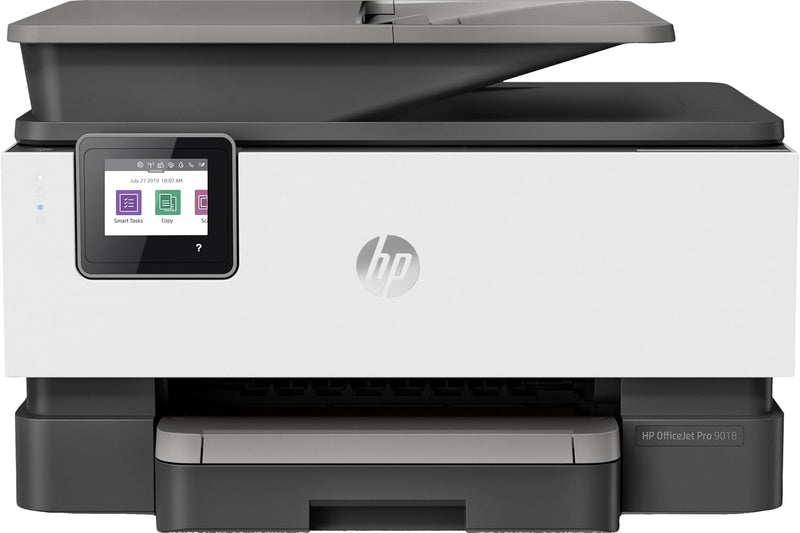
HP 3UK84A#1H3 OfficeJet Pro 9018 Wireless All-in-One Printer
★★★★★
Streamline Your Workflow: HP OfficeJet Pro 9018 All-in-One PrinterEnhance your office productivity with the HP OfficeJet Pro 9018. This all-in-one printer delivers high-quality color printing, scanning, copying, and faxing with wireless connectivity and automatic duplex printing. Designed for eff...
View price on Amazon
Affiliate Disclosure: Studio Supplies may earn a commission from qualifying purchases made through links on this page, at no additional cost to you. This helps support our editorial team.
Notice a mistake? Let Us Know
Overview
Streamline Your Workflow: HP OfficeJet Pro 9018 All-in-One Printer
Enhance your office productivity with the HP OfficeJet Pro 9018. This all-in-one printer delivers high-quality color printing, scanning, copying, and faxing with wireless connectivity and automatic duplex printing. Designed for efficiency and ease of use, it’s an ideal solution for small businesses and home offices.
Specifications:
- Functions: Print, Copy, Scan, Fax
- Connectivity: USB
- Paper Size Support: A4, A5, A6, B5 (JIS), Envelope (DL, C5, C6, Chou #3, Chou #4), Card (Hagaki, Ofuku Hagaki)
- Output Capacity: Up to 60 sheets
- Max Copy Resolution Color: 4800 x 1200 dpi
- Duplex Printing: Automatic
- Connectivity Technology: USB
- Printing Technology: Inkjet
- Printer Output: Color
- Maximum Print Speed (Color): 15 ppm
- Max Printspeed Monochrome: 15 ppm
Key Features
Output capacity :Up to 60 sheets
Connectivity Technology: Usb
Paper Size: A4; A5; A6; B5 (Jis); Envelope (Dl, C5, C6, Chou #3, Chou #4); Card (Hagaki, Ofuku Hagaki)
Specifications
Brand
HP
Model Number
3UK84A#1H3
Printer Type
All-in-One
Connectivity Technology
Wireless, USB
Output Capacity
Up to 60 sheets
Supported Paper Sizes
A4, A5, A6, B5 (Jis), Envelope (Dl, C5, C6, Chou #3, Chou #4), Card (Hagaki, Ofuku Hagaki)
Pros & Cons
👍 Pros
- The HP OfficeJet Pro 9018 is an All-in-One printer, providing print, scan, copy, and fax functionalities in a single device.
- It features wireless connectivity (USB is also an option), allowing for flexible placement and printing from various devices without cables.
- The printer supports a wide range of paper sizes, including A4, A5, A6, B5, and various envelope and card formats, enhancing versatility.
- With an output capacity of up to 60 sheets, it can handle moderate print jobs without constant attention.
- As an OfficeJet Pro model, it is designed for efficiency and productivity in a business or home office environment.
👎 Cons
- Specific details on print speed (pages per minute) for either black and white or color documents are not provided.
- The listing does not specify whether the printer supports automatic duplex printing, which is a common and desirable feature for office use.
- Information regarding ink cartridge types, page yield, or whether starter cartridges are included is not present.
- While wireless connectivity is noted, details on supported wireless standards (e.g., Wi-Fi Direct, Apple AirPrint) are not provided.
- The maximum print resolution for documents and images is not mentioned, making it difficult to assess print quality.
Frequently Asked Questions
Does the HP OfficeJet Pro 9018 support wireless printing from mobile devices?
Yes, the HP OfficeJet Pro 9018 features wireless connectivity, which typically allows printing from various mobile devices through compatible apps or services.
What functions does this All-in-One printer perform?
As an All-in-One printer, the HP OfficeJet Pro 9018 is capable of printing, scanning, copying, and faxing documents.
Is automatic double-sided printing a feature of this model?
The provided features do not explicitly state whether the HP OfficeJet Pro 9018 supports automatic duplex printing, which is a common convenience for reducing paper usage.
Can this printer handle different types of media, such as photo paper or card stock?
The HP OfficeJet Pro 9018 supports various paper types including card (Hagaki, Ofuku Hagaki), suggesting it can handle different media, but specific maximum paper weights are not listed.
What is the benefit of a 60-sheet output capacity?
An output capacity of up to 60 sheets means you can print a moderate number of pages without needing to clear the output tray frequently, which is convenient for multi-page documents.
Is this HP printer easy to set up for wireless use?
HP printers with wireless connectivity are generally designed for straightforward setup, typically guided by an on-screen display or companion app, though specific steps are not detailed here.
Related Products


