



HP
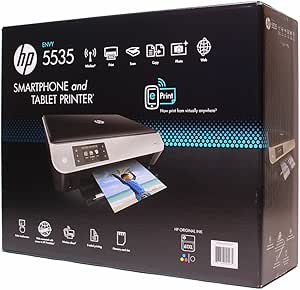
HP Envy 5535 Wireless Photo Printer Scanner Copier
★★★★★
1200 x 6004800 x 12001200 x 1200
21 ppm black output and 4800 x 1200 dpi photo resolution bring laser-class speed and inkjet-quality photos to one wireless all-in-one.
$399.88*
Check availability
*Price sourced from Amazon.com. Last updated:Jun 28, 2026.Price and availability are subject to change.
Affiliate Disclosure: Studio Supplies may earn a commission from qualifying purchases made through links on this page, at no additional cost to you. This helps support our editorial team.
Notice a mistake? Let Us Know
Overview
Key Features
Up to 21 ppm black, up to 17 ppm color
Print Resolution - Black (best): Up to 1200 x 600 dpi, Color (best): Up to 4800 x 1200 optimized dpi on HP Advanced Photo paper, 1200 x 1200 input dpi
Energy Star certified
Built-in Wireless LAN (802.11b/g/n)
Specifications
Print Speed (Black)
Up to 21 ppm
Print Speed (Color)
Up to 17 ppm
Resolution (Black)
Up to 1200 x 600 dpi
Resolution (Color)
Up to 4800 x 1200 optimized dpi (on HP Advanced Photo Paper)
Input Resolution
1200 x 1200 dpi
Wireless Standard
802.11b/g/n
Functions
Print, Scan, Copy
Energy Certification
Energy Star
Pros & Cons
👍 Pros
- Up to 21 ppm black and 17 ppm color print speeds make it one of the faster inkjet all-in-ones at the home-office tier.
- 4800 x 1200 optimized dpi color output on HP Advanced Photo Paper produces photo lab-quality prints from a desktop device.
- 802.11b/g/n wireless eliminates USB cable dependency and allows printing from smartphones, tablets, and multiple computers simultaneously.
- Built-in scanner and copier consolidate three functions into one footprint, reducing desk space requirements.
- Energy Star certification reduces idle and standby power consumption versus non-certified inkjet printers.
👎 Cons
- Peak 4800 x 1200 dpi color resolution is only achievable on HP Advanced Photo Paper — standard paper drops output quality significantly.
- 21 ppm black speed is a best-case draft rating; real mixed-content document throughput will be measurably lower.
- 802.11b/g/n is 2.4GHz only — no 5GHz band support, which can cause interference in dense Wi-Fi environments.
- Ink cartridge yield and cost-per-page are not specified, making long-term operating costs difficult to benchmark against competing models.
Frequently Asked Questions
What is the effective print resolution for documents versus photos?
For black text documents, the HP Envy 5535 outputs at up to 1200 x 600 dpi — sufficient for sharp, readable text at standard document sizes. For color photos on HP Advanced Photo Paper, the engine reaches up to 4800 x 1200 optimized dpi (with 1200 x 1200 input dpi), which translates to noticeably smoother gradients and finer color detail in printed images compared to standard 600 dpi color output.
Does the wireless connection require a router, or can it connect directly to a device?
The Envy 5535 uses 802.11b/g/n Wi-Fi, which requires a 2.4GHz wireless router for standard network printing. It also supports HP Wireless Direct, allowing direct device-to-printer connection without a router, and is compatible with HP ePrint for sending jobs via email from anywhere.
How does the 21 ppm black speed hold up in real multi-page print jobs?
The 21 ppm rating is a draft-mode ceiling measured under ideal conditions. Real-world throughput on standard-quality multi-page documents runs slower — typically in the 10–14 ppm range depending on content density. The rating is still competitive for a home inkjet all-in-one but should not be compared directly to laser-class throughput.
Is this printer Energy Star certified, and what does that mean in practice?
Yes, it is Energy Star certified. In practical terms, the printer enters a low-power sleep state during idle periods, and the total annual energy consumption meets EPA thresholds — typically meaning noticeably lower electricity draw compared to non-certified inkjet printers operated in a home office context.
What types of media can the Envy 5535 print on?
The printer supports standard plain paper, HP Advanced Photo Paper for maximum color resolution, envelopes, labels, and cards. The maximum photo quality spec (4800 x 1200 dpi) is only achievable on HP Advanced Photo Paper — standard photo paper and plain paper will yield lower effective resolution.
Related Products


