



HP
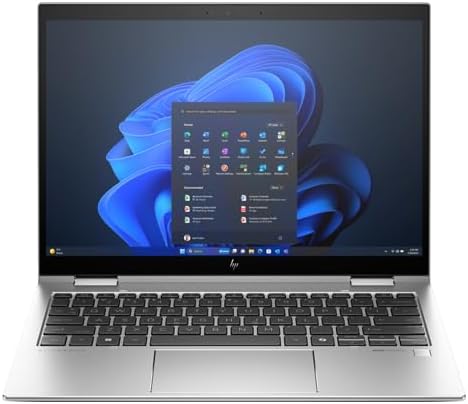
HP A6SU5UT#ABA Elite x360 830 G11 Convertible Notebook
Intel Core Ultra 7 vPro, 32GB LPDDR5X, and a 360-degree hinge give enterprise users a single device that handles boardroom presentations, field work, and demanding multitasking without compromise.
$1,599.99*
Check availability
*Price sourced from Amazon.com. Last updated:Jun 04, 2026.Price and availability are subject to change.
Affiliate Disclosure: Studio Supplies may earn a commission from qualifying purchases made through links on this page, at no additional cost to you. This helps support our editorial team.
Notice a mistake? Let Us Know
Overview
Key Features
Processor Manufacturer: Intel
Processor Type: Core Ultra 7
Processor Model: 155U
Processor Core: Dodeca-core (12 Core)
Maximum Turbo Speed: 4.80 GHz
Specifications
Processor
Intel Core Ultra 7 155U (vPro), 12-core
Max Turbo Speed
4.80 GHz
L3 Cache
12 MB
Memory
32GB LPDDR5X 7500MHz (on-board)
Storage
512GB M.2 SSD
Display
13.3" WUXGA (1920×1200) IPS Touchscreen, 400 nit, 100% sRGB
Graphics
Intel Integrated (shared memory)
Wireless
IEEE 802.11ax (Wi-Fi 6E)
Ports
2× Thunderbolt 4, 2× USB, 1× HDMI
Security
Fingerprint Reader, vPro
Battery
3-cell, 65W USB-C charging
Form Factor
Convertible (360-degree hinge)
Dimensions
0.64" H × 11.8" W × 8.5" D
Operating System
Windows 11 Pro
Pros & Cons
👍 Pros
- The Core Ultra 7 155U's 12-core (4P + 8E + 2LPE) architecture handles sustained enterprise multitasking — simultaneous video conferencing, document processing, and cloud sync — without the clock-speed degradation that plagues lower-efficiency mobile chips under mixed load.
- 32GB LPDDR5X at 7500MHz provides memory bandwidth that exceeds standard LPDDR5 implementations, meaningfully benefiting browser-heavy and multi-application workflows where memory bandwidth is the bottleneck.
- Intel vPro integration enables enterprise IT remote management and hardware-enforced security at a level that non-vPro business laptops cannot match — a critical distinction for managed fleet deployments.
- The 1920×1200 WUXGA panel delivers an extra 120 pixels of vertical screen real estate versus standard 1920×1080 displays — noticeably useful in document-heavy workflows where vertical content density matters.
- Dual Thunderbolt 4 ports provide full-bandwidth single-cable docking flexibility, eliminating the USB-A dock bottlenecks that limit connectivity on competing business ultrabooks.
👎 Cons
- Intel Integrated Graphics (shared memory) is the hard ceiling for graphics-intensive tasks — 3D modeling, GPU-accelerated video rendering, and any gaming above casual titles are outside this machine's practical capability.
- At 0.64 inches thin, the chassis limits thermal headroom; sustained all-core workloads will trigger throttling sooner than a thicker chassis with more cooling infrastructure could sustain.
- The 512GB SSD is modest for enterprise users who work with large datasets, virtual machines, or local media libraries — supplemental cloud or external storage is effectively required for these workflows.
- On-board 32GB RAM cannot be upgraded if workload demands grow, making right-sizing the configuration at purchase critical — there is no field upgrade path.
- The 13.3-inch display, while portable, limits on-device productivity for users who regularly work with multiple document windows side-by-side; an external display is effectively mandatory for sustained multi-pane workflows.
Frequently Asked Questions
What does vPro technology add to the Core Ultra 7 155U, and why does it matter for enterprise IT?
Intel vPro on the 155U enables hardware-level remote management capabilities — specifically Intel AMT (Active Management Technology), which allows IT administrators to remotely access, diagnose, and remediate devices even when the OS is unresponsive or the machine is powered off. For enterprise fleet management, this significantly reduces on-site IT intervention requirements. It also includes hardware-enforced security features like TXT (Trusted Execution Technology) that complement Windows 11 Pro's software-layer protections.
Is the 32GB RAM soldered or upgradeable?
The 32GB LPDDR5X memory is on-board (soldered) — it cannot be upgraded post-purchase. The 7500MHz LPDDR5X specification is faster than the LPDDR5 used in most competing business ultrabooks, which partially compensates for the non-upgradeable ceiling. For enterprise deployments, 32GB is sufficient for the vast majority of professional productivity and collaboration workloads.
How does the 360-degree hinge perform under daily convertible use — does it hold position firmly?
HP's Elite x360 series uses a precision hinge engineered for repeated open-close and rotation cycles. It holds position firmly in laptop, tent, stand, and tablet modes without requiring latch mechanisms. Long-term hinge durability on the Elite x360 line has a strong track record in enterprise reviews, though daily intensive use will eventually affect hinge tension over a multi-year device life.
Does the Thunderbolt 4 support external GPU connections, and what's the practical bandwidth for docking stations?
Thunderbolt 4 provides 40 Gbps bidirectional bandwidth, supporting external GPU enclosures (eGPU), multi-display docks, and high-speed NVMe storage over a single cable. For a docking station use case — the most common enterprise deployment — Thunderbolt 4 enables dual 4K external displays, GbE, and full USB hub functionality through a single cable connection. eGPU performance is viable but limited by the Thunderbolt 4 bus bandwidth relative to PCIe 4.0 x16.
What is the actual battery life under enterprise mixed-use workloads, and how fast does 65W USB-C charging restore the battery?
HP's rated battery life figures for the Elite x360 reflect light-use scenarios; real-world mixed enterprise workloads — video calls, document editing, background sync, moderate screen brightness — typically produce 7-9 hours. The 65W USB-C charger delivers a meaningful charge rate; roughly 50% battery restoration in 45-60 minutes from depleted is achievable, though exact rates depend on workload during charging.
Related Products


