

HP
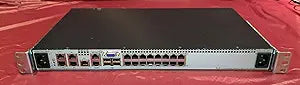
HP AF621A 2x1Ex16 KVM IP Console Switch
Manage up to 16 servers remotely from a single console with this enterprise-grade KVM over IP switch.
View price on Amazon
Affiliate Disclosure: Studio Supplies may earn a commission from qualifying purchases made through links on this page, at no additional cost to you. This helps support our editorial team.
Notice a mistake? Let Us Know
Overview
Streamline Your Server Management with Ease
Introducing the AF621A HP 2x1Ex16 KVM IP Console Switch G2, your ultimate solution for efficient server management. This console switch offers remote access and control, ensuring seamless operation and enhanced productivity. Complete with Virtual Media CAC SW for added versatility.
- Ports (Front): 1 x keyboard (USB Type A), 1 x mouse (USB Type A), 1 x display (VGA), 1 x Network (RJ-45), 4 x USB (USB Type A)
- Ports (Rear): 16 x keyboard/video/mouse (KVM) - RJ-45, 1 x management - RJ-45
Pros & Cons
👍 Pros
- Supports up to 16 servers from a single console, reducing cable clutter and hardware in the rack
- IP-based remote access enables full server control from anywhere on the network
- Virtual Media with CAC software support allows remote OS deployment and firmware updates
- Dedicated management port separates administrative traffic from KVM data
- Front-panel USB ports and local VGA console provide direct hands-on access when needed
👎 Cons
- Requires compatible KVM adapter cables for each server connection, which are typically sold separately
- The RJ-45 KVM interface limits maximum video resolution compared to newer digital KVM solutions
- Setup and configuration can be complex for administrators unfamiliar with enterprise KVM infrastructure
- Limited to two simultaneous local user sessions, which may not suffice for larger IT teams
- The unit adds another managed device to the rack that requires its own network configuration and maintenance
Frequently Asked Questions
How many servers can the HP AF621A KVM switch control?
It supports up to 16 servers via the rear RJ-45 KVM ports, with two local users able to access servers simultaneously.
Does the HP AF621A support remote access over IP?
Yes, this is a KVM over IP switch, meaning you can access and control connected servers remotely through a network connection via the dedicated management port.
What does the Virtual Media feature do on this KVM switch?
Virtual Media allows you to remotely mount disk images or USB drives to a connected server, enabling tasks like remote OS installations, firmware updates, and file transfers without being physically present.
What type of cables are needed to connect servers to this KVM switch?
Servers connect to the 16 rear RJ-45 KVM ports, typically using HP-compatible KVM adapter cables that convert from the RJ-45 port to the server's video and USB connections.
Can two users access different servers at the same time on this switch?
Yes, the 2x1Ex16 designation indicates support for two local user sessions, allowing simultaneous access to different connected servers.
Related Products


