



HP
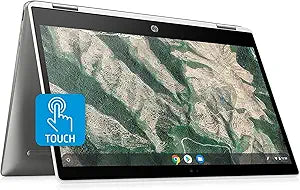
HP CA0053 Chromebook X360 14" Touch Laptop
★★★★★
UHD1920 x 1080i3-10110U64GB eMMCWiFi 6
A Wi-Fi 6 Chromebook with a 360-degree touchscreen that handles multitasking and media consumption with a 10th Gen Core i3 and no fan noise.
$399.99*
View on Amazon
✓ In Stock on Amazon.com
*Price sourced from Amazon.com. Last updated:Jun 07, 2026.Price and availability are subject to change.
Affiliate Disclosure: Studio Supplies may earn a commission from qualifying purchases made through links on this page, at no additional cost to you. This helps support our editorial team.
Notice a mistake? Let Us Know
Overview
Key Features
Experience the performance, versatility and standout features of the HP Chromebook 14 x360 that helps you multitask between work and play without skipping a beat. Beautifully equipped with a powerful Dual-Core 10th Generation Intel Core i3 processor and flexible 360-degree hinge, this slim PC is designed for everything you do and so much more.
14" Full HD multitouch screen The 1920 x 1080 resolution boasts impressive color and clarity. IPS technology for wide viewing angles. Energy-efficient WLED backlight. 360° flip-and-fold design Offers versatile functionality with laptop, audience, tabletop, presentation and tablet modes. Intel UHD Graphics On-processor graphics with shared video memory provide everyday image quality for Internet use, basic photo editing and casual gaming.
Intel Core i3-10110U mobile processor: Smart dual-core, four-way processing performance for HD-quality computing. 8GB system memory for advanced multitasking: Substantial high-bandwidth RAM to smoothly run your games and photo- and video-editing applications, as well as multiple programs and browser tabs all at once. 64GB eMMC storage-- Get up to 15x faster performance than a traditional hard drive.No optical drve
Backlit keyboard Allows you to enjoy comfortable and accurate typing, even in dim lighting. Wireless/Wired connectivity (WiFi 6 - 802.11 ax); Built-in media reader for simple photo transfer; Built-in HD webcam with dual array microphone; Built-in fingerprint reader; Built-in virus protection and Google products; 2xUSB 3.1 Type C ; 1x USB 3.0 Type A; Bang & Olufsen Audio, 2xStereo speakers
Google Chrome OS Chromebook is a computer for the way the modern world works, with thousands of apps, built-in virus protection and cloud backups. It is secure, fast, up-to-date, versatile and simple. 3-cell Lithium-polymer battery; Size: 8.60 x 12.82 x 0.70 Inches; Weight: 3.64lbs, 2-week IFT support
Specifications
Model
Chromebook X360 14"
Screen Size
14 inches
Display Resolution
1920 x 1080
Touchscreen
Multitouch
Display Technology
IPS, WLED backlight
Processor
Intel Core i3-10110U Dual-Core
System Memory
8GB RAM
Storage
64GB eMMC
Graphics
Intel UHD Graphics (shared video memory)
Operating System
Google Chrome OS
Wireless Connectivity
WiFi 6 (802.11 ax)
Ports
2x USB 3.1 Type C, 1x USB 3.0 Type A
Audio
Bang & Olufsen Audio, 2x Stereo speakers
Security Features
Built-in virus protection, Fingerprint reader
Battery
3-cell Lithium-polymer
Weight
3.64 lbs
Dimensions
8.60 x 12.82 x 0.70 inches
Keyboard
Backlit
Webcam
Built-in HD webcam with dual array microphone
Brand
HP
Pros & Cons
👍 Pros
- The 360-degree hinge enables genuine versatility across laptop, tent, presentation, and tablet modes — it's a physically durable pivot mechanism that survives daily mode-switching over months of use.
- Wi-Fi 6 connectivity future-proofs the wireless performance tier on a device expected to remain in daily use for several years on ChromeOS's update schedule.
- The 14-inch 1080p IPS touchscreen delivers accurate color and wide viewing angles for a device in this price category — text and media look crisp at native resolution.
- 8GB of RAM ensures ChromeOS multitasking with dozens of browser tabs, Android apps, and background processes remains fluid without the swap-induced slowdowns common on 4GB Chromebooks.
- The built-in fingerprint reader and Google's built-in virus protection create a low-friction, high-security daily driver for users who need quick, reliable access without antivirus management.
👎 Cons
- 64GB eMMC storage is a hard ceiling — there is no internal storage expansion, and heavy app installations or offline media libraries will exhaust the available space without external storage management.
- The Intel UHD shared graphics cannot handle GPU-accelerated tasks, sustained video encoding, or any serious graphics workload — it's adequate for streaming and casual photo editing only.
- No built-in HDMI port means external display connectivity requires a USB-C adapter or hub, adding an accessory cost and a potential point of failure for presentations.
- The 3.64 lb weight and 0.70-inch thickness make it one of the heavier Chromebooks in its class — it's noticeable relative to 12-inch Chromebooks when carried in a bag all day.
- ChromeOS app ecosystem limitations remain a factor for users who require specific Windows-only software — no Windows compatibility layer is available, and Linux container app support has performance and compatibility trade-offs.
Frequently Asked Questions
Does the 64GB eMMC storage fill up quickly with ChromeOS and typical app usage?
64GB eMMC is a known constraint on this device. ChromeOS itself is lean, but Android apps from the Play Store, downloaded media, and local file caches accumulate quickly. For users who rely primarily on web apps and cloud storage, 64GB is manageable. For offline media storage, app-heavy workflows, or Linux app development, it will require careful management or a USB-C external drive for overflow storage.
How does the Core i3-10110U perform in the 360-degree tablet mode for touch-based tasks and Android apps?
The dual-core Core i3-10110U handles ChromeOS app switching, Android app multitasking, and media playback smoothly in tablet mode. The 8GB RAM is generous for ChromeOS and ensures app states are retained during mode switching. For productivity apps, streaming, and light photo editing in tablet orientation, performance is fluid.
What does Wi-Fi 6 (802.11ax) provide practically compared to a Wi-Fi 5 Chromebook?
Wi-Fi 6 delivers higher throughput on congested networks — in office environments or homes with many connected devices, Wi-Fi 6's OFDMA technology reduces latency and maintains more consistent throughput than Wi-Fi 5 under load. For a Chromebook that relies heavily on web connectivity, this translates to faster page loads and more stable video conferencing in high-traffic wireless environments.
Does the HP Chromebook X360 support Linux app development, and is it suitable for light coding tasks?
Yes — ChromeOS supports the Crostini Linux container environment, allowing installation of Linux apps including VS Code, Git, and other development tools. The Core i3 and 8GB RAM handle light development tasks competently. The 64GB eMMC storage is the limiting factor for projects with large dependencies, so external storage or cloud sync strategies are advisable.
What ports does this Chromebook offer, and can I connect an external monitor?
The X360 provides two USB 3.1 Type-C ports and one USB 3.0 Type-A port. External monitor connection is via USB-C with a compatible DisplayPort Alt Mode cable or USB-C hub. No HDMI port is built in directly, so a USB-C adapter is required for HDMI monitor or projector connectivity.
Related Products


