



HP
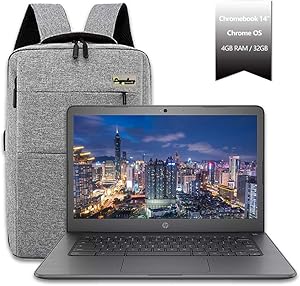
HP Celeron N3350 14" Chromebook Touchscreen
★★★★★
1366 x 76832GB SSDBluetooth 4.2USB 3.1
The HP 14" Chromebook pairs a Celeron N3350 with Chrome OS to deliver a fast, maintenance-free computing experience at a weight students can carry all day.
Check availability
Affiliate Disclosure: Studio Supplies may earn a commission from qualifying purchases made through links on this page, at no additional cost to you. This helps support our editorial team.
Notice a mistake? Let Us Know
Overview
Key Features
14" Diagonal HD IPS SVA Anti-Glare WLED-backlit Display (1366 x 768) HD Graphics 500, Multi-Format SD Media Card Reader, HD Webcam, NO Optical Drive
802.11b/g/n/ac, Bluetooth 4.2, 2x USB 3.1 Gen 1 (1 HP Sleep and Charge), 1x Headphone/microphone Combo Jack
4GB LPDDR4 SDRM, 32GB SSD
Intel Celeron N3350 (1.1 GHz base frequency, up to 2.4 GHz burst frequency, 2 MB cache, 2 cores). Chromebooks run Chrome OS for a fast, simple, secure computing experience
Google Chrome OS, Chromebooks run Chrome OS for a fast, simple, secure computing experience. NOT Compatible with Windows, 2-Cell Lithium Ion Battery, Power Cord Included,
Specifications
Screen Size
14 inches
Display Type
HD IPS SVA Anti-Glare WLED-backlit Display
Resolution
1366 x 768
Graphics
HD Graphics 500
Processor
Intel Celeron N3350
Processor Base Frequency
1.1 GHz
Processor Burst Frequency
Up to 2.4 GHz
Processor Cache
2 MB
Processor Cores
2
RAM
4GB LPDDR4 SDRM
Storage
32GB SSD
Operating System
Google Chrome OS
Wireless Connectivity
802.11b/g/n/ac, Bluetooth 4.2
USB Ports
2x USB 3.1 Gen 1 (1 HP Sleep and Charge)
Audio Ports
1x Headphone/microphone Combo Jack
Card Reader
Multi-Format SD Media Card Reader
Optical Drive
No Optical Drive
Webcam
HD Webcam
Battery
2-Cell Lithium Ion
Pros & Cons
👍 Pros
- Chrome OS's lightweight architecture extracts genuine everyday performance from the Celeron N3350 that a Windows machine at this spec level couldn't match — boot time, wake-from-sleep, and browser responsiveness are fast.
- The 14-inch IPS display with anti-glare coating is a step up from cheaper TN panels at this price tier — viewing angles and outdoor readability are noticeably better.
- At 3.4 lbs with a compact footprint, it's portable enough for a full school day bag without becoming a burden.
- Built-in Google Play Store access adds Android app compatibility beyond the browser, expanding the software library significantly.
- Chrome OS's automatic updates and sandboxed architecture eliminate the malware vulnerability and maintenance overhead that plagues Windows budget laptops.
👎 Cons
- 32GB eMMC storage is genuinely limiting after OS overhead — users who store media, large downloads, or work offline will exhaust it quickly without relying on cloud storage or an SD card.
- The Celeron N3350 dual-core processor hits a ceiling quickly under multitasking — running more than 8–10 browser tabs simultaneously causes perceptible slowdown.
- 1366 x 768 resolution on a 14-inch display produces a pixel density below modern standards — text and UI elements look softer compared to 1080p panels at this screen size.
- No optical drive and limited to USB 3.1 and a single headphone jack — no Thunderbolt, no HDMI out confirmed in specs, which limits display extension without adapters.
- Windows software incompatibility is a hard wall — users who need any Windows-native application will find Chrome OS's ecosystem cannot substitute.
Frequently Asked Questions
Can this Chromebook run Windows applications or Microsoft Office desktop software?
No — this device runs Chrome OS exclusively and is not compatible with Windows. Microsoft Office desktop apps (.exe) will not install. However, Microsoft 365 web apps (Word, Excel, PowerPoint) run fully in Chrome, and the Google Play Store provides access to Android versions of Office apps.
How much local storage does 32GB eMMC actually provide for usable files?
After Chrome OS system overhead, expect approximately 20–24GB of free usable storage. Chrome OS is designed around cloud storage (Google Drive), so local storage is primarily for offline caching, Android app data, and downloaded files. Heavy local file storage users will need an external drive or SD card.
Does the touchscreen on this Chromebook support stylus input?
The product specifications do not indicate active stylus support — it is a standard capacitive touch display. Finger touch and passive stylus interaction should work, but pressure-sensitive active stylus pens are not confirmed compatible.
Will the Intel Celeron N3350 handle video conferencing and classroom applications smoothly?
Yes — Google Meet, Zoom (Android app or web), and standard classroom platforms like Google Classroom run smoothly on the N3350 with 4GB RAM. The CPU is not suited for video encoding or heavy multitasking, but web-based educational workflows perform reliably.
What is the battery life on this Chromebook under typical classroom use?
Battery life is not specified in available product data. The 2-cell lithium-ion battery in Celeron-class Chromebooks typically delivers 8–10 hours of mixed web and productivity use, but this figure is not confirmed for this specific model.
Related Products


