

HP
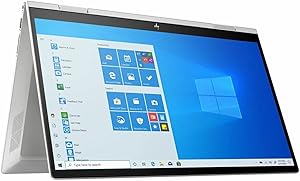
HP ED100 Envy X360 15.6" FHD Touch 2-in-1 Laptop i5 12GB 512GB SSD
★★★★★
Tiger Lake's Iris Xe GPU and a 512GB NVMe SSD give this 2-in-1 the performance headroom that mid-range laptops usually sacrifice.
View price on Amazon
Affiliate Disclosure: Studio Supplies may earn a commission from qualifying purchases made through links on this page, at no additional cost to you. This helps support our editorial team.
Notice a mistake? Let Us Know
Overview
Specifications
Display
15.6" FHD (1920 x 1080) Touchscreen
Processor
Intel Core i5-1135G7, 4 Cores, 2.4GHz Base / 4.2GHz Turbo
Memory
12GB DDR4
Storage
512GB M.2 SSD
Graphics
Intel Iris Xe (80 EU, shared memory)
Operating System
Windows 10 Home
Wireless
WiFi 6 (802.11ax), Bluetooth 5
Ports
USB Type-C, USB Type-A, HDMI 2.0
Keyboard
Backlit with Fingerprint Reader
Form Factor
2-in-1 Convertible, 360° Hinge
Pros & Cons
👍 Pros
- The i5-1135G7's 4.2GHz Turbo Boost delivers snappy single-threaded response for productivity workflows that can't leverage multiple cores.
- 512GB M.2 SSD provides sequential read speeds in the 2,000+ MB/s range, eliminating the storage bottleneck that plagues HDD-equipped laptops in this price tier.
- WiFi 6 (802.11ax) support enables 1.2Gbps+ theoretical throughput on compatible routers, future-proofing wireless connectivity as networks upgrade.
- Backlit keyboard with integrated fingerprint reader adds both low-light usability and biometric Windows Hello authentication without external hardware.
- HDMI 2.0 output supports 4K/60Hz external display, making the 15.6" panel an addition to your workspace rather than its ceiling.
👎 Cons
- Iris Xe performance drops significantly if RAM is configured in single-channel — a hardware-level limitation that affects GPU-accelerated tasks and cannot be corrected in software.
- The 1135G7's 15W TDP base means sustained CPU loads (long rendering jobs, large compilations) will throttle to maintain thermals, particularly in the closed laptop orientation.
- At 15.6 inches and 2-in-1 weight, portability is compromised — this is a desk-first machine that can fold flat, not a true mobile convertible.
- Pre-installed Windows 10 will require a free upgrade to Windows 11 to maintain security support, adding a setup step out of the box.
- USB port count is limited — the combination of one Type-C and one Type-A means a hub is likely necessary for users with multiple peripherals.
Frequently Asked Questions
What does the Intel Core i5-1135G7 processor deliver in day-to-day performance?
The i5-1135G7 is Intel's 11th Gen Tiger Lake quad-core at 2.4GHz base with a 4.2GHz single-core Turbo and 28W PL2 burst. It handles office productivity, light content creation, and multitasking without throttling under typical loads — it's not a workstation chip, but it's meaningfully faster than 10th Gen equivalents at the same TDP.
Is Intel Iris Xe Graphics capable of handling video editing or light gaming?
Iris Xe in the i5-1135G7 configuration runs 80 Execution Units shared with system memory. It will handle 1080p video playback, basic Premiere Pro timelines, and older or indie games at medium settings. It is not a discrete GPU — demanding 3D titles or GPU-accelerated rendering will hit its ceiling quickly, especially if system RAM is not running in dual-channel.
Does 12GB of DDR4 RAM help with the shared Iris Xe graphics?
Yes — Iris Xe performance scales with memory bandwidth. 12GB in a single-DIMM configuration (common in this tier) limits bandwidth versus dual-channel. If the RAM is configured as two sticks (e.g., 8GB + 4GB), you'll see noticeably better GPU throughput. Check the specific unit's configuration; single-channel is a real bottleneck for Xe graphics.
What is the practical speed difference between the 512GB M.2 SSD and a traditional hard drive?
An M.2 NVMe SSD in this form factor typically delivers 2,000–3,500 MB/s sequential reads versus ~120 MB/s on a 5400 RPM HDD. Boot times drop from 30–60 seconds to under 10, and application launch is substantially faster. The 512GB capacity is sufficient for an operating system and primary working files; large media libraries may require external storage.
Does the 360-degree hinge affect keyboard or display rigidity at the laptop position?
2-in-1 hinges introduce some flex compared to traditional clamshell designs. The Envy X360's hinge is reasonably tight, but the screen will show more wobble on vibrating surfaces (trains, desks with foot traffic) than a fixed-hinge laptop. In standard laptop mode this is rarely noticeable; it matters more in tent or stand mode under touch input.
Related Products


