



HP
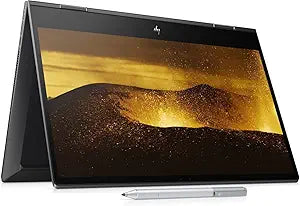
HP Envy x360 15.6" Touchscreen Ryzen 7 16GB 256GB SSD
★★★★★
FHD1920 x 1080Ryzen 7 5700U256GB SSDDisplayPort
The Ryzen 7 5700U and 256GB NVMe SSD give the HP Envy x360 genuine all-day responsiveness in a 2-in-1 form factor that adapts from laptop to tablet mode.
Check availability
Affiliate Disclosure: Studio Supplies may earn a commission from qualifying purchases made through links on this page, at no additional cost to you. This helps support our editorial team.
Notice a mistake? Let Us Know
Overview
Key Features
【Memory & Storage】 Memory is 16GB high-bandwidth RAM to run multiple applications and browser tabs all at once smoothly, Hard Drive is 256GB PCIe NVMe M.2 Solid State Drive allows to fast bootup and data transfer
【Processor】 AMD Ryzen 7 5700U 1.8GHz Octa-Core Processor up to 4.3GHz, AMD Radeon Graphics
【Screen】 15.6" diagonal FHD, IPS, micro-edge, WLED-backlit, multitouch-enabled, edge-to-edge glass, 250 nits (1920 x 1080)
【Ports】 1 x USB Type-C (10Gbps signaling rate, Power Delivery, DisplayPort 1.4, HP Sleep and Charge), 1 x USB Type-A (10Gbps signaling rate, HP Sleep and Charge), 1 x USB Type-A (10Gbps signaling rate), 1 x HDMI 2.0, 1 x AC smart pin, 1 x headphone/microphone combo, 1 x Multi-format SD media card reader, Wireless-AC Wi-Fi 6 AX 200 (2x2) and Bluetooth 5 combo
【Operating System】Windows 11 Home 64-bit, HP Stylus Pen Included
Specifications
Processor
AMD Ryzen 7 5700U (8-core, 1.8GHz base, up to 4.3GHz boost)
Memory
16GB DDR4 RAM
Storage
256GB PCIe NVMe M.2 SSD
Display
15.6" FHD IPS Touchscreen (1920x1080, 250 nits)
Graphics
AMD Radeon Integrated Graphics
Operating System
Windows 11 Home 64-bit
Wireless
Wi-Fi 6 AX200 (2x2) + Bluetooth 5
USB-C
1x (10Gbps, DisplayPort 1.4, Power Delivery, HP Sleep and Charge)
USB-A
2x (10Gbps; one with HP Sleep and Charge)
Video Output
HDMI 2.0
Audio
HP Audio Boost 2.0 with Bang & Olufsen Stereo Speakers
Battery
3-Cell Li-ion, up to 8 hours
Included Accessories
HP Stylus Pen
Pros & Cons
👍 Pros
- The Ryzen 7 5700U's 8 cores and 16 threads deliver genuine multi-threaded throughput that single- and quad-core Intel mobile alternatives in this price segment cannot match for parallel workloads.
- Ryzen 7 5700U with 8 cores boosting to 4.3GHz handles demanding productivity multitasking — multiple browser tabs, Office applications, and video calls simultaneously without perceptible slowdown
- 256GB PCIe NVMe M.2 SSD delivers fast boot and application load times that a SATA SSD at this price tier would not match
- Wi-Fi 6 (AX200 2x2) provides the higher throughput and lower latency of 802.11ax compared to the Wi-Fi 5 equipment found in competing notebooks at this tier.
- USB-C with DisplayPort 1.4, Power Delivery, and 10Gbps data consolidates three critical functions in a single port — a meaningful reduction in required peripherals for mobile professionals.
- Wi-Fi 6 (AX200) with 2x2 antenna configuration provides higher throughput and lower latency on Wi-Fi 6 routers compared to older 802.11ac adapters
- USB-C with DisplayPort 1.4 and Power Delivery supports external 4K display output and standardized charging from a single port
- The 360-degree hinge enables four physical use modes (laptop, stand, tent, tablet), making the device genuinely versatile for content consumption, presentation, and stylus input scenarios.
- HDMI 2.0 output supports 4K display connectivity at 60Hz without adapters — a concrete advantage over HDMI 1.4 ports found on older convertibles at this price.
- 16GB DDR4 RAM runs the system comfortably above the threshold where Windows 11 multitasking starts showing memory pressure
👎 Cons
- The 256GB NVMe SSD is undersized for users who store project files, media, or development environments locally — available user storage after Windows 11 installation is closer to 200GB.
- 256GB SSD capacity leaves limited headroom after Windows 11 installation — real available storage for user files is well under 200GB
- No discrete GPU means compute-intensive graphics tasks — video encoding at high resolution, 3D modeling, gaming above minimum settings — are constrained by the integrated Radeon graphics
- At 250 nits brightness, the 15.6-inch FHD IPS display is on the dim end for comfortable outdoor or high-ambient-light use — a meaningful limitation for users who work in variable lighting environments.
- The 3-cell battery rated to 8 hours delivers noticeably shorter real-world life under performance load — Ryzen 7 boost clock behavior draws more power than the base spec suggests in demanding tasks.
- Battery rated at approximately 8 hours sees real-world duration fall under that in active use scenarios with the display at typical brightness and Wi-Fi active
- The 250-nit display brightness is below average for outdoor or bright-environment use, where competing displays at 300–400 nits remain comfortably readable
- The AMD Radeon integrated graphics shares system memory rather than dedicated VRAM — capable for light creative work and display driving, but insufficient for GPU-accelerated video rendering or gaming above 1080p medium settings.
- Only a single USB-C port is available — users with multiple USB-C peripherals will need a hub, and simultaneous charging plus DisplayPort output requires a USB-C dock with PD passthrough.
- AMD Radeon integrated graphics (Vega generation) is two GPU architecture generations behind AMD's current RDNA integrated graphics in newer Ryzen platforms
Frequently Asked Questions
How does the Ryzen 7 5700U's performance compare to Intel equivalents in the same price tier?
The Ryzen 7 5700U is an 8-core, 16-thread processor with a 1.8GHz base clock boosting to 4.3GHz. In multi-threaded workloads, the 8-core Zen 3 architecture competes favorably with Intel 11th-gen quad-core equivalents, particularly in content creation and parallel processing tasks. Single-threaded peak performance is competitive in the 4.3GHz boost window.
How does the Ryzen 7 5700U's 1.8GHz base clock translate to real-world performance?
The 1.8GHz base is the sustained all-core floor under extended load — the processor regularly boosts to 4.3GHz on a single core during brief, intensive tasks like opening apps or rendering small files. For everyday productivity, the boost behavior means the system feels fast; the base clock matters mainly under sustained heavy multi-threaded workloads like video encoding where thermal limits kick in.
Does the 256GB NVMe SSD create a storage bottleneck for typical use?
The PCIe NVMe interface delivers fast sequential read/write speeds that make boot and app launch times excellent. The 256GB capacity is the real constraint — after Windows 11 and standard applications, available user storage narrows quickly. External drives or cloud storage are practical necessities for media-heavy workflows.
Is 256GB of NVMe SSD storage sufficient, and how upgradeable is the storage?
256GB is the baseline capacity in this configuration — adequate for the OS, standard applications, and a moderate working file set, but insufficient as primary storage for large media libraries or video editing projects. The M.2 slot form factor supports SSD upgrades; verify with HP's service documentation whether the M.2 slot is user-accessible on this model before planning an upgrade.
What are the USB-C port capabilities, and can it charge the laptop?
The single USB-C port supports 10Gbps data transfer, DisplayPort 1.4 video output, and Power Delivery charging — the three functions a content creator or dual-display user needs from a single port. HP Sleep and Charge allows the port to charge peripherals when the laptop is asleep.
What does the USB-C port support beyond charging?
The USB-C port supports 10Gbps data transfer, DisplayPort 1.4 video output (for external monitors up to 4K), and Power Delivery for charging. HP Sleep and Charge on the USB-A port allows device charging even when the laptop is off or in sleep mode.
How does the AMD Radeon integrated graphics handle creative tasks or light gaming?
The Ryzen 7 5700U uses AMD Radeon integrated graphics (Vega architecture, 8 compute units). It handles 1080p video playback, Lightroom edits, and casual gaming at reduced settings competently. It is not suitable for 3D rendering, CAD, or modern titles at high quality settings — there is no discrete GPU.
What stylus does the Envy x360 15 include, and what is it useful for?
The HP Stylus Pen is included in the box. It is suitable for annotation, sketching, and navigation in tablet mode. It is not an active digitizer stylus with pressure sensitivity levels comparable to a Wacom-class input device — manage expectations for fine digital art applications accordingly.
What is the realistic battery life under productivity use?
HP rates battery life at up to 8 hours from the 3-cell Li-ion pack. Real-world productivity use (browser tabs, Office applications, moderate brightness) typically yields 5–7 hours. Video playback and performance-mode workloads will reduce this significantly toward 3–4 hours.
Is the touchscreen compatible with the included HP Stylus Pen for note-taking?
Yes — the multitouch display is compatible with the included HP Stylus Pen for inking, sketching, and note-taking in tablet mode. The stylus is an active pen, allowing pressure-sensitive input in compatible apps.
Related Products


