



Price history
HP
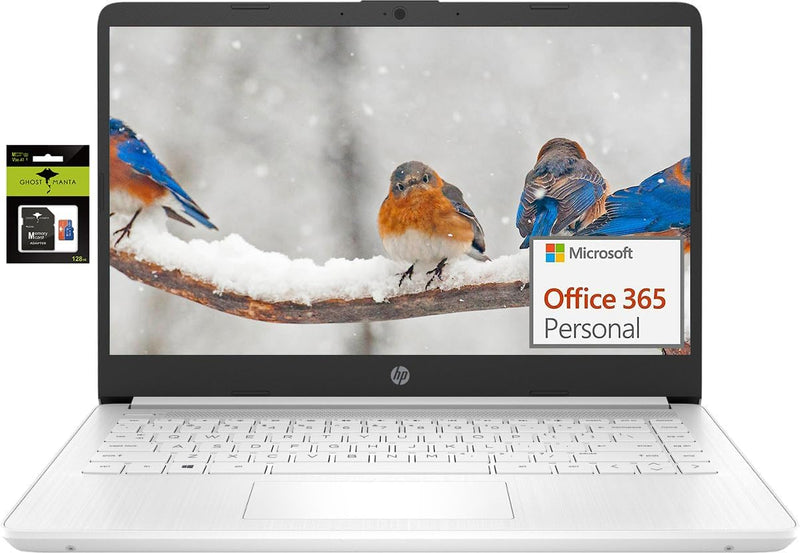
HP Laptop 14" Ultralight - Celeron 16GB RAM 320GB Storage - Win 11 S
★★★★★
Lightweight and Versatile: HP 14" Laptop for Students and Business The HP 14" Laptop combines portability and functionality, making it an ideal choice for students and professionals. Powered by an Intel Celeron processor and featuring ample RAM and storage, this laptop is ready for a variety of t...
$299.00*$299.99Save 0%
Check availability
*Price sourced from Amazon.com. Last updated:Jul 21, 2026.Price and availability are subject to change.
Affiliate Disclosure: Studio Supplies may earn a commission from qualifying purchases made through links on this page, at no additional cost to you. This helps support our editorial team.
Notice a mistake? Let Us Know
Overview
Lightweight and Versatile: HP 14" Laptop for Students and Business
The HP 14" Laptop combines portability and functionality, making it an ideal choice for students and professionals. Powered by an Intel Celeron processor and featuring ample RAM and storage, this laptop is ready for a variety of tasks.
Specifications:
- Brand: HP
- Screen Size: 14 inch
- Display Resolution: HD (1366 x 768)
- Processor: Intel Celeron N4120 (4 Cores, 4 Threads)
- RAM: 16GB DDR4
- Storage: 320GB (64GB eMMC + 256GB Ghost Manta SD)
- Operating System: Windows 11 Home in S mode
- Graphics: Intel UHD Graphics 600
- Wireless: 802.11a/b/g/n/ac Wi-Fi
- Bluetooth: Yes
- Webcam: True Vision 720p HD
- Ports: 1 x USB 3.1 Type-C, 2 x USB 3.1 Type-A, 1 x HDMI, 1 x Headphone/Microphone Combo
- Color: Snowflake White
- Dimensions: 12.76 x 8.86 x 0.71 inches
- Weight: 3.24 lbs
- Battery Life: Up to 10 hours
Key Features
【14" HD Display】14.0-inch diagonal, HD (1366 x 768), micro-edge, BrightView. With virtually no bezel encircling the display, an ultra-wide viewing experience provides for seamless multi-monitor set-ups.【Ports】1 x USB 3.1 Type-C ports, 2 x USB 3.1 Type-A ports, 1 x HDMI, 1 x Headphone/Microphone Combo Jack, and there's a microSD slot.
【Processor & Graphics】Intel Celeron N4120, 4 Cores & 4 Threads, 1.10 GHz Base Frequency, Up to 2.60 GHz Burst Frequency, 4 MB Cahce, Intel UHD Graphics 600, Handle multitasking reliably with the perfect combination of performance, power consumption, and value
【RAM & Storage】Upgraded to 16GB RAM high-bandwidth DDR4 Memory (2400 MHz), Adequate high-bandwidth RAM to smoothly run multiple applications and browser tabs all at once. High-speed eMMC Storage for your office and webinar needs.
【Windows 11 Home in S mode】You may switch to regular windows 11: Press "Start button" bottom left of the screen; Select "Settings" icon above "power" icon;Select "Activation", then Go to Store; Select Get option under "Switch out of S mode"; Hit Install. (If you also see an "Upgrade your edition of Windows" section, be careful not to click the "Go to the Store" link that appears there.)
Activate pre-installed Office 365: 1.Launch any Office app > 2.Start your activation by signing in with your account(Create a account if you don't have one yet) > 3.Click "Activative Office" > 4.Sign in your account and follow the next prompts. > 5.Complete Step 1,2 and 3 > 6.Click on Refresh once Office is ready > 7.Open a document and accept the license agreement.
Specifications
Display Size
14.0 inches
Display Resolution
HD (1366 x 768)
Display Type
Micro-edge, BrightView
Processor
Intel Celeron N4120
Processor Cores
4
Processor Threads
4
Base Frequency
1.10 GHz
Burst Frequency
Up to 2.60 GHz
Processor Cache
4 MB
Graphics
Intel UHD Graphics 600
RAM
16GB DDR4 (2400 MHz)
Storage Type
eMMC Storage
USB Type-C Ports
1 x USB 3.1
USB Type-A Ports
2 x USB 3.1
Video Output
1 x HDMI
Audio Output
1 x Headphone/Microphone Combo Jack
Card Reader
microSD slot
Operating System
Windows 11 Home in S mode
Frequently Asked Questions
What is the screen resolution of this HP 14" laptop?
This HP laptop features a 14.0-inch HD (1366 x 768) display with a micro-edge, BrightView design for an expansive viewing experience.
What type of processor and graphics does this laptop have?
It is powered by an Intel Celeron N4120 processor with 4 cores and 4 threads, and includes Intel UHD Graphics 600 for reliable multitasking.
Can I install applications from outside the Microsoft Store on this laptop?
The laptop comes with Windows 11 Home in S mode, which limits app installations to the Microsoft Store. You can switch to regular Windows 11 by following the instructions provided in the system settings if you need to install other applications.
How much RAM and storage are included with this HP laptop?
This HP laptop is upgraded with 16GB of high-bandwidth DDR4 RAM (2400 MHz) and comes with high-speed eMMC storage, which is suitable for office and webinar needs. The title indicates 320GB storage.
What connectivity options are available on this laptop?
The HP laptop includes 1 x USB 3.1 Type-C port, 2 x USB 3.1 Type-A ports, 1 x HDMI port, 1 x Headphone/Microphone Combo Jack, and a microSD slot.
Related Products


