



HP
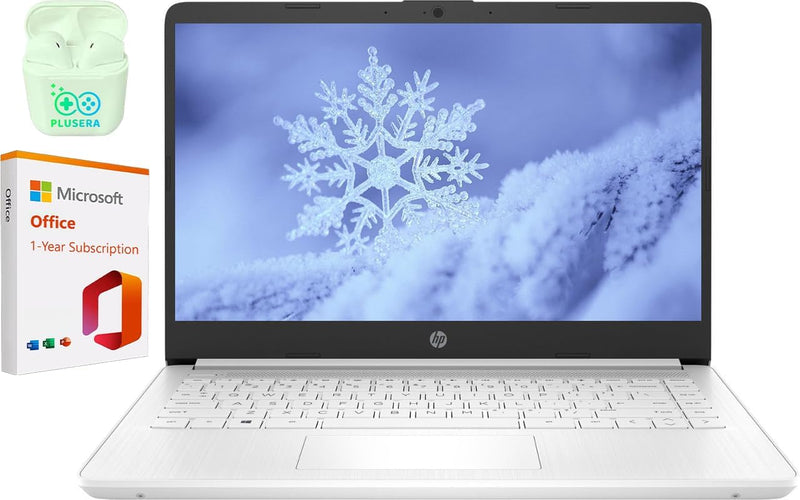
HP 14" Laptop N4120 16GB RAM 320GB SSD
★★★★★
UHD1366 x 76816GB RAM320GB SSDUSB-C
A budget 14-inch laptop with 16GB of RAM that handles basic productivity, but the Celeron N4120 and HD display set a hard performance ceiling.
View price on Amazon
Affiliate Disclosure: Studio Supplies may earn a commission from qualifying purchases made through links on this page, at no additional cost to you. This helps support our editorial team.
Notice a mistake? Let Us Know
Overview
Key Features
【Processor】Intel Celeron N4120 (4 Cores, 4 Threads, Max Boost Clock Up to 2.60Ghz, 4MB Cache). Intel UHD Graphics 600. This 14-inch laptop is also equipped with Windows 11 S, which makes your work or study easy and convenient.
【Display】14" HD, LED, 1366 x 768 resolution.
【Exceptional Storage Space】Equipped with DDR4 RAM and eMMC Solid State Drive, runs smoothly, responds quickly, handles multi-application and multimedia workflows efficiently and quickly.
【Tech Specs】1 x USB-C 3.0. 2 x USB-A 3.0. 1 x HDMI. 1 x Headphone/Microphone Combo Jack. 1 x SD Card Reader. Wi-Fi. Windows 11 S, 1-Year Microsoft Office 365, Bluetooth. Up to 11 hours and 30 minutes battery life. HP Imagepad with multi-touch gesture support. HD Audio with stereo speakers.
【Designed for the Office】With Windows 11 S, Intel UHD Graphics 600, Bluetooth. Up to 11 hours and 30 minutes battery life. HP Imagepad with multi-touch gesture support. HD Audio with stereo speakers, it ensures a stylish and innovative look, excellent portability, and is suitable for daily work and play. It is a great choice for businesses, offices, or students.
Specifications
Brand
HP
Model
HP 14
Processor
Intel Celeron N4120 (4 Cores, 4 Threads, up to 2.60GHz, 4MB Cache)
RAM
16GB DDR4
Storage
64GB eMMC + 256GB SD Card (320GB combined)
Display
14" HD LED (1366 x 768)
Graphics
Intel UHD Graphics 600
Operating System
Windows 11 S
Ports
1x USB-C 3.0, 2x USB-A 3.0, 1x HDMI, 1x Headphone/Mic Combo, 1x SD Card Reader
Wireless
Wi-Fi, Bluetooth
Battery Life
Up to 11 hours 30 minutes
Color
White
Frequently Asked Questions
Can the Celeron N4120 handle multitasking with multiple browser tabs and Office apps?
The N4120 is a quad-core chip with a 2.60GHz boost clock, which handles light multitasking — a few browser tabs alongside a Word document or spreadsheet. Push past 10-15 active Chrome tabs or add a video call, and you'll feel the CPU bottleneck. The 16GB RAM helps prevent page file thrashing, but it can't compensate for the processor's limited throughput.
Is the 320GB storage actually a single SSD?
No. The "320GB" is a combined figure — 64GB of built-in eMMC storage plus a 256GB SD card. eMMC is significantly slower than a standard SATA or NVMe SSD for read/write operations, so expect longer app load times and file transfers compared to a true SSD-equipped laptop.
Can I switch out of Windows 11 S Mode to run standard desktop applications?
Yes, you can switch out of S Mode for free through the Microsoft Store. S Mode restricts you to Microsoft Store apps only, so switching is necessary if you need to install Chrome, desktop software like Zoom, or any non-Store application. The switch is one-way — you cannot go back to S Mode once you leave it.
Is the 1366x768 display adequate for daily use?
At 14 inches, a 1366x768 resolution results in roughly 112 pixels per inch, which is noticeably less sharp than the 1080p panels found on most competing laptops. Text appears slightly fuzzy, and you get less usable screen real estate for side-by-side windows. It's functional for single-window tasks but feels dated.
How does the 11.5-hour battery life claim hold up under real use?
The rated 11 hours 30 minutes is based on light workloads. The low-power Celeron and HD-resolution display do sip power efficiently, so expect 7-9 hours of realistic mixed use with Wi-Fi active — which is still solid for an all-day work or school session.
Related Products


