



HP
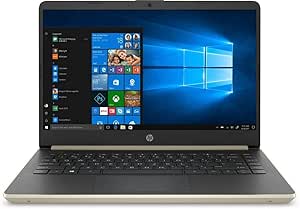
HP HP-14-DQ1038WM i3 8GB 128GB SSD Home Business Laptop
★★★★★
An i3-powered, SSD-equipped 14" laptop that handles everyday productivity tasks at a 3.24-lb carry weight built for home and mobile business use.
$489.99*
Check availability
*Price sourced from Amazon.com. Last updated:Jul 15, 2026.Price and availability are subject to change.
Affiliate Disclosure: Studio Supplies may earn a commission from qualifying purchases made through links on this page, at no additional cost to you. This helps support our editorial team.
Notice a mistake? Let Us Know
Overview
Specifications
Screen Size
14-inch
Processor
Intel Core i3
RAM
8GB
Storage
128GB SSD
Pros & Cons
👍 Pros
- The 128GB SSD delivers substantially faster boot times and application launch speeds compared to HDD-equipped budget laptops in this class — Windows loads in seconds rather than minutes.
- At 3.24 lbs and 0.71 inches thin, the chassis is genuinely portable for daily commuting or travel without the weight penalty of larger 15" business laptops.
- Windows 10 Pro inclusion provides access to enterprise features — BitLocker encryption, Remote Desktop, and domain join — that the Home edition withholds at this price tier.
- The i3-1005G1's boost to 3.4 GHz handles burst workloads like spreadsheet calculations or document exports without the sustained thermal throttling seen in older Celeron or Pentium-based budget systems.
- The port selection — USB-C 3.1 Gen 1, two USB-A 3.1 Gen 1, and HDMI — covers standard peripheral and display connectivity without requiring a hub for basic setups.
👎 Cons
- The 14" HD display resolution of 1366x768 is below the 1080p floor expected for comfortable extended document and spreadsheet work — pixel density is noticeably low at normal viewing distances.
- The Realtek RTL8821CE 1x1 wireless implementation produces inconsistent throughput on busy networks compared to Intel's dual-band Wi-Fi solutions found on similarly priced competing laptops.
- 128GB of onboard SSD storage fills quickly once Windows updates, Office, and standard business applications are installed — external storage or cloud dependency becomes a near-immediate requirement.
- The dual-core i3-1005G1 has no headroom for parallel compute-heavy tasks; any workload beyond light productivity will surface as CPU bottleneck before thermal constraints even register.
- Intel UHD integrated graphics share system RAM and offer no capability for GPU-accelerated workflows — video editing, large photo libraries, or even some web-based tools with hardware acceleration requirements will underperform.
Frequently Asked Questions
What does the Intel Core i3-1005G1 processor actually deliver in day-to-day use?
The i3-1005G1 is a dual-core Ice Lake chip with a 1.2 GHz base clock that boosts to 3.4 GHz under load. For web browsing, document editing, video calls, and light spreadsheet work, it performs competently. It will struggle with video rendering, large Excel models, or running multiple memory-intensive applications simultaneously.
Is 128GB of SSD storage enough, and can it be upgraded?
128GB is tight for a primary drive — after Windows 10 Pro and standard applications, you may have 60–70GB of usable space. The HP 14-DQ series uses an M.2 SSD slot, but the specific upgrade path depends on the individual unit's BIOS and board configuration; confirm compatibility before purchasing an upgrade drive.
What wireless standard does this laptop use, and what does that mean for connection speed?
The Realtek RTL8821CE supports 802.11ac (Wi-Fi 5) on a 1x1 antenna configuration. That single-stream implementation caps theoretical throughput below what a 2x2 or 3x3 antenna array would achieve — on a congested network, you may see more variance in real-world speeds than a higher-tier wireless card would deliver.
Does this laptop support external monitors, and at what resolution?
Yes — the HDMI 1.4b port supports external display output. HDMI 1.4b has a bandwidth ceiling of 10.2 Gbps, which limits 4K output to 30Hz. For a standard 1080p external monitor, it performs without limitation.
How does 8GB DDR4 RAM affect multitasking on this system?
8GB is the functional minimum for Windows 10 Pro multitasking. You can run a browser with several tabs, a document editor, and a video call simultaneously, but background processes will cause perceptible slowdowns if you push much further. RAM is not user-upgradeable on all variants of this chassis — verify before purchase if expansion is a priority.
Related Products


