

HP
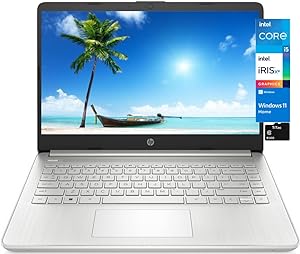
HP 14 i5 Laptop 8GB/512GB SSD 14" HD Windows 11
★★★★★
1366 x 768Ryzen 3 3250U512GB SSDBluetooth 4.2
Stay Productive and Connected with the HP 14 LaptopThe HP Notebook 14 Laptop offers a perfect blend of performance and portability. Featuring a 14" HD display and powered by an Intel Core i5 processor, this laptop ensures a smooth and efficient computing experience. With 8GB of RAM and a 512GB SS...
$479.99*
Check availability
*Price sourced from Amazon.com. Last updated:Jul 21, 2026.Price and availability are subject to change.
Affiliate Disclosure: Studio Supplies may earn a commission from qualifying purchases made through links on this page, at no additional cost to you. This helps support our editorial team.
Notice a mistake? Let Us Know
Overview
Stay Productive and Connected with the HP 14 Laptop
The HP Notebook 14 Laptop offers a perfect blend of performance and portability. Featuring a 14" HD display and powered by an Intel Core i5 processor, this laptop ensures a smooth and efficient computing experience. With 8GB of RAM and a 512GB SSD, you'll have plenty of space for your files and applications. Its long battery life and lightweight design make it ideal for on-the-go productivity.
- Display: 14" HD (1366 x 768)
- Processor: Intel Core i5-1135G7 (Up to 4.2 GHz)
- Memory: 8GB DDR4 RAM
- Storage: 512GB SSD
- Operating System: Windows 11 Home in S mode
- Connectivity: Wi-Fi, HDMI, USB Type-C, USB Type-A
- Battery Life: Up to 9 Hours
Key Features
[Processor] AMD Ryzen 3 3250U (2.6 GHz base clock, up to 3.5 GHz max boost clock, 4 MB L3 cache, 2 cores, 4 threads)
[Display] 14" diagonal, NonTouch HD (1366 x 768), micro-edge, BrightView, 220 nits, 45% NTSC
[UPGRADE RAM and Capacity] 8GB system memory for advanced multitasking; 512GB Solid State Drive provides storage space.
[Ports & Bundle] Built-in HD webcam with microphone; 1 SuperSpeed USB Type-C 5Gbps signaling rate; 2 SuperSpeed USB Type-A 5Gbps signaling rate; 1 HDMI 1.4b; 1 AC smart pin; 1 headphone/microphone combo; Realtek RTL8821CE 802.11a/b/g/n/ac (1x1) Wi-Fi and Bluetooth 4.2 combo; bundled with TiTac 32GB Card, Brand Register on amazon
[OPERATION SYSTEM] Windows 11 Home in S mode (You may switch to regular windows 11 Home: open "Settings > System > Activation. Find the Switch to Windows 11 section, then select the Go to the Store link. On the page that appears in Microsoft Store (Switch out of S mode or a similar page), select the Get button"
Specifications
Model
HP 14 i5 Laptop
Processor
AMD Ryzen 3 3250U
Base Clock Speed
2.6 GHz
Max Boost Clock
3.5 GHz
Cores/Threads
2 Cores, 4 Threads
L3 Cache
4 MB
Display Size
14 inches
Display Resolution
HD (1366 x 768)
Display Type
NonTouch, micro-edge, BrightView
Display Brightness
220 nits
Color Gamut
45% NTSC
RAM
8GB
Storage
512GB Solid State Drive
USB Type-C Ports
1 SuperSpeed USB Type-C 5Gbps signaling rate
USB Type-A Ports
2 SuperSpeed USB Type-A 5Gbps signaling rate
Video Output
1 HDMI 1.4b
Audio Port
1 headphone/microphone combo
Wireless Connectivity
Realtek RTL8821CE 802.11a/b/g/n/ac (1x1) Wi-Fi
Bluetooth
Bluetooth 4.2 combo
Webcam
Built-in HD webcam with microphone
Operating System
Windows 11 Home in S mode
Included Accessory
TiTac 32GB Card
Frequently Asked Questions
What processor does this HP 14 laptop use?
This HP 14 laptop is powered by an AMD Ryzen 3 3250U processor, with a base clock of 2.6 GHz and a max boost of 3.5 GHz.
How much RAM and storage does this laptop have?
The laptop features 8GB of system memory for multitasking and a 512GB Solid State Drive for storage.
What is the display resolution of the HP 14 laptop?
It has a 14-inch diagonal HD (1366 x 768) display, featuring micro-edge and BrightView technology.
Does this laptop come with Windows 11 Home in S mode, and can I switch out of it?
Yes, it comes with Windows 11 Home in S mode. You can switch to regular Windows 11 Home through the Microsoft Store settings.
What connectivity options are available on this laptop?
It includes 1 SuperSpeed USB Type-C, 2 SuperSpeed USB Type-A, 1 HDMI 1.4b, and Realtek RTL8821CE Wi-Fi and Bluetooth 4.2 combo.
Is there an integrated webcam on this HP 14 laptop?
Yes, the laptop comes with a built-in HD webcam with a microphone, suitable for video calls.
Related Products


