

HP
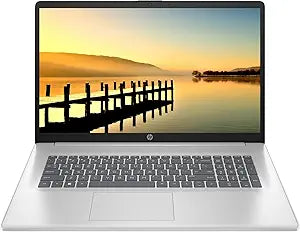
HP HP Essential 17.3" i3-1125G4 16GB 1TB SSD Laptop
★★★★★
1600 x 900i3-1125G416GB RAM1TB SSD
Elevate Your Productivity with the HP Essential 17.3" Laptop The HP Essential 17.3" laptop is a powerhouse designed for both business and students. Equipped with an Intel Core i3 processor, ample memory and a spacious SSD, this laptop delivers reliable performance for all your tasks. Its large HD...
View price on Amazon
Affiliate Disclosure: Studio Supplies may earn a commission from qualifying purchases made through links on this page, at no additional cost to you. This helps support our editorial team.
Notice a mistake? Let Us Know
Overview
Elevate Your Productivity with the HP Essential 17.3" Laptop
The HP Essential 17.3" laptop is a powerhouse designed for both business and students. Equipped with an Intel Core i3 processor, ample memory and a spacious SSD, this laptop delivers reliable performance for all your tasks. Its large HD+ display and included accessories enhance your overall experience.
Specifications:
- Processor: Intel Core i3-1125G4, 4 Cores & 8 Threads, 3.70GHz Max Boost Clock
- Graphics: Intel UHD Graphics
- Display: 17.3" diagonal, HD+ (1600 x 900), narrow bezels, anti-glare, 250 nits
- Operating System: Windows 11 Home in S Mode
- Memory: 16GB DDR4 RAM
- Storage: 1TB NVMe SSD
- Ports: 1 x USB Type-C 5Gbps signaling rate, 2 x USB Type-A 5Gbps signaling rate, 1 x headphone/microphone combo, 1 x AC smart pin, 1 x HDMI 1.4b
- Wireless: WiFi 5 (2x2) and Bluetooth 5
- Webcam: HP True Vision 720p HD camera with integrated digital microphone
- Audio: Dual speakers
- Battery Life: Up to 8 hours and 30 minutes
- Dimensions: 16.33 x 10.72 x 0.96 in
- Weight: 5.25 lb
Key Features
【Quad-Core Intel Processor】Intel Core i3-1125G4, 4 Cores & 8 Threads, 2.00 GHz Base Clock, 3.70GHz Max Boost Clock, 8MB Cache. Brings the perfect combination of features to make you unstoppable. Get things done fast with high performance, instant responsiveness and best-in-class connectivity.
【17.3" HD+ Display】17.3" diagonal, HD+ (1600 x 900), narrow bezels, anti-glare, 250 nits. Enjoy vibrant, crystal-clear images with Non-reflective and low gloss means you'll get less glare while you're outside
【Upgraded to 16GB RAM】Substantial high-bandwidth RAM to smoothly run your games and photo- and video-editing applications, as well as multiple programs and browser tabs all at once.
【Upgraded to 1TB PCIe SSD】Get up to 15x faster performance than a traditional hard drive. Give you a long-lasting and smooth experience, both system boot up and application start are very fast.
【Windows 11 Home in S mode】You may switch to regular windows 11: Press "Start button" bottom left of the screen; Select "Settings" icon above "power" icon;Select Update & Security and Activation, then Go to Store; Select "Get" option under "Switch out of S mode"; Hit Install. (If you also see an "Upgrade your edition of Windows" section, be careful not to click the "Go to the Store" link that appears there.)
Specifications
Processor
Intel Core i3-1125G4
Cores / Threads
4 Cores / 8 Threads
Base Clock Speed
2.00 GHz
Max Boost Clock Speed
3.70GHz
Cache
8MB
Display Size
17.3"
Display Resolution
HD+ (1600 x 900)
Display Features
Narrow bezels, anti-glare, 250 nits
RAM
16GB
Storage
1TB PCIe SSD
Operating System
Windows 11 Home in S mode
Pros & Cons
👍 Pros
- The Intel Core i3-1125G4 quad-core processor offers a base clock of 2.00 GHz and a boost up to 3.70GHz, providing reliable performance for everyday tasks.
- With 16GB of high-bandwidth RAM, this laptop can smoothly handle multiple applications, games, and browser tabs concurrently.
- The 1TB PCIe SSD delivers significantly faster performance compared to traditional hard drives, ensuring quick system boot-ups and application launches.
- A spacious 17.3" HD+ anti-glare display with a 1600 x 900 resolution and 250 nits brightness offers clear visuals with reduced outdoor glare.
- The laptop comes with Windows 11 Home in S mode, offering a streamlined and secure operating experience, with the option to switch to regular Windows 11.
👎 Cons
- The HD+ (1600 x 900) resolution on a 17.3-inch display might not be as sharp or detailed as Full HD or QHD options.
- Windows 11 Home in S mode restricts software installation to apps from the Microsoft Store unless switched out, which might not suit all users.
- The anti-glare display, while good for outdoor use, might slightly reduce the vibrancy of colors compared to glossy screens.
- While the i3-1125G4 processor is efficient, it may not offer the top-tier performance required for extremely demanding tasks or intensive gaming compared to higher-tier CPUs.
- Specific details on port selection beyond general connectivity are not provided, which could be a factor for users with many peripherals.
Frequently Asked Questions
What type of processor powers this HP Essential laptop?
This laptop is equipped with a Quad-Core Intel Core i3-1125G4 processor, featuring 4 cores and 8 threads with a max boost clock of 3.70GHz.
What is the resolution of the laptop's display?
The laptop features a 17.3" HD+ display with a resolution of 1600 x 900, designed with narrow bezels and an anti-glare finish.
How much RAM does this HP laptop come with?
This HP Essential laptop is upgraded with 16GB of high-bandwidth RAM, allowing for smooth multitasking across various applications.
What kind of storage is included in this laptop?
The laptop comes with an upgraded 1TB PCIe SSD, offering up to 15x faster performance than traditional hard drives for quick boot and app starts.
Can I switch out of Windows 11 Home in S mode?
Yes, you can switch to regular Windows 11 by navigating through the 'Settings' menu, then 'Update & Security,' 'Activation,' and selecting the "Get" option under "Switch out of S mode" in the Store.
Is the display suitable for outdoor use?
The 17.3" HD+ display features an anti-glare coating and 250 nits brightness, which helps to reduce glare when using the laptop outdoors.
Related Products


