



HP
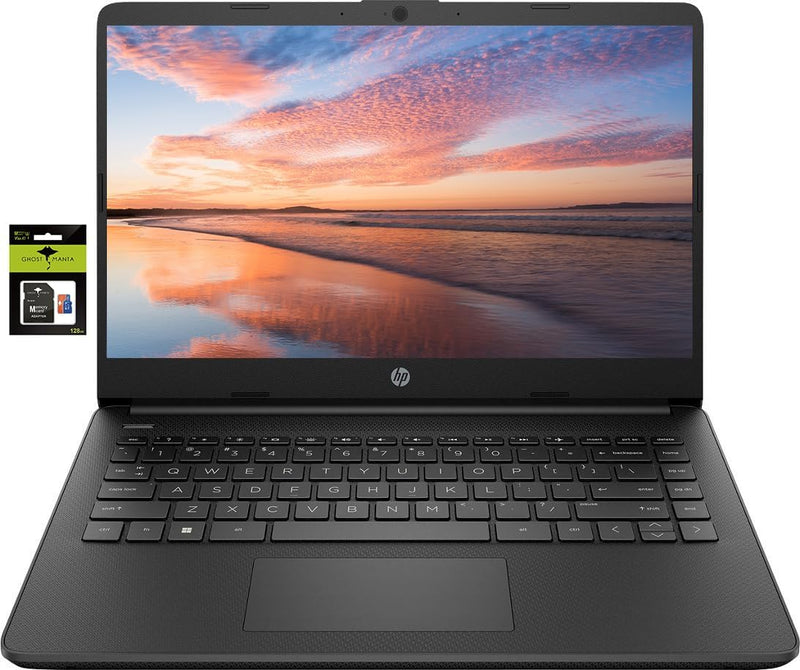
HP HP 14" Premium HD Celeron Laptop w/ Office 365
★★★★★
16GB RAM128GB eMMC
Portable and Productive: HP 14 Premium HD Laptop The HP 14 Premium HD Portable Laptop Computer is designed for students and business professionals who need a reliable and lightweight device. Powered by a Quad-Core Intel Celeron processor and upgraded with 16GB of RAM, this laptop ensures smooth p...
$269.99*$299.99Save 10%
Check availability
*Price sourced from Amazon.com. Last updated:Jul 16, 2026.Price and availability are subject to change.
Affiliate Disclosure: Studio Supplies may earn a commission from qualifying purchases made through links on this page, at no additional cost to you. This helps support our editorial team.
Notice a mistake? Let Us Know
Overview
Portable and Productive: HP 14 Premium HD Laptop
The HP 14 Premium HD Portable Laptop Computer is designed for students and business professionals who need a reliable and lightweight device. Powered by a Quad-Core Intel Celeron processor and upgraded with 16GB of RAM, this laptop ensures smooth performance for everyday tasks. It features a 256GB storage solution (128GB eMMC + 128GB SD Card) and comes with a 1-year subscription to Office 365, enhancing productivity right out of the box. The HD display and included KW accessories make it an excellent choice for on-the-go use.
Specifications:
- Brand: HP
- Model: HP 14
- Screen Size: 14.0-inch
- Resolution: HD (1366 x 768)
- Processor: Intel Celeron N4120 (up to 2.6 GHz)
- Memory: 16GB RAM
- Storage: 128GB eMMC + 128GB SD Card
- Graphics: Intel UHD Graphics 600
- Operating System: Windows 11 Home in S mode
- Connectivity: 802.11a/b/g/n/ac Wi-Fi, Bluetooth
- Webcam: HP True Vision 720p HD camera
Key Features
【14-inch HD Screen Laptop】HP 14" Laptop with HD, micro-edge, BrightView display. Enjoy an immersive multimedia experience with a slim bezel design and maximized viewing area. HP True Vision 720p HD webcam with integrated dual-array digital microphones keeps video chats crystal clear, even in low-light conditions.
【Intel Celeron N4120 Processor】Powered by an Intel processor, 4 Core performance delivers seamless multi-monitor setups. With an ultra-sensitive precision touchpad, you can browse the web, study, work and do more anytime with up to 11 hours of battery life, you can easily power through a full day of work and play.
【Upgraded to 16GB RAM & 128GB eMMC】Adequate high-bandwidth RAM to smoothly run multiple applications and browser tabs all at once. Massive storage space for your files, applications, and multimedia content, providing fast and reliable data access.
【Windows 11 Home in S mode】You may switch to regular windows 11: Press "Start button" bottom left of the screen; Select "Settings" icon above "power" icon;Select "Activation", then Go to Store; Select Get option under "Switch out of S mode"; Hit Install. (If you also see an "Upgrade your edition of Windows" section, be careful not to click the "Go to the Store" link that appears there.)
Activate pre-installed Office 365: 1.Launch any Office app > 2.Start your activation by signing in with your Microsoft account(Create a account if you don't have one yet) > 3.Click "Activative Office" > 4.Sign in your account and follow the next prompts. > 5.Complete Step 1,2 and 3 > 6.Click on Refresh once Office is ready > 7.Open a document and accept the license agreement.
Specifications
Screen Size
14 inches
Display Resolution
HD
Processor Brand
Intel
Processor Model
Celeron N4120
Processor Cores
4
RAM
16GB
Storage Type
eMMC
Storage Capacity
128GB
Operating System
Windows 11 Home in S mode
Battery Life
Up to 11 hours
Webcam
HP True Vision 720p HD
Pros & Cons
👍 Pros
- Features a 14-inch HD micro-edge BrightView display for an immersive viewing experience with slim bezels.
- Equipped with an Intel Celeron N4120 processor for seamless multi-monitor setups and everyday tasks.
- Offers up to 11 hours of battery life, allowing for extended use throughout a full day of work or entertainment.
- Comes with 16GB of RAM and 128GB eMMC storage, providing ample memory and space for applications and files.
- Includes Windows 11 Home in S mode, with the option to easily switch to regular Windows 11 if desired.
👎 Cons
- The Intel Celeron N4120 processor might not be ideal for highly demanding applications or intensive multitasking scenarios.
- While 128GB eMMC provides fast data access, it may be less expandable or offer slower speeds than traditional SSDs.
- Windows 11 Home in S mode restricts software installation to the Microsoft Store unless switched out, which is an extra step.
- The HD resolution of the display might not be as sharp or detailed as Full HD or higher resolutions for certain content.
- Integrated Intel graphics are suitable for general use but are not designed for high-performance gaming or intensive graphic design.
Frequently Asked Questions
What type of display does this HP laptop feature?
This HP laptop features a 14-inch HD, micro-edge, BrightView display, designed to provide an immersive multimedia experience with slim bezels.
Can I install applications outside of the Microsoft Store on this laptop?
Yes, the laptop comes with Windows 11 Home in S mode, but you have the option to switch to regular Windows 11 to install apps from any source.
How long does the battery typically last on this device?
This laptop offers up to 11 hours of battery life, allowing you to power through a full day of work or play without needing to recharge frequently.
What kind of processor is included in this HP laptop?
It is powered by an Intel Celeron N4120 processor, which features 4 cores for smooth performance, including support for multi-monitor setups.
Is Microsoft Office 365 included with this laptop, and how do I activate it?
Yes, Office 365 is pre-installed. You can activate it by launching any Office app, signing in with your Microsoft account, and following the activation prompts.
Related Products


