

HP
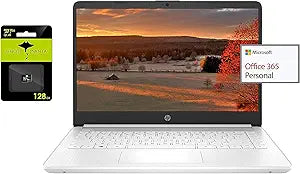
HP Intel N4020 14" Ultra Light Laptop 8GB RAM 192GB Storage
★★★★★
UHD1366 x 7688GB RAMUSB 3.1
Lightweight and Efficient: HP 14" Ultra Light Laptop The HP 14" Ultra Light Laptop is designed for on-the-go productivity. Powered by an Intel N4020 Processor and 8GB of RAM, this laptop offers reliable performance for everyday tasks. With 192GB of storage (64GB eMMC + 128GB Micro SD), a built-in...
Check availability
Affiliate Disclosure: Studio Supplies may earn a commission from qualifying purchases made through links on this page, at no additional cost to you. This helps support our editorial team.
Notice a mistake? Let Us Know
Overview
Lightweight and Efficient: HP 14" Ultra Light Laptop
The HP 14" Ultra Light Laptop is designed for on-the-go productivity. Powered by an Intel N4020 Processor and 8GB of RAM, this laptop offers reliable performance for everyday tasks. With 192GB of storage (64GB eMMC + 128GB Micro SD), a built-in webcam, and multiple connectivity options, it's perfect for students and professionals alike.
Specifications:
- Brand: HP
- Model: HP
- Processor: Intel N4020 Processor (up to 2.8GHz)
- Memory: 8GB RAM
- Storage: 64GB eMMC + 128GB Micro SD
- Display: 14" HD
- Connectivity: WiFi, Bluetooth
- Ports: USB-A, USB-C, HDMI
- Operating System: Windows 11 S
Key Features
【14" HD Display】14.0-inch diagonal, HD (1366 x 768), micro-edge, BrightView. With virtually no bezel encircling the display, an ultra-wide viewing experience provides for seamless multi-monitor set-ups
【Processor & Graphics】Intel Celeron N4120, 4 Cores & 4 Threads, 1.10 GHz Base Frequency, Up to 2.60 GHz Burst Frequency, 4 MB Cahce, Intel UHD Graphics 600, Handle multitasking reliably with the perfect combination of performance, power consumption, and value
【RAM & Storage】4GB high-bandwidth DDR4 Memory (2400 MHz), Adequate high-bandwidth RAM to smoothly run multiple applications and browser tabs all at once. 64GB high-speed eMMC Storage for your office and webinar needs
【Ports】1 x USB 3.1 Type-C ports, 2 x USB 3.1 Type-A ports, 1 x HDMI, 1 x Headphone/Microphone Combo Jack, and there's a microSD slot
【Windows 11 Home in S mode】You may switch to regular windows 11: Press "Start button" bottom left of the screen; Select "Settings" icon above "power" icon;Select "Activation", then Go to Store; Select Get option under "Switch out of S mode"; Hit Install. (If you also see an "Upgrade your edition of Windows" section, be careful not to click the "Go to the Store" link that appears there.)
Specifications
Display Size
14.0-inch
Display Resolution
HD (1366 x 768)
Display Type
Micro-edge, BrightView
Processor
Intel Celeron N4120
Processor Cores
4
Processor Threads
4
Processor Base Frequency
1.10 GHz
Processor Burst Frequency
Up to 2.60 GHz
Processor Cache
4 MB
Graphics
Intel UHD Graphics 600
RAM
4GB DDR4 (2400 MHz)
Storage
64GB eMMC
Operating System
Windows 11 Home in S mode
USB 3.1 Type-C Ports
1
USB 3.1 Type-A Ports
2
HDMI Ports
1
Audio Ports
1 x Headphone/Microphone Combo Jack
Card Reader
MicroSD slot
Frequently Asked Questions
What is the screen resolution of this HP laptop?
This HP laptop features a 14.0-inch HD display with a resolution of 1366 x 768, offering clear visuals for everyday tasks.
How much storage is available on this laptop?
It comes with 64GB of high-speed eMMC storage, which is suitable for basic office applications and storing essential documents.
Can I run applications not from the Microsoft Store on this laptop?
The laptop ships with Windows 11 Home in S mode, which restricts apps to the Microsoft Store. However, you can switch to regular Windows 11 to install apps from other sources.
What type of processor is in this laptop?
This HP laptop is powered by an Intel Celeron N4120 processor, which has 4 cores and a burst frequency of up to 2.60 GHz.
How much RAM does this model include?
It is equipped with 4GB of high-bandwidth DDR4 memory, providing adequate performance for multitasking with common applications and browser tabs.
What connectivity options are available for external devices?
The laptop includes 1 USB 3.1 Type-C port, 2 USB 3.1 Type-A ports, 1 HDMI port, a headphone/microphone combo jack, and a microSD slot for various peripherals.
Related Products


