

HP
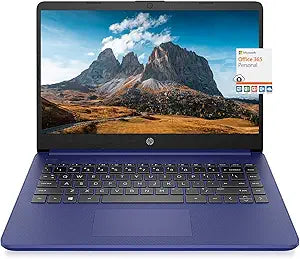
HP 14" HD Lightweight Laptop 16GB RAM 1TB SSD Blue
★★★★★
1366 x 76816GB RAM1TB SSD64GB eMMC6W
## Stay Productive On-the-Go with the HP 14" HD Lightweight Laptop This upgraded HP 14" HD laptop is designed for portability and performance. Featuring an AMD Dual Core 3000 Series Processor, upgraded RAM and ample storage, this laptop is perfect for everyday tasks. Comes with Windows 10, Micros...
$349.99*$399.00Save 12%
Check availability
*Price sourced from Amazon.com. Last updated:Jul 17, 2026.Price and availability are subject to change.
Affiliate Disclosure: Studio Supplies may earn a commission from qualifying purchases made through links on this page, at no additional cost to you. This helps support our editorial team.
Notice a mistake? Let Us Know
Overview
## Stay Productive On-the-Go with the HP 14" HD Lightweight Laptop
This upgraded HP 14" HD laptop is designed for portability and performance. Featuring an AMD Dual Core 3000 Series Processor, upgraded RAM and ample storage, this laptop is perfect for everyday tasks. Comes with Windows 10, Microsoft Office 365 and a mousepad to enhance your user experience right out of the box.
Specifications
- Brand: HP
- Display: 14" HD (1366 x 768) WLED-backlit, BrightView
- Processor: AMD 3020e, 2 Cores & 4 Threads, 1.2GHz Base Clock, 2.6GHz Max Boost Clock
- Memory: 16GB RAM
- Storage: 64GB eMMC + 1TB SSD
- Ports: 1 x 5Gbps USB Type-C, 2 x 5Gbps USB Type-A, 1 x HDMI 1.4, 1 x Headphone/Microphone Combo, 1 x multi-format SD media card reader
- Wireless: WiFi 5, Bluetooth 5
- Webcam: HP True Vision 720p HD camera with integrated dual array digital microphone
- Battery Type: 3-cell, 41 Wh Li-ion
- Average Battery Life: Up to 10.5 Hours
- Audio Features: Dual speakers
- Dimensions: 12.76 x 8.86 x 0.71 inches
- Weight: 3.24 lbs
- Color: Blue
- Operating System: Windows 10 in S mode
Key Features
【14" HD Display】14" HD(1366 x 768) Display with micro-edge bezel design, WLED-backlit, BrightView, Enjoy your entertainment with the great quality and high-definition detail of 1 million pixels
【AMD 3000 Series Mobile Processors】AMD 3020e, 2 Cores & 4 Thrades, 1.2GHz Base Clock, 2.6GHz Max Boost Clock, 4MB L3 Cache, 6W TDP, Built in 3 Cores Radeon Graphics, Exprience high performance for all your entertainment
【Upgraded to 16GB RAM】Substantial high-bandwidth RAM to smoothly run your games and photo- and video-editing applications, as well as multiple programs and browser tabs all at once
【Upgraded to 64GB eMMC + 1TB SSD】Speedy solid-state drive for seanless performance and reliable multitasking, allows you to store a large number of files, improving the reading speed of large files, ensuring daily use and the speed of opening large files, reduce the time of application and file loading
【Activate 1 Year MS office 365 & Win10 in S mode】(About switch to regular Win10, see the detail in Product description) Activate pre-installed Office: 1.Launch any Office app > 2.Start your activation by signing in with your Microsoft account(Create a account if you don't have one yet) > 3.Click "Activate Office" > 4.Sign in your account and follow the next prompts. > 5.Complete Step 1,2 and 3 > 6.Click on Refresh once Office is ready > 7.Open a document and accept the license agreement.
Specifications
Display Size
14"
Display Resolution
HD (1366 x 768)
Display Features
Micro-edge bezel, WLED-backlit, BrightView
Processor Brand
AMD
Processor Series
3000 Series Mobile Processors
Processor Model
3020e
Processor Cores
2 Cores
Processor Threads
4 Threads
Base Clock Speed
1.2GHz
Max Boost Clock Speed
2.6GHz
L3 Cache
4MB
TDP
6W
Graphics
Built in 3 Cores Radeon Graphics
Installed RAM
16GB
Primary Storage
64GB eMMC
Secondary Storage
1TB SSD
Operating System Mode
Win10 in S mode
Software Included
1 Year MS office 365
Color
Blue
Frequently Asked Questions
What is the display resolution of this HP laptop?
This HP laptop features a 14" HD (1366 x 768) display, providing high-definition detail with 1 million pixels for your entertainment.
Can I install applications from outside the Microsoft Store on this laptop?
This laptop comes with Windows 10 in S mode, which limits app installations to the Microsoft Store. You can switch to regular Windows 10, as detailed in the product description, to install apps from other sources.
How much total storage does this laptop have?
This laptop is upgraded with 64GB eMMC for speedy initial performance and an additional 1TB SSD, providing a substantial amount of storage for files and applications.
Is the AMD 3020e processor powerful enough for video editing?
The AMD 3020e processor with built-in Radeon Graphics is designed for high performance in entertainment and daily tasks, but it's an entry-level CPU that might be limited for professional or very intensive video editing.
Does the 1-year MS Office 365 need to be purchased separately?
No, this laptop includes a pre-installed 1 year of MS Office 365. You will need to activate it by signing in with your Microsoft account following the provided steps.
What kind of battery life can I expect from this lightweight laptop?
The product features describe it as a "Lightweight Laptop" suitable for entertainment, but specific details on battery life are not provided.
Can I play games on this laptop?
With the AMD 3020e processor and built-in 3 Cores Radeon Graphics, along with 16GB RAM, this laptop can handle many games smoothly, especially less demanding titles, but it's not designed for high-end gaming.
Related Products


