



HP
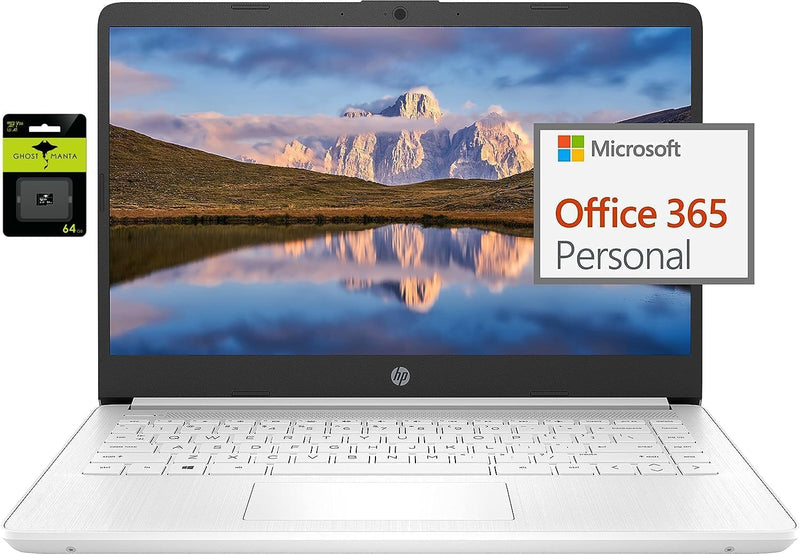
HP 14" Ultralight Laptop N4120 16GB RAM 128GB SSD Windows 11
★★★★★
UHD1366 x 76816GB RAM128GB SSDUSB 3.1
Portable Performance for Students and ProfessionalsIntroducing the HP 14" Ultral Light Laptop, designed for students and business users who need a reliable and lightweight device for everyday tasks. Processor: Intel Celeron N4120, 4 Cores & 4 Threads Memory: 16GB DDR4 Storage: 64...
$290.00*$339.00Save 14%
View on Amazon
✓ In Stock on Amazon.com
*Price sourced from Amazon.com. Last updated:Jun 07, 2026.Price and availability are subject to change.
Affiliate Disclosure: Studio Supplies may earn a commission from qualifying purchases made through links on this page, at no additional cost to you. This helps support our editorial team.
Notice a mistake? Let Us Know
Overview
Portable Performance for Students and Professionals
Introducing the HP 14" Ultral Light Laptop, designed for students and business users who need a reliable and lightweight device for everyday tasks.
- Processor: Intel Celeron N4120, 4 Cores & 4 Threads
- Memory: 16GB DDR4
- Storage: 64GB eMMC + 64GB Micro SD
- Display: 14.0-inch diagonal, HD (1366 x 768), micro-edge, BrightView
- Graphics: Intel UHD Graphics 600
- Operating System: Windows 11 Home in S mode
- Connectivity: 802.11a/b/g/n/ac (2x2) Wi-Fi and Bluetooth
- Ports: 1 x USB 3.1 Type-C, 2 x USB 3.1 Type-A, 1 x HDMI, 1 x Headphone/Microphone Combo Jack, 1 x MicroSD slot
- Webcam: HP True Vision 720p HD camera with integrated dual array digital microphones
Key Features
【14" HD Display】14.0-inch diagonal, HD (1366 x 768), micro-edge, BrightView. With virtually no bezel encircling the display, an ultra-wide viewing experience provides for seamless multi-monitor set-ups
【Processor & Graphics】Intel Celeron N4120, 4 Cores & 4 Threads, 1.10 GHz Base Frequency, Up to 2.60 GHz Burst Frequency, 4 MB Cahce, Intel UHD Graphics 600, Handle multitasking reliably with the perfect combination of performance, power consumption, and value
【RAM & Storage】16GB high-bandwidth DDR4 Memory (2400 MHz), Adequate high-bandwidth RAM to smoothly run multiple applications and browser tabs all at once. 64GB high-speed eMMC Storage for your office and webinar needs
【Ports】1 x USB 3.1 Type-C ports, 2 x USB 3.1 Type-A ports, 1 x HDMI, 1 x Headphone/Microphone Combo Jack, and there's a microSD slot
【Windows 11 Home in S mode】You may switch to regular windows 11: Press "Start button" bottom left of the screen; Select "Settings" icon above "power" icon;Select "Activation", then Go to Store; Select Get option under "Switch out of S mode"; Hit Install. (If you also see an "Upgrade your edition of Windows" section, be careful not to click the "Go to the Store" link that appears there.)
Specifications
Display Size
14.0-inch
Display Resolution
HD (1366 x 768)
Display Type
Micro-edge, BrightView
Processor
Intel Celeron N4120
Processor Cores
4 Cores
Processor Threads
4 Threads
Base Frequency
1.10 GHz
Burst Frequency
Up to 2.60 GHz
Processor Cache
4 MB
Graphics
Intel UHD Graphics 600
RAM
16GB DDR4 (2400 MHz)
Storage
64GB eMMC
USB Type-C Ports
1
USB Type-A Ports
2 (USB 3.1)
HDMI Ports
1
Audio Jack
1 x Headphone/Microphone Combo
Card Reader
MicroSD slot
Operating System
Windows 11 Home in S mode
Pros & Cons
👍 Pros
- Features a 14" HD (1366 x 768) micro-edge BrightView display, providing an immersive viewing experience
- Powered by an Intel Celeron N4120 processor with 4 cores and 4 threads, offering reliable multitasking performance
- Equipped with 16GB of high-bandwidth DDR4 RAM, ensuring smooth operation of multiple applications and browser tabs
- Includes 64GB of high-speed eMMC storage, suitable for office tasks and webinar needs with quick load times
- Offers versatile connectivity with 1x USB 3.1 Type-C, 2x USB 3.1 Type-A, 1x HDMI, and a headphone/mic combo jack, plus a microSD slot
- Comes with Windows 11 Home in S mode, which can be easily switched to regular Windows 11 for broader software compatibility
👎 Cons
- The HD (1366 x 768) display resolution is lower than Full HD, which might result in less crisp visuals for some users
- The 64GB eMMC storage may be limited for users who require significant space for large files, games, or extensive software installations
- The Intel Celeron N4120 processor is an entry-level CPU, which might not be powerful enough for demanding tasks like video editing or heavy gaming
- Intel UHD Graphics 600 are integrated graphics, suitable for basic tasks but not for high-performance visual applications
- Windows 11 Home in S mode initially restricts software to the Microsoft Store, requiring a manual switch for broader application support
Frequently Asked Questions
What kind of display does this HP laptop feature?
This HP laptop features a 14.0-inch HD (1366 x 768) micro-edge BrightView display, offering an expansive viewing area with minimal bezels.
How much RAM and storage does this laptop include?
It comes with 16GB of high-bandwidth DDR4 RAM and 64GB of high-speed eMMC storage, suitable for running multiple applications and everyday tasks.
What is the processor in this laptop?
The laptop is powered by an Intel Celeron N4120 processor, which has 4 cores and 4 threads, with a burst frequency up to 2.60 GHz.
Can I use this laptop for more than just basic office work?
While designed for reliable multitasking with performance, power consumption, and value in mind, the Intel Celeron N4120 processor and Intel UHD Graphics 600 are best suited for office and webinar needs rather than intensive applications.
Is it possible to switch out of Windows 11 Home in S mode?
Yes, you can easily switch to regular Windows 11 by navigating through the "Settings" menu to "Activation" and then selecting the "Get" option under "Switch out of S mode" in the Microsoft Store.
Related Products


