



HP
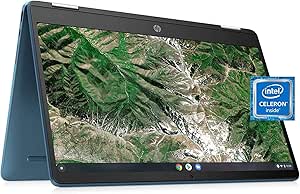
HP Chromebook x360: 14" Touchscreen, Celeron, 4GB/64GB eMMC
★★★★★
1366 x 7684GB DDR464GB eMMCUSB 3.13.3 lbs
Flexible 2-in-1 Chromebook with a 14-inch touchscreen, x360 hinge, and all-day Chrome OS simplicity.
$269.95*
View on Amazon
✓ In Stock on Amazon.com
*Price sourced from Amazon.com. Last updated:Jun 04, 2026.Price and availability are subject to change.
Affiliate Disclosure: Studio Supplies may earn a commission from qualifying purchases made through links on this page, at no additional cost to you. This helps support our editorial team.
Notice a mistake? Let Us Know
Overview
Key Features
【14" HD TouchScreen Display】1366 x 768 resolution boasts impressive color and clarity. Anti-glare Energy-efficient LED screen.
【Intel Celeron N4120】Ultra-low-voltage platform. 4-core, 4-way processing provides maximum high-efficiency power to go.
【4GB DDR4 RAM】Plenty of high-bandwidth RAM to smoothly run your games as well as multiple programs. 【64GB eMMC Storage】provides enhanced storage capabilities, streamlined data management, quick boot-up times and support for high-definition video playback.
【Intel HD Graphics 600】with shared video memory provide solid image quality for Internet use, movies, basic photo editing and casual gaming.
【Chrome OS included】12.81"x 8.52"x 0.7", 3.3 lbs. Ports: 2x USB 3.1 Type A Ports, 2x USB 3.1 Type C Ports, 1x Headphone jack, 1x Micro SD Reader. Built-in cloud support; 802.11a/b/g/n/ac Wi-Fi and Bluetooth combo, Forest Teal, Bonus 32GB SnowBell USB Card.
Specifications
Processor
Intel Celeron N4120
Memory
4GB RAM
Storage
64GB eMMC
Display
14" Touchscreen
Form Factor
x360 Convertible
Webcam
HD Webcam
Operating System
Chrome OS
Color
Forest Teal
Pros & Cons
👍 Pros
- Convertible x360 design offers laptop, tent, stand, and tablet modes
- Touchscreen display adds flexibility for drawing, navigation, and casual use
- Chrome OS boots quickly, updates automatically, and requires minimal maintenance
- Lightweight and portable form factor suited for travel and on-the-go use
- Forest Teal color gives it a distinctive look compared to standard silver laptops
👎 Cons
- 4GB RAM limits the number of browser tabs and apps that can run simultaneously
- 64GB eMMC storage fills up quickly and is not user-upgradable
- Celeron N4120 processor is underpowered for demanding applications or heavy multitasking
- eMMC storage is significantly slower than SSD-based alternatives
- HD webcam at 720p produces only basic video quality for calls
Frequently Asked Questions
Can this Chromebook be used as a tablet?
Yes, the x360 hinge allows you to fold the screen all the way back, converting it from a laptop into a tablet for touchscreen use.
Is 64GB of eMMC storage expandable?
The internal eMMC storage is not upgradable, but you can supplement it with cloud storage or a USB drive for additional file space.
What types of apps can this Chromebook run?
It runs Chrome OS, which supports web apps, Google Play Store Android apps, and Linux apps if you enable the Linux development environment.
How does the Intel Celeron N4120 perform for everyday tasks?
The Celeron N4120 is a quad-core processor suitable for web browsing, document editing, video streaming, and light multitasking — but it will struggle with heavy software or many simultaneous tabs.
Does it have a touchscreen?
Yes, the 14-inch display is a full touchscreen that works in all modes — laptop, tent, stand, and tablet.
Related Products


