

HP
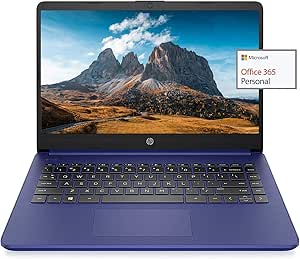
HP Newest 14" HD Laptop 8GB RAM 128GB SSD AMD Dual Core
★★★★★
1366 x 7688GB RAM128GB SSD64GB emmc6W
Lightweight Portability with Essential FeaturesThe HP 14" HD Laptop offers a blend of portability and functionality for everyday use. Featuring an AMD Dual-Core processor, sufficient RAM, and dual storage (SSD + eMMC), this laptop provides reliable performance. It includes a 1-year Office 365 sub...
$399.99*
Check availability
*Price sourced from Amazon.com. Last updated:Jul 17, 2026.Price and availability are subject to change.
Affiliate Disclosure: Studio Supplies may earn a commission from qualifying purchases made through links on this page, at no additional cost to you. This helps support our editorial team.
Notice a mistake? Let Us Know
Overview
Lightweight Portability with Essential Features
The HP 14" HD Laptop offers a blend of portability and functionality for everyday use. Featuring an AMD Dual-Core processor, sufficient RAM, and dual storage (SSD + eMMC), this laptop provides reliable performance. It includes a 1-year Office 365 subscription for enhanced productivity.
Specifications:- Display: 14" HD
- Processor: AMD 3020e Dual-Core (up to 2.6GHz)
- Memory: 8GB RAM
- Storage: 128GB SSD + 64GB eMMC
- Ports: 1 x USB Type-C, 2 x USB Type-A, 1 x HDMI 1.4, Headphone/Microphone Combo, SD Card Reader
- Connectivity: WiFi 5, Bluetooth 5
- Webcam: HP True Vision 720p HD Camera
- Operating System: Windows 10 in S mode (switchable)
- Battery Life: Up to 10.5 Hours
Key Features
✔【14" HD Display】14" HD(1366 x 768) Display with micro-edge bezel design, WLED-backlit, BrightView, Enjoy your entertainment with the great quality and high-definition detail of 1 million pixels
✔【AMD 3000 Series Mobile Processors】AMD 3020e, 2 Cores & 4 Thrades, 1.2GHz Base Clock, 2.6GHz Max Boost Clock, 4MB L3 Cache, 6W TDP, Built in 3 Cores Radeon Graphics, Exprience high performance for all your entertainment
✔【Upgraded to 8GB RAM】Substantial high-bandwidth RAM to smoothly run your games and photo- and video-editing applications, as well as multiple programs and browser tabs all at once
【Upgraded to 64GB emmc + 128GB SSD】Speedy solid-state drive for seanless performance and reliable multitasking, allows you to store a large number of files, improving the reading speed of large files, ensuring daily use and the speed of opening large files, reduce the time of application and file loading
✔【Activate 1 Year MS office 365 & Win10 in S mode】(About switch to regular Win10, see the detail in Product description) Activate pre-installed Office: 1.Launch any Office app > 2.Start your activation by signing in with your Microsoft account(Create a account if you don't have one yet) > 3.Click "Activate Office" > 4.Sign in your account and follow the next prompts. > 5.Complete Step 1,2 and 3 > 6.Click on Refresh once Office is ready > 7.Open a document and accept the license agreement.
Specifications
Display Size
14 inches
Display Resolution
1366 x 768
Display Type
HD WLED-backlit, BrightView
Processor
AMD 3020e Dual Core
Processor Cores
2
Base Clock Speed
1.2GHz
Max Boost Clock Speed
2.6GHz
RAM Capacity
8GB
Storage Type
64GB eMMC + 128GB SSD
Graphics Card
Built-in 3 Cores Radeon Graphics
Operating System
Windows 10 S mode
Included Software
1 Year MS Office 365
Frequently Asked Questions
What kind of display does this HP laptop feature?
This HP laptop features a 14-inch HD (1366 x 768) display with a micro-edge bezel design, WLED-backlit, and BrightView technology for clear visuals.
What processor is included in the HP 14" HD Laptop?
It is powered by an AMD 3020e Dual Core processor, offering 2 cores and 4 threads with a base clock of 1.2GHz and a max boost up to 2.6GHz.
How much RAM and storage does this laptop have?
This model is upgraded to 8GB of high-bandwidth RAM and features a combination of 64GB eMMC plus a 128GB SSD for speedy performance and storage.
What operating system and software are pre-installed?
It comes with Windows 10 in S mode and includes a 1-year activation for Microsoft Office 365. Instructions for switching out of S mode are in the product description.
Is this laptop suitable for gaming or photo/video editing?
It includes built-in 3 Cores Radeon Graphics, which are designed to provide high performance for entertainment, including games and photo/video editing applications.
What is the purpose of the 64GB eMMC + 128GB SSD storage configuration?
This combination offers a speedy solid-state drive for seamless performance and reliable multitasking, allowing storage of a large number of files and improving reading speed for large files.
Related Products


