

Price history
HP
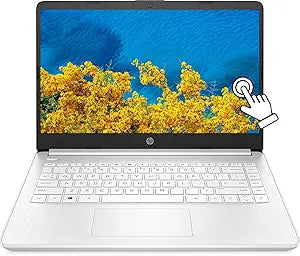
HP 14" Ryzen 3 Touchscreen Laptop 16GB RAM 512GB SSD
★★★★★
1366 x 76816GB RAM16 GB DDR4512GB SSD512 GB SSD
Versatile Performance in a Portable PackageThe HP 14" HD Touchscreen Laptop offers a blend of performance and portability, perfect for students, professionals, and anyone on the go. Powered by an AMD Ryzen 3 processor, ample memory, and fast SSD storage, this laptop delivers a smooth and responsi...
$463.99*
View on Amazon
✓ In Stock on Amazon.com
*Price sourced from Amazon.com. Last updated:Jul 18, 2026.Price and availability are subject to change.
Affiliate Disclosure: Studio Supplies may earn a commission from qualifying purchases made through links on this page, at no additional cost to you. This helps support our editorial team.
Notice a mistake? Let Us Know
Overview
Versatile Performance in a Portable Package
The HP 14" HD Touchscreen Laptop offers a blend of performance and portability, perfect for students, professionals, and anyone on the go. Powered by an AMD Ryzen 3 processor, ample memory, and fast SSD storage, this laptop delivers a smooth and responsive experience for everyday tasks. The touchscreen display and lightweight design make it easy to stay productive wherever you are.
Specifications:
- Display: 14" HD Touchscreen (1366 x 768)
- Processor: AMD Ryzen 3 3250U (Up to 3.5GHz)
- Memory: 16GB DDR4 RAM
- Storage: 512GB SSD
- Graphics: AMD Radeon Graphics
- Operating System: Windows 11 S
- Connectivity: HDMI, Webcam
- Keyboard: Anti Bacterial KB
Key Features
【14" HD Touchscreen Display】10-finger multi-touch support, 1366 x 768 resolution boasts impressive color and clarity, Anti-Glare Energy-efficient LED screen.
【AMD Ryzen 3-3250U Processor】2.6 GHz base clock, up to 3.5 GHz max boost clock, 4 MB L3 cache, 2 cores, 4 threads. Enjoy performance that you can count on with AMD Ryzen 3 processors. Featuring signature architecture, they deliver speedy results for work and play.
【Upgraded Powerful Storage】16 GB DDR4 RAM, 512 GB SSD, with reliable performance, letting you stream, surf, and speed through tasks. Up to 9 hours battery life.
【AMD Radeon graphics】Get world-class performance with AMD Radeon graphics, designed to deliver breathtakingly lifelike visuals apple, samsung, sony, dell, new levels of immersion, and must-have features for the ultimate entertainment experience.
【Win 11 Pro mode】 You may switch win 11 pro mode to the regular win 11: Update Microsoft App Store to the latest version. Press "Start button" bottom left of the screen; Select "Settings" icon above "power" icon; Select anti bacteria germ Hit Install.
Specifications
Display Size
14"
Display Type
HD Touchscreen, Anti-Glare Energy-efficient LED
Display Resolution
1366 x 768
Touch Support
10-finger multi-touch
Processor
AMD Ryzen 3-3250U
Base Clock Speed
2.6 GHz
Max Boost Clock Speed
3.5 GHz
Cores
2
Threads
4
Cache
4 MB L3
Memory
16 GB DDR4 RAM
Storage
512 GB SSD
Graphics
AMD Radeon graphics
Battery Life
Up to 9 hours
Frequently Asked Questions
Does this HP laptop have a touchscreen?
Yes, this HP laptop features a 14" HD Touchscreen Display with 10-finger multi-touch support for interactive use.
What type of processor is included in this laptop?
It is equipped with an AMD Ryzen 3-3250U Processor, offering a 2.6 GHz base clock and up to 3.5 GHz max boost clock.
How much RAM and storage does this laptop have?
This laptop comes with an upgraded 16 GB DDR4 RAM and a 512 GB SSD for efficient performance and storage.
What is the estimated battery life of this device?
The HP 14" Ryzen 3 Touchscreen Laptop provides up to 9 hours of battery life on a single charge.
What kind of graphics does it use?
It utilizes AMD Radeon graphics, which are designed to deliver clear visuals for entertainment experiences.
Can I switch from Windows 11 Pro mode to regular Windows 11?
Yes, you can switch to the regular Windows 11 experience by updating the Microsoft App Store, then navigating through settings to deactivate the "anti bacteria germ Hit Install" option.
Related Products


