

HP
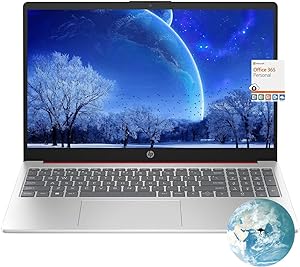
HP Flagship 15.6 HD Pentium N200 Laptop
★★★★★
16GB DDR4128GB SSD
Experience Efficient Computing On the GoIntroducing the HP Flagship 15.6" HD Laptop Computer. This laptop combines essential features with reliable performance for everyday tasks. Featuring an Intel Quad-Core Pentium N200 processor, upgraded memory, and fast SSD storage, this machine is ready to ...
$299.99*
Check availability
*Price sourced from Amazon.com. Last updated:Jul 17, 2026.Price and availability are subject to change.
Affiliate Disclosure: Studio Supplies may earn a commission from qualifying purchases made through links on this page, at no additional cost to you. This helps support our editorial team.
Notice a mistake? Let Us Know
Overview
Experience Efficient Computing On the Go
Introducing the HP Flagship 15.6" HD Laptop Computer. This laptop combines essential features with reliable performance for everyday tasks. Featuring an Intel Quad-Core Pentium N200 processor, upgraded memory, and fast SSD storage, this machine is ready to handle your daily computing needs.
- Processor: Intel Quad-Core Pentium N200 (up to 3.7GHz)
- Memory: 16GB RAM
- Storage: 128GB SSD
- Display: 15.6" HD
- Operating System: Windows 11
- Wireless: 802.11b/g/n/ac, Bluetooth 4.2 combo, MU-MIMO supported
- Features: Numeric Keypad, Webcam, Fast Charge, HDMI
Key Features
【Processor】The Latest Generation Intel Processor N200 (lder Lake-N series, Released in 2023), 4-Core, 4 Threads, max turbo to 3.7GHz, 6MB Cache. the laptop delivers impressive performance for both everyday tasks and demanding applications, making your computing experience smooth and efficient.
【15.6 HD Micro-edge display】With virtually no bezel encircling the display, an ultra-wide viewing experience provides for seamless multi-monitor set-ups. Enjoy your entertainment with the great quality and highdefinition detail of 1 million pixels.
【Upgraded to 16GB DDR4 RAM】Substantial high-bandwidth RAM to smoothly run your games and photo- and video-editing applications, as well as multiple programs and browser tabs all at once.
【128GB SSD】Provides massive storage space for huge files, so that you can store important digital data and work your way through it with ease. It gives you enormous space to save all of your files.
【Windows 11 Home in S mode】You may switch to regular windows 11: Press ''Start button'' bottom left of the screen; Select ''Settings'' icon above ''power'' icon;Select Update & Security and Activation, then Go to Store; Select ''Get'' option under ''Switch out of S mode''; Hit Install. (If you also see an ''Upgrade your edition of Windows'' section, be careful not to click the ''Go to the Store'' link that appears there.)
Specifications
Processor
Intel Processor N200 (4-Core, 4 Threads, max turbo 3.7GHz)
Display Size
15.6 inches
Display Resolution
HD (1366 x 768)
RAM
16GB DDR4
Storage
128GB SSD
Operating System
Windows 11 Home in S mode
Display Feature
Micro-edge
Processor Cache
6MB
Frequently Asked Questions
What type of processor is included in this HP laptop?
This HP laptop features the latest generation Intel Processor N200, which is a 4-Core, 4-Thread processor with a max turbo speed of 3.7GHz and 6MB Cache.
Can I install software from outside the Microsoft Store on this laptop?
The laptop comes with Windows 11 Home in S mode, which limits installations to the Microsoft Store. However, you can switch out of S mode to regular Windows 11 to install other software.
What is the screen resolution of the display?
The laptop has a 15.6-inch HD micro-edge display with a resolution of 1366 x 768, providing 1 million pixels for viewing entertainment.
How much RAM and storage does this laptop offer?
It is upgraded with 16GB of DDR4 RAM and includes a 128GB SSD, designed for smooth multitasking and ample storage for files.
What are the key features of the display?
The display is a 15.6-inch HD micro-edge panel, offering an ultra-wide viewing experience with minimal bezel, providing great quality and high-definition detail.
Related Products


