

HP
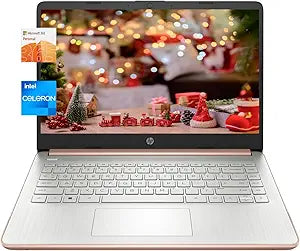
HP Laptop Intel Celeron N4120 14" HD Business Laptop
★★★★★
UHD1366 x 76816GB RAM64GB eMMC
Essential Computing for Everyday Tasks The 2023 HP Business Laptop is designed for essential computing tasks. Featuring an Intel Celeron N4120 processor, up to 16GB of RAM, and a combination of eMMC and SD card storage, this laptop is perfect for everyday productivity. It comes with a cleaning b...
$329.99*
Check availability
*Price sourced from Amazon.com. Last updated:Jul 20, 2026.Price and availability are subject to change.
Affiliate Disclosure: Studio Supplies may earn a commission from qualifying purchases made through links on this page, at no additional cost to you. This helps support our editorial team.
Notice a mistake? Let Us Know
Overview
Essential Computing for Everyday Tasks
The 2023 HP Business Laptop is designed for essential computing tasks. Featuring an Intel Celeron N4120 processor, up to 16GB of RAM, and a combination of eMMC and SD card storage, this laptop is perfect for everyday productivity. It comes with a cleaning brush to keep your device looking its best.
Specifications:
- Processor: Intel Celeron N4120 (up to 2.6GHz)
- Graphics: Intel UHD Graphics 600
- Operating System: Windows 11 Home in S Mode
- Display: 14.00 inches, 1366 x 768 (HD)
- Memory: Up to 16GB RAM DDR4
- Storage: Up to 64GB eMMC + 256GB Micro SD Card
- Connectivity: Wi-Fi 5, Bluetooth
- Ports: 1 x HDMI, 2 x USB Type-A 3.0, 1 x USB Type-C 3.0, 1 x Media Card Reader, 1 x Headphone / Microphone Combo
- Color: Rose Gold
- Dimensions: 12.76"W x 8.86"D x 0.71"H
- Weight: 3.24 pounds
Key Features
【Processor】Unleash your unstoppable potential with the Intel Celeron N4120 (clocked up to 2.6GHz). Boasting 4MB of L3 cache, this powerhouse packs 4 cores and 4 threads to seamlessly handle all your tasks.
【Display】Dive into an immersive visual experience on the 14-inch micro-edge anti-glare HD display. With a resolution of 1366 x 768 (HD), every moment comes to life in vibrant colors. Take control with intuitive screen navigation for a computing adventure at the edge of innovation.
【Graphics】Elevate your entertainment with the smooth streaming and gaming prowess of Intel UHD Graphics 600. Immerse yourself in a new realm of graphics performance, bringing your creations, games, and content to life on this sleek, thin, and light laptop.
【Upgraded】Boost your performance to new heights with up to 16GB RAM. Experience lightning-fast start-up times and data access with up to 64GB eMMC + 256GB Micro SD Card. Enjoy the silence of no moving parts, reduced heat production, and minimal power draw on the battery.
【Windows 11 Home in S Mode】Embark on a journey with the rejuvenated Start menu and discover new ways to connect with your favorite people, news, games, and content. Windows 11 Home in S Mode is your creative haven, where thinking, expressing, and creating flow naturally.
Specifications
Processor
Intel Celeron N4120
Maximum Processor Speed
2.6GHz
Processor Cache
4MB L3
Processor Cores
4
Processor Threads
4
Display Size
14 inches
Display Resolution
1366 x 768 (HD)
Display Features
Micro-edge, Anti-glare
RAM
Up to 16GB
Storage
Up to 64GB eMMC + 256GB Micro SD Card
Graphics
Intel UHD Graphics 600
Operating System
Windows 11 Home in S Mode
Frequently Asked Questions
What processor powers this HP Business Laptop?
This HP Business Laptop is powered by an Intel Celeron N4120 processor, which can be clocked up to 2.6GHz, featuring 4 cores and 4 threads.
What kind of display does this laptop have?
It features a 14-inch micro-edge anti-glare HD display with a resolution of 1366 x 768 (HD), providing clear visuals and reducing reflections.
How much storage is included with this HP laptop?
This laptop comes with an upgraded storage configuration of up to 64GB eMMC and a 256GB Micro SD Card for quick data access.
Is this HP laptop suitable for gaming?
Equipped with Intel UHD Graphics 600, it is capable of smooth content streaming and some light gaming, though it's not designed for graphically intensive titles.
What operating system does this laptop run?
It runs on Windows 11 Home in S Mode, which offers a secure and streamlined experience with access to apps from the Microsoft Store.
Can I install applications from outside the Microsoft Store on this laptop?
While it comes with Windows 11 Home in S Mode, you can typically switch out of S Mode through the settings if you need to install applications from other sources.
Related Products


