



HP
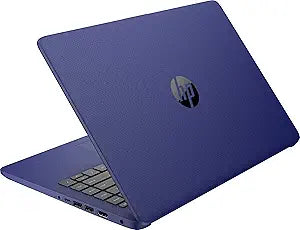
HP Stream 14" Laptop Celeron 4GB 192GB SSD WiFi Webcam Windows 11 + 365
★★★★★
Celeron N4120 and 192GB of combined storage pack everyday Windows 11 productivity into a 14-inch sub-$300 chassis.
$289.95*
Check availability
*Price sourced from Amazon.com. Last updated:Jul 15, 2026.Price and availability are subject to change.
Affiliate Disclosure: Studio Supplies may earn a commission from qualifying purchases made through links on this page, at no additional cost to you. This helps support our editorial team.
Notice a mistake? Let Us Know
Overview
Specifications
Processor
Intel Celeron N4120, Dual-Core, 1.1GHz base / 2.8GHz burst, 4MB L2 cache
Memory
4GB DDR4-2400 SDRAM
Storage
192GB total (64GB eMMC + 128GB ADATA microSDXC)
Display
14" HD 1366x768 SVA WLED BrightView Micro-edge
Graphics
Intel Integrated UHD Graphics 600
Wi-Fi
Realtek RTL8822CE 802.11a/b/g/n/ac (2x2)
Bluetooth
Bluetooth 5
Ports
1x USB 3.1 Gen 1 Type-C, 2x USB 3.1 Gen 1 Type-A, 1x HDMI, 1x combo audio, 1x media card reader
Battery
3-cell Lithium Ion
Operating System
Windows 11 Home in S mode
Included Software
Microsoft Office 365 (1 year)
Pros & Cons
👍 Pros
- The 14-inch 1366x768 BrightView display covers basic productivity and media viewing at this price tier without color accuracy compromises that affect work.
- Bundled Office 365 subscription adds tangible software value, eliminating a separate purchase cost for core productivity tools.
- Wi-Fi 6 (802.11ac) and Bluetooth 5 connectivity ensure compatibility with modern routers and wireless peripherals.
- USB-C port alongside two USB-A ports and HDMI provides connectivity flexibility beyond what many budget laptops offer at this price.
- 192GB total storage via eMMC plus bundled microSD card provides more room than the 64GB eMMC alone would suggest at first glance.
👎 Cons
- The Intel Celeron N4120's 4MB L2 cache and dual-core architecture creates a hard ceiling on multitasking — opening more than three or four browser tabs alongside an Office document noticeably taxes the system.
- eMMC storage at ~250MB/s sequential read is roughly 10–12x slower than budget NVMe SSDs, meaning application launch times and file operations are measurably slower.
- 4GB DDR4-2400 is soldered and non-upgradeable on this platform — there is no path to expanding memory if workloads grow.
- The 1366x768 display resolution renders text at lower pixel density than 1080p panels, which becomes noticeable during extended document work.
- The microSD card-based storage expansion is less reliable for long-term application storage than internal SSD — card failure would result in data loss from that partition.
Frequently Asked Questions
What is the actual usable storage on this laptop, and how is it split?
Total storage is 192GB, composed of 64GB onboard eMMC and a bundled 128GB ADATA microSDXC card. The eMMC handles the OS and applications; the microSD card expands file storage. Note that eMMC read/write speeds are significantly slower than NVMe SSDs — expect roughly 250MB/s sequential reads versus 3,000MB/s on a modern NVMe drive.
Is 4GB RAM sufficient for Windows 11 and Office 365?
It is functional but tight. 4GB DDR4-2400 gives Windows 11 and a single Office application enough headroom for basic tasks. Running multiple browser tabs alongside Office apps will push the system to its limit — users should manage open applications actively.
What does "Windows 11 Home in S mode" mean for this laptop?
S mode restricts app installation to the Microsoft Store only. Most mainstream productivity apps are available, but third-party software outside the Store cannot be installed without switching out of S mode — a free, one-way process through Microsoft's settings.
Can the display connect to an external monitor?
Yes. The laptop includes a full-size HDMI port for connecting an external display. This extends the 1366x768 native panel to a secondary screen, which significantly improves multitasking capability given the modest screen resolution.
Is the Intel Celeron N4120 fast enough for video calls and streaming?
Yes for those specific tasks. The N4120's 2.8GHz burst frequency handles video conferencing, HD streaming, and web browsing without issue. Locally encoded video, large spreadsheets, or multitasking beyond two or three applications will expose the processor's single-threaded ceiling.
Related Products


