



HP
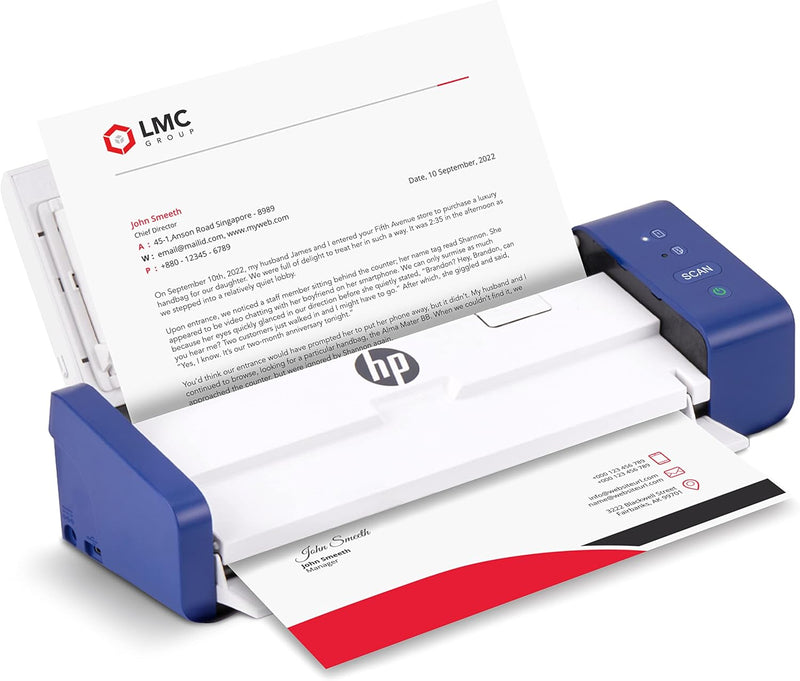
HP HPPS200 Portable Duplex Mobile Document Photo Scanner
★★★★★
Digitize Documents on the Go with HP Compact ScannerThe HP Compact Desktop Duplex USB Mobile Document & Photo Scanner offers portable and efficient scanning for home and office use. With its auto-feed tray and duplex capability, this scanner simplifies the process of digitizing documents and ...
$279.99*
View on Amazon
✓ In Stock on Amazon.com
*Price sourced from Amazon.com. Last updated:Jun 28, 2026.Price and availability are subject to change.
Affiliate Disclosure: Studio Supplies may earn a commission from qualifying purchases made through links on this page, at no additional cost to you. This helps support our editorial team.
Notice a mistake? Let Us Know
Overview
Digitize Documents on the Go with HP Compact Scanner
The HP Compact Desktop Duplex USB Mobile Document & Photo Scanner offers portable and efficient scanning for home and office use. With its auto-feed tray and duplex capability, this scanner simplifies the process of digitizing documents and photos.
- Brand: HP
- Model: HPPS200
- Type: Compact Desktop Duplex USB Mobile Document & Photo Scanner
- Scanning Speed: 25ppm
- Resolution: 1200 dpi
- Max Paper Size: 8.5” x 14”
- Min Paper Size: 2” x 2.9”
- Duplex Scanning: Yes
- Software: HP WorkScan
- Connectivity: USB
Key Features
ON-THE-GO SCANNING MADE SIMPLE | Meet the Fastest & Lightest Sheetfed Scanner in its Class! | The HPPS200 Mobile Document Scanner With Automatic Feed Tray Lets You Convert Stacks of Papers Into Digital Files—No Heavy, Expensive Equipment Needed! | Wide Compatibility Makes it Easy to Send Docs & Images to Your PC or Mac Computer, Laptop, or Similar Windows/MacOS Devices for Amazing Versatility
SAVE TIME WITH DOUBLE SIDED SCANNING | Despite its Slim Profile, This Office Essential Offers Reliable 25ppm [25 Pages Per Minute or 2.4 Seconds Per Page] Operating Speed for Small- to Medium-Batch Jobs in Black & White & Color | Convenient Duplex Feature Scans Both Sides of Your Document in a Single Pass, Speeding Up Scan Time & Improving Your Productivity When Converting Invoices, Contracts, Plans, Reports & Letters
DESIGNED FOR LIGHTWEIGHT PORTABILITY | Slip Inside a Bag or Briefcase, Then Travel from Home to Office to Business & Beyond! | Compact, Portable Styling Suits Your Busy Lifestyle While Providing All the Capabilities of a Professional-Quality Document Scanner Including Beautiful 1200 dpi Resolution, Versatile Paper Size Ranging from 2” x 2.9” (Minimum) to 8.5” x 14” (Maximum) & Versatile Conversion to PDF, JPG & Other File Formats
STUNNING MULTI-PAGE SCANS IN SECONDS | Device Easily Connects Via USB [Cable Included] & Powers Via Basic AC Wall Adapter | Integrated Rear Tray with Auto-Feed Lets You Stack Multiple Pages for Fast, Organized Scanning in Batches, Then Folds Down Neatly When Not in Use | Perfect for Commuters, Small Business Owners, Legal Practices, Tax Preparers & Unique Tasks Such as Cards, Photos, Reports & Receipts
WORK SMARTER WITH HP WORKSCAN | Download Our Free, Easy-to-Use Software or App for Windows & MacOS to Start Scanning! | Simple, Intuitive Platform with Auto-Scan & Size Detection Allows You to Easily Adjust Document Settings; Preview & Zoom in on Scans; Crop, Edit & Optimize Image Quality; Clean Up Background, Edges & Holes; & Save to Destination with Just a Few Clicks—No Tech Savvy Required!
Specifications
Scanning Speed
25 ppm (2.4 seconds per page)
Duplex Scanning
Yes
Resolution
1200 dpi
Minimum Paper Size
2” x 2.9”
Maximum Paper Size
8.5” x 14”
Connectivity
USB
Power Source
AC Wall Adapter
Software
HP WorkScan
Compatibility
Windows, MacOS
File Formats
PDF, JPG & Other
Pros & Cons
👍 Pros
- Offers convenient on-the-go scanning as the fastest and lightest sheetfed scanner in its class.
- Features a reliable 25 pages per minute operating speed for both black & white and color documents.
- Includes a duplex scanning feature that captures both sides of a document in a single pass, improving productivity.
- Supports versatile paper sizes ranging from 2” x 2.9” up to 8.5” x 14” for various document types.
- Provides a high-quality 1200 dpi resolution for clear and detailed digital images and documents.
- Comes with the HP WorkScan software for Windows and MacOS, offering auto-scan, editing, and optimization features.
- Integrated rear tray with auto-feed allows for fast, organized scanning of multiple pages in batches.
👎 Cons
- Requires connection via USB cable and powers via a basic AC wall adapter, limiting wireless power options.
- Specific compatibility is noted for PC or Mac computers, laptops, or similar Windows/MacOS devices.
- The auto-feed tray needs to be folded down neatly when not in use, indicating a small setup step.
- Ideal for small to medium-batch jobs, which may not suit users with very high volume scanning needs.
- The included software requires downloading for full functionality, which is an additional setup step.
Frequently Asked Questions
What is the scanning speed of the HPPS200 scanner?
The HPPS200 mobile document scanner offers a reliable operating speed of 25 pages per minute (2.4 seconds per page) for both black and white, and color documents.
Can this scanner handle double-sided documents automatically?
Yes, this office essential features a convenient duplex scanning capability that scans both sides of your document in a single pass, enhancing productivity.
What operating systems are compatible with the HPPS200 scanner?
The HPPS200 scanner is widely compatible with PC or Mac computers, laptops, and similar Windows/MacOS devices, offering versatile connectivity.
What is the maximum resolution for scans produced by this device?
This professional-quality document scanner provides a beautiful 1200 dpi resolution, ensuring clear and detailed digital files for your documents and photos.
What is the range of paper sizes that this scanner can accommodate?
The HPPS200 supports a versatile paper size range, from a minimum of 2” x 2.9” up to a maximum of 8.5” x 14” for various document types.
Is special software required to use this scanner effectively?
Yes, you can download the free and easy-to-use HP WorkScan software or app for Windows and MacOS to access features like auto-scan, size detection, editing, and image optimization.
How does the scanner handle multiple pages?
The device includes an integrated rear tray with an auto-feed mechanism, allowing you to stack multiple pages for fast and organized scanning in batches.
Related Products


