

HP
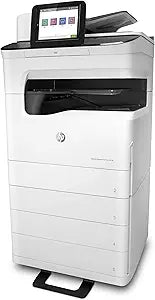
HP J7Z12A#B1H PageWide Enterprise Color Flow MFP 785zs Printer
★★★★★
Streamline Workflow with the HP PageWide Enterprise Color Flow MFP 785zs Maximize efficiency and productivity in your workspace with the HP PageWide Enterprise Color Flow MFP 785zs. This all-in-one inkjet printer delivers high-speed, professional-quality printing, scanning, copying, and faxing ca...
$919.00*$9,199.00Save 90%
Check availability
*Price sourced from Amazon.com. Last updated:Jun 28, 2026.Price and availability are subject to change.
Affiliate Disclosure: Studio Supplies may earn a commission from qualifying purchases made through links on this page, at no additional cost to you. This helps support our editorial team.
Notice a mistake? Let Us Know
Overview
Streamline Workflow with the HP PageWide Enterprise Color Flow MFP 785zs
Maximize efficiency and productivity in your workspace with the HP PageWide Enterprise Color Flow MFP 785zs. This all-in-one inkjet printer delivers high-speed, professional-quality printing, scanning, copying, and faxing capabilities. Designed for demanding office environments, the 785zs offers robust features and intuitive controls to streamline your document workflow.
Specifications:
- Printing Technology: All-in-One Inkjet
- Print Speed: Up to 75 ppm (General Office), 55 ppm (Professional)
- Print Resolution: Up to 2400 x 1200 dpi (Color)
- Input Tray: 550-sheet standard, 100-sheet multi-purpose tray
- Output Bin: 500-sheet, 350-page finisher with stapler (850 sheets total)
- Scanning Resolution: Up to 600 dpi (Flatbed and ADF)
- ADF Capacity: 200-sheet
- Copy Speed: Up to 55 cpm
- Copy Scaling: 25 to 400%
- Connectivity: USB 2.0, Ethernet, Wi-Fi, Bluetooth Low Energy
- Mobile Printing: Apple AirPrint, Google Cloud Print, HP ePrint
- Display: 8" Touchscreen with pull-out keyboard
- Duty Cycle: Up to 125,000 pages per month
Specifications
Product Type
PageWide Enterprise Color Flow MFP
Model Number
785zs
Pros & Cons
👍 Pros
- Designed as an Enterprise Color Flow MFP, indicating suitability for large business environments requiring high-volume color printing
- The "MFP" designation means it performs multiple functions, likely including printing, scanning, copying, and faxing, for comprehensive office needs
- As a PageWide printer, it offers impressive speed for color documents, potentially boosting office productivity significantly
- Engineered for demanding enterprise workflows, suggesting robust build quality and reliability for continuous use
- A "Flow" MFP implies advanced document handling features, such as enhanced scanning capabilities and efficient digital workflows
👎 Cons
- Specific technical specifications like print speed, resolution, or paper capacity are not detailed, making performance comparison difficult
- The initial cost of an enterprise-grade printer can be substantial, which may not be suitable for smaller offices or individual use
- Running costs for consumables like ink or toner are not provided, which is a significant factor in total cost of ownership
- The "enterprise" focus suggests it might have a larger footprint, which could be an issue for offices with limited space
- Complexity of features for an enterprise device might require specialized IT knowledge for optimal setup and maintenance
Frequently Asked Questions
What type of environment is the HP J7Z12A#B1H PageWide Enterprise Color Flow MFP 785zs printer designed for?
This printer is designed for enterprise environments, indicating its suitability for high-volume color printing and advanced document workflows in large businesses.
What does "MFP" signify in the product name?
"MFP" stands for Multi-Function Printer, meaning this device is capable of performing various office tasks beyond just printing, such as scanning, copying, and potentially faxing.
Is this printer capable of color printing?
Yes, it is explicitly referred to as a "Color Flow MFP," confirming its capability to print in color.
Are specific print speeds or resolutions available for this model?
The provided details do not include specific print speeds, resolutions, or paper capacities for the HP PageWide Enterprise Color Flow MFP 785zs.
Does this printer have advanced document handling features?
The "Flow" designation within its name suggests it incorporates advanced document handling features, likely for efficient digital workflows and enhanced scanning.
Related Products


