



HP
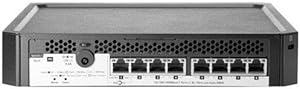
HP J9833AABA PS1810-8G 8-Port Gigabit Smart Managed Switch
★★★★★
Eight full-duplex Gigabit ports with Layer 2 smart management in a package sized for a desktop shelf or rack slot.
View price on Amazon
Affiliate Disclosure: Studio Supplies may earn a commission from qualifying purchases made through links on this page, at no additional cost to you. This helps support our editorial team.
Notice a mistake? Let Us Know
Overview
Key Features
More for the money with this high quality Product
Offers premium quality at outstanding saving
Excellent product
100% satisfaction
Specifications
Ports
8× RJ-45
Port Speed
10/100/1000Base-T (Gigabit Ethernet)
Duplex
Full-duplex
Management
Smart-managed, Layer 2, Web GUI
VLAN Support
IEEE 802.1Q tagged VLANs
Link Aggregation
IEEE 802.3ad LACP
Mounting
Desktop, Wall, Rack-mountable
Fiber/SFP Uplink
None
PoE
Not supported
Compatibility
Optimized for HP ProLiant Gen8 servers
Model
J9833AABA
Pros & Cons
👍 Pros
- All 8 ports run full-duplex Gigabit, delivering up to 16Gbps of non-blocking aggregate switching capacity for a fully loaded port group.
- Web-based Layer 2 management enables VLAN segmentation, QoS prioritization, and port statistics without requiring a dedicated management VLAN or console cable.
- IEEE 802.3ad LACP support allows bonded connections to servers or upstream switches, doubling throughput and adding path redundancy on critical links.
- Three mounting options — desktop, wall, and rack — give the unit deployment flexibility that purely rack-only switches lack.
- Optimized compatibility with HP ProLiant Gen8 servers means management integration and network stack behavior are validated for that platform generation.
👎 Cons
- No SFP or fiber uplink port means the switch is limited to copper connectivity — fiber uplinks to a core or distribution layer require external media conversion hardware.
- Eight ports is a hard ceiling; there is no expansion or stacking capability, so any growth beyond 8 devices requires a second switch and an uplink configuration.
- Smart-managed feature depth is shallower than a full L2+ or L3 managed switch — advanced features like OSPF, BGP, or dynamic routing are not available on this platform.
- The switch does not appear to support PoE on any port, limiting deployment options if you need to power IP phones, access points, or cameras from the same switch.
- Published throughput and forwarding rate specifications are not detailed in available documentation, making it difficult to validate performance under traffic-intensive conditions.
Frequently Asked Questions
What does "smart managed" mean on the PS1810-8G, and how is it configured?
Smart managed means the switch offers web-based configuration — VLANs, port-based QoS, link aggregation, and traffic statistics — without requiring a full CLI or dedicated management software. You access the GUI via any browser by pointing to the switch's IP address; no additional software is needed.
Does the PS1810-8G support VLANs, and how many can be configured?
Yes. The switch supports IEEE 802.1Q tagged VLANs. The exact VLAN table size is not published in the available specification data, but standard PS1810 firmware supports port-based and tagged VLAN segmentation suitable for separating server, client, and management traffic in a small business environment.
Can this switch be rack-mounted, or is it desktop-only?
It supports three mounting options: desktop, wall mounting, and rack mounting. Rack mount hardware compatibility should be verified, as a separate mounting kit may be required for standard 19-inch racks depending on the unit's chassis width.
Is this switch capable of link aggregation (LAG) for higher throughput to a server?
The PS1810-8G supports IEEE 802.3ad LACP link aggregation. You can bond two ports to a connected server or uplink switch to double your effective bandwidth and gain path redundancy, which is directly useful when connecting an HP ProLiant Gen8 with a dual-port NIC.
Does the PS1810-8G have an uplink port or SFP slot for fiber connectivity?
No. All eight ports are copper RJ-45 1GbE — there is no SFP or fiber uplink slot on this model. If you need a fiber uplink to a core switch, you'll require a separate media converter or a switch model that includes an SFP port.
Related Products


