



Price history
HP
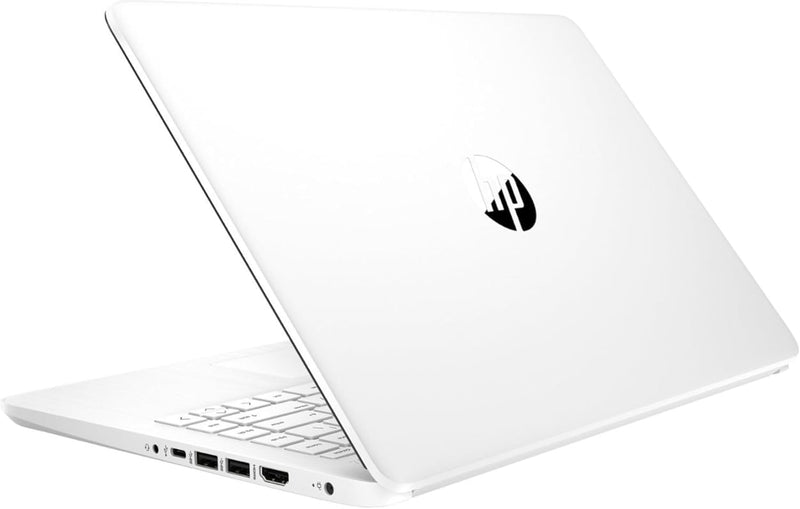
HP Latest Stream - 14" HD Laptop, Celeron, 4GB, 64GB eMMC
★★★★★
1366 x 76811 in4GB RAM64GB eMMC
The HP Stream 14 puts Windows 11, a full day's battery, and genuine portability into the most affordable laptop category — the right tool when lightweight connectivity is the whole job.
$234.99*
View on Amazon
✓ In Stock on Amazon.com
*Price sourced from Amazon.com. Last updated:Jul 18, 2026.Price and availability are subject to change.
Affiliate Disclosure: Studio Supplies may earn a commission from qualifying purchases made through links on this page, at no additional cost to you. This helps support our editorial team.
Notice a mistake? Let Us Know
Overview
Key Features
【Processor】Intel Celeron N4120 (up to 2.6 GHz burst frequency, 4 MB L2 cache, 4 cores, 4 threads) Ultra-low-voltage platform provides maximum high-efficiency power to go.
【Display】14" diagonal, HD (1366 x 768), micro-edge, BrightView, 220 nits, 45% NTSC impressive color and clarity, Anti-glare Energy-efficient WLED screen.
【Premium HP RAM】Experience improved multitasking with higher bandwidth thanks to HP 4GB RAM. This ultracompact memory system is ideal for mobile devices and applications, providing enhanced storage capabilities, streamlined data management, quick boot-up times and support for high-definition video playback.
【Operating System】Windows 11 in S mode, 64-bit. You May Switch Windows 11 Home S Mode to the Regular Windows 11 Home.
【Office 365 for one year】Get full access to Microsoft Excel, Word, PowerPoint, OneNote, Access, and 1 TB of One Drive storage for 1 year.
Wireless comm standard : 802 11 ABGNAC
Model year : 2023
System ram type : ddr4 sdram
Specifications
Processor
Intel Celeron N4120 (up to 2.6 GHz burst, 4 cores, 4 threads)
RAM
4GB DDR4 SDRAM
Storage
64GB eMMC
Display
14" HD (1366 x 768), BrightView, micro-edge, 220 nits
Graphics
Intel UHD Graphics 600 (integrated)
Operating System
Windows 11 Home in S mode (64-bit)
Wireless
802.11a/b/g/n/ac, Bluetooth 5
Ports
1x USB 3.1 Gen 1 Type-C, 2x USB 3.1 Gen 1 Type-A, 1x HDMI 1.4b, 1x headphone/mic combo
Webcam
HP True Vision 720p HD
Battery Life
Up to 11.5 hours
Weight
3.24 lbs
Color
White
Included Software
Office 365 (1 year), 1TB OneDrive
Frequently Asked Questions
Will the 64GB eMMC storage fill up quickly, and what can I do about it?
Yes — Windows 11 and basic apps will consume a significant portion of the 64GB, often leaving 20-30GB of usable space out of the box. A microSD card (if the unit supports one) or cloud storage via the bundled OneDrive 1TB subscription are the practical solutions. This is the machine's tightest hardware constraint.
What does Windows 11 in S mode mean, and should I switch out of it?
S mode restricts app installation to the Microsoft Store only — you can't install Chrome, standard desktop software, or most third-party tools in S mode. Switching to regular Windows 11 Home is free, one-way, and takes a few minutes. For most users, switching out of S mode is necessary to use the laptop as a general-purpose machine.
Can the Intel Celeron N4120 handle video streaming and basic document work simultaneously?
Yes — web browsing, Office 365, and 1080p video streaming are within the Celeron N4120's capabilities. Multitasking across many browser tabs simultaneously will produce noticeable slowdowns due to the 4GB RAM ceiling, so keeping active tasks lean is the operational norm for this processor/memory configuration.
Is the USB-C port on this laptop capable of video output or charging?
The USB 3.1 Gen 1 Type-C port supports data transfer and display output via the HDMI 1.4b port, but USB-C charging capability should be verified against the specific unit's documentation — the HP Stream typically charges via its barrel connector rather than USB-C.
Who is this laptop actually the right purchase for versus a more capable machine?
This is the right purchase for students needing a lightweight note-taking and Office machine, light travelers who need email and document access on the road, or a secondary device for low-demand tasks. Anyone who edits video, runs local applications heavily, or needs the machine to handle complex multitasking will quickly hit the hardware ceiling.
Related Products


