

HP
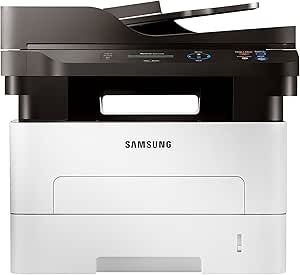
HP M2875DW Wireless Monochrome Multifunction Printer
★★★★★
Efficient and Versatile Wireless PrintingThe HP Samsung Electronics SL-M2875DW Wireless Monochrome Multifunction Printer delivers fast and reliable printing for your home or office. With its wireless connectivity, automatic duplex printing, and eco-friendly features, this printer enhances product...
$477.00*
View on Amazon
✓ In Stock on Amazon.com
*Price sourced from Amazon.com. Last updated:Jun 27, 2026.Price and availability are subject to change.
Affiliate Disclosure: Studio Supplies may earn a commission from qualifying purchases made through links on this page, at no additional cost to you. This helps support our editorial team.
Notice a mistake? Let Us Know
Overview
Efficient and Versatile Wireless Printing
The HP Samsung Electronics SL-M2875DW Wireless Monochrome Multifunction Printer delivers fast and reliable printing for your home or office. With its wireless connectivity, automatic duplex printing, and eco-friendly features, this printer enhances productivity and reduces costs.
Specifications:
- Brand: HP (formerly Samsung)
- Model: M2875DW
- Print Speed: Up to 29 ppm
- Duplex Printing: Automatic
- Connectivity: Wireless, Network
- Mobile Printing: Supported
Key Features
Wireless Monochrome Multifunction Printer
Fast Print Speeds at up to 29 PPM
2-piece Toner for Low CPP
Built in double-sided print
Specifications
Printer Type
Monochrome Multifunction Printer
Connectivity
Wireless
Print Speed
Up to 29 PPM
Toner System
2-piece Toner
Duplex Printing
Built-in double-sided print
Pros & Cons
👍 Pros
- Achieves fast print speeds of up to 29 pages per minute, suitable for busy environments
- Features a 2-piece toner system, contributing to a low cost per page for economical printing
- Equipped with built-in double-sided printing, saving paper and reducing environmental impact
- Offers wireless connectivity, enabling flexible placement and printing from multiple devices without cables
- As a monochrome multifunction printer, it consolidates printing, copying, and scanning functions into one device
👎 Cons
- The printer is monochrome only, meaning it cannot print in color, which is a significant limitation for some users
- Specific details on the resolution of prints are not provided, so image quality cannot be fully assessed
- Information regarding scanner or copier speeds and resolutions is not available, limiting understanding of multifunction capabilities
- Connectivity options beyond wireless are not listed, such as USB or Ethernet, potentially impacting setup flexibility
- Details about paper tray capacity or supported paper types are not mentioned, which could be important for volume users
Frequently Asked Questions
What is the maximum print speed of this HP printer?
The HP M2875DW printer offers fast print speeds of up to 29 pages per minute.
Does this printer support double-sided printing automatically?
Yes, this printer features built-in double-sided printing for convenience and paper saving.
Is this a color printer?
No, the HP M2875DW is a wireless monochrome multifunction printer, meaning it only prints in black and white.
How does the toner system contribute to printing costs?
The printer uses a 2-piece toner system, which is designed to provide a low cost per page (CPP).
Can this printer be connected wirelessly?
Yes, it is a wireless multifunction printer, allowing for flexible placement and printing from various connected devices.
Related Products


