



HP
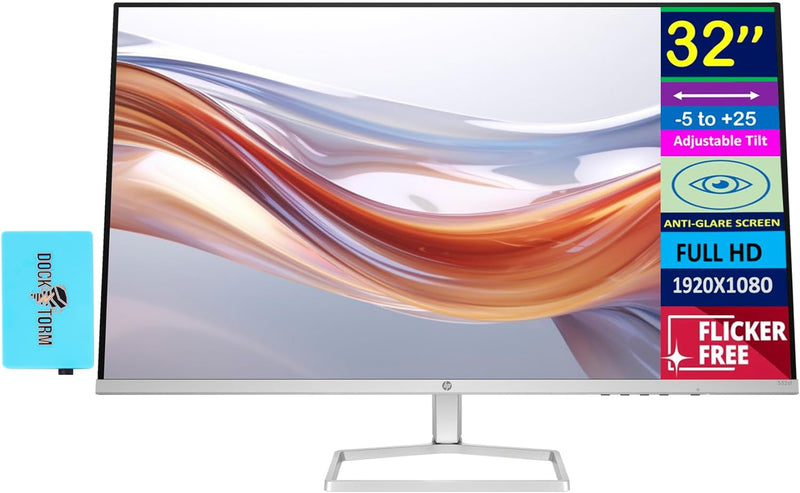
HP Series 5 532sf 32" FHD Monitor with Docztorm Dock
A 32-inch VA panel with 100Hz refresh and built-in Eye Ease technology delivers productivity-scale screen real estate without the eyestrain tax.
View price on Amazon
Affiliate Disclosure: Studio Supplies may earn a commission from qualifying purchases made through links on this page, at no additional cost to you. This helps support our editorial team.
Notice a mistake? Let Us Know
Overview
Key Features
Features: 24-inch WUXGA (1920 x 1200), 1 x HDMI, 1 x Displayport, 4 x USB Type-A, 1 x USB Type-B, -5 to +23 degrees Adjustable Tilt, Swivel, Pivot, Anti-glare, Flicker free, VESA Mount, Low blue light, Brightness 350 nits
Elevate your productivity – See more of your work and get more done on this 24-inch WUXGA resolution monitor. A lightning-fast 100 Hz refresh rate brings out every detail. Elevate your view even more by experiencing bright, vibrant, consistent colors with 100% sRGB and HP Progressive White Balance.
Sleek Design – See and do more on your screen with a 3-sided borderless with micro-edge bezel design that maximizes your viewing area for a sleek design and virtually seamless dual-monitor setups.
Take control of your comfort – Find a way to feel your best all day with 4-way adjustability optimized by the step-by-step Ergonomic Setup Guide in HP Display Center. Keep your eyes comfortable with HP Eye Ease by reducing blue light without impacting color.
Easily Accessible – More ports means more capabilities. With HDMI 1.4, DisplayPort 1.2, USB-B (upstream), and 4 USB-A 3.2 ports, you can connect multiple devices. Easy rear-facing design makes connecting a breeze.
Specifications
Display Size
32 inches
Resolution
FHD (1920x1080)
Aspect Ratio
16:9
Refresh Rate
100Hz
Response Time
7ms GtG (with overdrive)
Contrast Ratio
3000:1
Brightness
300 nits
Panel Type
VA
Connectivity
2x HDMI 1.4, 1x VGA
Features
Anti-glare, Flicker-Free, HP Eye Ease
Tilt Adjustment
-5° to +25°
Dimensions (WxDxH)
27.96 x 8.52 x 19.48 in
Weight
11.24 lb
Pros & Cons
👍 Pros
- VA panel delivers 3000:1 native contrast ratio, meaningfully deeper blacks than comparable IPS monitors at this size and price.
- 100Hz refresh rate over HDMI 1.4 eliminates the 60Hz ceiling that hampers most budget 32-inch displays.
- HP Eye Ease hardware-level blue light reduction preserves color accuracy better than software-based filters.
- Flicker-Free backlight removes PWM flicker across all brightness levels, reducing fatigue during extended sessions.
- 300 nits brightness is adequate for typical office and home office ambient lighting conditions at this panel size.
👎 Cons
- FHD (1920x1080) resolution across 32 inches yields a pixel density of approximately 69 PPI — noticeably soft for text-heavy work compared to a 24-inch FHD or 27-inch 1440p display.
- 7ms GtG response time (with overdrive) is average for a VA panel; fast-moving content may exhibit some trailing artifacts without overdrive enabled.
- Stand offers tilt-only adjustment with no height, swivel, or pivot — a significant ergonomic limitation for multi-hour workdays.
- Single VGA port adds legacy connectivity but cannot run the panel at its full 100Hz spec.
- No USB hub or audio output; the bundled Docztorm Dock's spec details are not confirmed in product documentation.
Frequently Asked Questions
What does the 3000:1 contrast ratio mean in practical terms for a VA panel at this size?
VA panels at 3000:1 contrast produce noticeably deeper blacks than IPS alternatives at this price tier, which matters for spreadsheet readability and dark UI themes. At 32 inches, that contrast depth also helps distinguish shadow detail in reference images without cranking brightness.
Is HDMI 1.4 a limiting factor at FHD/100Hz?
No. HDMI 1.4 has sufficient bandwidth for 1920x1080 at 100Hz. You will only hit HDMI 1.4 bandwidth constraints if you attempt 4K output, which this panel does not support anyway. Both HDMI ports will deliver the full 100Hz refresh without compromise.
What does HP Eye Ease technology actually do at the hardware level?
HP Eye Ease is a low blue-light filter built into the panel hardware, not applied via software overlay. It reduces blue light emission across the 415–455nm range without the color shift that software filters introduce. Flicker-Free backlight (DC dimming) eliminates PWM flicker at all brightness levels.
Does the VGA port support the full 100Hz refresh rate?
No. VGA is an analog interface with bandwidth limitations that cap it well below 100Hz at 1080p. Use either HDMI port to access the full 100Hz refresh rate. VGA is present for legacy compatibility only.
How much tilt adjustment does the stand offer, and is height adjustment available?
The stand tilts from -5 to +25 degrees. There is no height adjustment, pivot, or swivel — the stand is tilt-only. Users requiring height adjustment will need a VESA-compatible arm (VESA mount compatibility not confirmed in specifications).
Related Products


