

HP
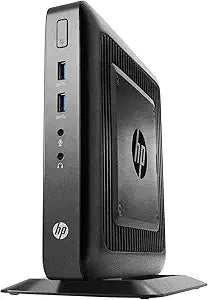
HP V2V48UT#ABA Flexible Thin Client Desktop
Efficient and Secure Virtual Desktop ExperienceThe HP Flexible Thin Client T520 provides a reliable and secure desktop experience for virtual network users. Designed for easy integration and smart performance, it's a cost-effective solution for virtual environments. Features: Work Smarter, Powerf...
Check availability
Affiliate Disclosure: Studio Supplies may earn a commission from qualifying purchases made through links on this page, at no additional cost to you. This helps support our editorial team.
Notice a mistake? Let Us Know
Overview
Efficient and Secure Virtual Desktop Experience
The HP Flexible Thin Client T520 provides a reliable and secure desktop experience for virtual network users. Designed for easy integration and smart performance, it's a cost-effective solution for virtual environments.
- Features: Work Smarter, Powerful Performance, Seamless Integration, Smart Investment
Key Features
Work smarter
Powerful performance
Seamless integration
Rest easy with a smart investment
Specifications
Brand
HP
Model
V2V48UT#ABA
Product Type
Flexible Thin Client Desktop
Pros & Cons
👍 Pros
- Designed for seamless integration into existing IT infrastructures, simplifying deployment and management.
- Offers powerful performance, which helps to ensure smooth operation and responsiveness for various tasks.
- Promotes smarter work with its flexible thin client desktop design, adapting to different user needs and environments.
- Provides a smart investment, suggesting reliability and efficiency for long-term operational cost savings.
- Benefits from HP's established reputation for reliable business hardware and enterprise solutions.
👎 Cons
- Specific processor, RAM, and storage details are not provided, making it difficult to assess its exact performance capabilities.
- As a "thin client," it relies heavily on server-side processing, which may not be suitable for demanding local applications or offline work.
- The term "flexible" is general and doesn't specify concrete features like VESA mounting options or various form factors.
- Lacks detailed technical specifications that would allow for a direct comparison with other thin client solutions.
- An external monitor, keyboard, and mouse would be required, as is typical for desktop units, but not explicitly stated as included.
Frequently Asked Questions
What kind of users or environments benefit most from a flexible thin client desktop?
Flexible thin client desktops are ideal for organizations that need centralized management, enhanced security, and cost-effective deployment across a large number of users, such as call centers, educational institutions, or corporate offices.
What does "powerful performance" mean for a thin client?
For a thin client, "powerful performance" typically refers to its ability to efficiently connect to virtual desktops or cloud applications, rendering the streamed content smoothly and responding quickly to user input, rather than raw local processing power.
Does this HP thin client come with an operating system pre-installed?
The product description states it is a "Flexible Thin Client Desktop," which often implies a specialized thin client operating system is pre-installed, but specific OS details are not provided.
How does a thin client offer a "smart investment"?
Thin clients can be a smart investment due to lower initial hardware costs, reduced power consumption, extended lifespans, and simplified IT management, all contributing to a lower total cost of ownership over time.
Can this thin client be used as a standalone desktop PC?
No, a thin client is designed to operate within a client-server architecture, relying on a central server for applications and data processing, and cannot function as a standalone desktop PC for local computing.
Related Products


