



HP
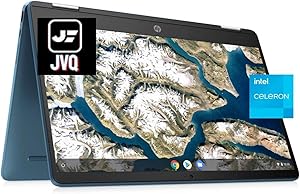
HP X360 Chromebook 14" Touchscreen Laptop
★★★★★
A flexible 2-in-1 Chromebook that converts between laptop and tablet mode for students and light users who need portability over raw horsepower.
$288.88*
Check availability
*Price sourced from Amazon.com. Last updated:Jun 04, 2026.Price and availability are subject to change.
Affiliate Disclosure: Studio Supplies may earn a commission from qualifying purchases made through links on this page, at no additional cost to you. This helps support our editorial team.
Notice a mistake? Let Us Know
Overview
Specifications
Brand
HP
Model
X360
Operating System
Chrome OS
Display
14.0-inch HD (1366 x 768) Touchscreen
Processor
Intel Celeron N4000, Dual-Core, 1.1 GHz base / 2.8 GHz boost
Graphics
Intel UHD Graphics
RAM
4GB DDR4 SDRAM
Storage
320GB (64GB eMMC + 256GB Card)
Wireless
802.11a/b/g/n/ac (2x2) Wi-Fi, Bluetooth 5.0
Ports
2x USB-C (5Gbps), 1x USB-A (5Gbps), 1x Headphone/Mic combo
Color
Blue
Dimensions
22 x 14 x 4 inches
Weight
3.64 lb
Form Factor
2-in-1 Convertible
Pros & Cons
👍 Pros
- 2-in-1 360-degree hinge enables laptop, tent, stand, and tablet modes, adding flexibility for presentations, note-taking, and media consumption from one device.
- 14-inch HD touchscreen provides a larger display footprint than most entry Chromebooks, which typically ship at 11 or 12 inches.
- Combined 320GB storage (64GB eMMC + 256GB card) gives more total space than typical base-tier Chromebooks that ship with 32GB eMMC only.
- Bluetooth 5.0 and 802.11ac Wi-Fi deliver modern wireless connectivity for peripherals and network performance.
- 3.64 lb weight keeps it portable enough for daily carry between home, class, or a co-working space.
👎 Cons
- 4GB DDR4 RAM is a hard ceiling that Chrome OS cannot overcome — heavy multitasking and Android app use will hit memory pressure quickly.
- Intel Celeron N4000 dual-core CPU is a 2018-generation chip, meaning this machine is already behind the performance curve on arrival.
- 1366 x 768 (HD) display resolution is below 1080p — text and images lack the sharpness of Full HD screens now common at this price tier.
- The 256GB storage component is a card, not a faster NVMe or UFS solution, so large file operations will be limited by card read/write speeds.
- No HDMI port means external monitor connections require a USB-C adapter or hub, an added cost not included in the box.
Frequently Asked Questions
What processor powers this Chromebook and what does that mean for everyday performance?
The Intel Celeron N4000 is a dual-core chip with a 1.1 GHz base clock that boosts to 2.8 GHz. It handles web browsing, Google Docs, streaming, and Android apps comfortably — it is not designed for video editing, local compilation, or multitasking with dozens of browser tabs.
How much storage does this Chromebook actually have, and is it expandable?
Total storage is 320GB — comprised of 64GB eMMC internal storage and a 256GB included card. The 64GB eMMC is the primary fast storage; the card adds capacity but at lower read/write speeds. Cloud storage via Google Drive supplements both.
Does the touchscreen support stylus input?
The product listing does not specify stylus support. The display is a 14-inch HD touch panel rated for finger touch input; stylus compatibility is not confirmed from available specifications.
What ports are available on this Chromebook?
Two USB-C (SuperSpeed 5Gbps), one USB-A (SuperSpeed 5Gbps), and a headphone/microphone combo jack. There is no HDMI port listed — external display connections would route through USB-C.
Is this Chromebook suitable for a student or remote worker?
For Google Workspace-centric workflows — Docs, Sheets, Meet, and web browsing — yes. The 4GB RAM ceiling becomes a practical constraint if you rely heavily on multiple browser tabs or run Android apps alongside web tools simultaneously.
Related Products


