



HP
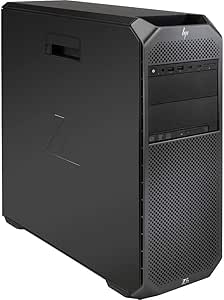
HP Z6 G4 Renewed Workstation, Gold 6148, 16GB RAM, 1TB NVMe, WX 4100
A 20-core Xeon Gold 6148 and WX 4100 professional graphics make this renewed Z6 G4 a capable workstation for CAD, rendering, and data-intensive professional applications.
$1,140.00*
View on Amazon
✓ In Stock on Amazon.com
*Price sourced from Amazon.com. Last updated:Jun 30, 2026.Price and availability are subject to change.
Affiliate Disclosure: Studio Supplies may earn a commission from qualifying purchases made through links on this page, at no additional cost to you. This helps support our editorial team.
Notice a mistake? Let Us Know
Overview
Specifications
Brand
HP
Model
Z6 G4
Condition
Renewed
Processor
Intel Xeon Gold 6148, 20-Core/40-Thread, 2.4GHz
Memory
16GB RAM (ECC)
Storage
1TB NVMe SSD
Graphics
AMD Radeon Pro WX 4100
Operating System
Windows 11 (Pre-installed)
Pros & Cons
👍 Pros
- 20-core, 40-thread Xeon Gold 6148 at 2.4GHz (with Turbo) handles heavily multi-threaded professional workloads — rendering, simulation, and large dataset processing — that would saturate 8-core desktop CPUs
- ECC memory support provides data integrity protection essential for professional applications where silent memory errors are unacceptable
- WX 4100 professional GPU carries ISV-certified drivers for CAD and DCC applications, ensuring stability that consumer GTX/RTX cards cannot guarantee in those workflows
- 1TB NVMe delivers fast storage I/O for large project files, assets, and OS responsiveness
- Pre-installed Windows 11 reduces initial setup time on a renewed platform
👎 Cons
- 16GB RAM is a significant under-provisioning for the Gold 6148 platform — professional workloads that justify this CPU will almost universally require a RAM upgrade before serious deployment
- WX 4100 4GB VRAM ceiling limits real-time viewport performance in scenes with large polygon counts or high-resolution texture assets — it is mid-tier professional, not high-end
- Renewed condition means DIMM slot health, NVMe wear state, and thermal paste condition are unknowns that require auditing before production use
- The Gold 6148's 2.4GHz base clock means lightly-threaded applications — some CAD operations, single-threaded code compilation — will feel slower than a modern desktop Core i7 or i9 at higher base clocks
- No GPU specification details (memory type, bus width) provided beyond model name, limiting pre-purchase performance comparisons
Frequently Asked Questions
What does the Xeon Gold 6148 offer that a desktop Core i9 does not?
The Gold 6148 is a 20-core, 40-thread Xeon with support for ECC memory and large memory capacity — critical distinctions for professional workloads. ECC RAM corrects single-bit memory errors silently, which matters in CAD, scientific computing, and financial modeling where data integrity is non-negotiable. The Z6 G4 platform also supports multi-socket configurations, though this unit is single-socket.
Is 16GB RAM sufficient for professional workstation tasks on this platform?
16GB is below the expected baseline for serious workstation use with a Gold 6148 platform. Large assemblies in CAD, multi-layer compositing, and VM workloads will benefit substantially from expanding to 64GB or more. The Z6 G4 supports high-capacity ECC LRDIMMs — RAM expansion is one of the first practical upgrades for this unit.
What does the AMD WX 4100 GPU support in professional applications?
The WX 4100 is a professional-grade GPU with certified drivers for applications like AutoCAD, SolidWorks, Maya, and Premiere Pro. It supports 4x Mini DisplayPort outputs for multi-monitor configurations. Unlike consumer GPUs, it is qualified and validated by ISVs for stable operation in those applications — the driver stack is optimized for precision, not peak gaming throughput.
Can the 1TB NVMe SSD be supplemented with additional storage?
Yes. The Z6 G4 supports multiple drive bays and PCIe expansion, allowing additional NVMe or SATA storage to be added. The platform's storage expandability is one of its workstation-class advantages over tower consumer desktops.
What does "renewed" mean for this workstation, and what should I check?
Renewed indicates refurbished/recertified hardware. Verify Windows 11 activation status, run HP's built-in BIOS diagnostics, confirm all memory DIMMs register correctly, check NVMe health via CrystalDiskInfo or equivalent, and validate WX 4100 driver installation before deploying in a production workflow.
Related Products


