

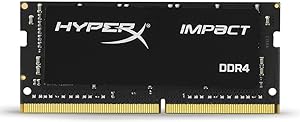


HyperX
HyperX HX424S14IB2/8 Impact 8GB 2400MHz DDR4 SODIMM Memory
Upgrade to 2400MHz DDR4 and eliminate the memory bandwidth ceiling that throttles your laptop's multitasking and integrated graphics performance.
Check availability
Affiliate Disclosure: As an Amazon Associate, Studio Supplies earns from qualifying purchases made through links on this page, at no additional cost to you. This helps support our editorial team.
Notice a mistake? Let Us Know
Overview
Key Features
Optimized for Intel's Series 100 and 200 chipsets
4GB–16GB capacities, frequencies up to 2666MHz*
Automatic overclocking for a hassle-free boost
XMP-ready profiles for easy custom tuning
Low 1.2 standard voltage runs more efficiently
Specifications
Capacity
8GB
Memory Type
DDR4
Form Factor
SODIMM
Frequency
2400MHz
CAS Latency
CL14
Voltage
1.2V
Error Correction
Non-ECC
Chipset Optimization
Intel Series 100 & 200
XMP Support
Yes
Frequently Asked Questions
Which laptops and platforms is this module optimized for?
The HX424S14IB2/8 is specifically optimized for Intel Series 100 and 200 chipsets — that covers 6th and 7th generation Intel Core platforms (Skylake, Kaby Lake). It will physically fit any SODIMM-compatible slot, but XMP profile support and guaranteed rated-speed operation are validated on those Intel chipsets. Verify your platform before assuming AMD compatibility.
What does CL14 latency mean in practice versus a CL16 module at the same frequency?
CAS latency 14 means the module responds to a memory access command in 14 clock cycles rather than 16. At 2400MHz, that's a measurable but modest real-world difference — most users won't feel it in general productivity, but latency-sensitive workloads like gaming or real-time audio processing will show a slight edge over CL16 configurations.
Can I run this single 8GB stick alongside an existing stick for dual-channel operation?
Dual-channel requires a matched pair running in corresponding slots. If your existing stick is also 8GB DDR4 and runs at or below 2400MHz, the system will attempt to pair them — but mixed-SKU pairing isn't guaranteed to run at rated speeds or with XMP active. For reliable dual-channel, a matched HyperX pair is the cleaner solution.
Does XMP enable automatically, or do I need to enter BIOS to activate it?
XMP does not auto-enable on every system. On compatible Intel platforms, you'll typically need to enter BIOS/UEFI and manually enable XMP or Intel Extreme Memory Profile to run at 2400MHz. Without it, the system defaults to JEDEC standard speeds (usually 2133MHz). The process is a single toggle on most consumer BIOS interfaces.
Is this module suitable for small form factor PCs, not just laptops?
Yes — the SODIMM form factor is used in both laptops and compact SFF desktops (Intel NUC, various mini-ITX builds with SODIMM slots). If your SFF system uses SODIMM slots and runs a compatible Intel chipset, this module drops in identically to a laptop installation.
Related Products


