



Intel
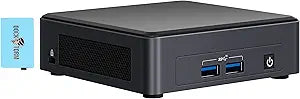
Intel BNUC11TNKI70Z00-4033-228199 NUC 11 Pro i7 Mini Desktop, 16GB RAM, 2TB SSD, Win 11 Pro
i7-1165G716GB RAM16GB DDR42TB SSD120W
The NUC 11 Pro packs an i7-1165G7, 16GB RAM, and a 2TB NVMe SSD into a 5x5x2-inch chassis ready for Windows 11 Pro workloads.
$709.99*
Check availability
*Price sourced from Amazon.com. Last updated:Jul 15, 2026.Price and availability are subject to change.
Affiliate Disclosure: Studio Supplies may earn a commission from qualifying purchases made through links on this page, at no additional cost to you. This helps support our editorial team.
Notice a mistake? Let Us Know
Overview
Key Features
【Upgraded】 Seal is opened for Hardware/Software upgrade only to enhance performance. No Display ; Wi-Fi 6 AX201 Wifi, Bluetooth 5.2, Ethernet LAN (RJ-45), No Webcam, .
【Powerful Performance with Intel Core i7-1165G7 Quad Core】 11th Gen Intel Core i7-1165G7 2.80GHz Processor (upto 4.7 GHz, 12MB Cache, 4-Cores, 8-Threads, ) ; Intel Iris Xe Integrated Graphics, .
【High Speed and Multitasking】 16GB DDR4 SODIMM; 120W Power Supply; Black Color, .
【Enormous Storage】 2TB PCIe NVMe SSD; 1 USB 2.0, 2 x HDMI 2.0b, No Optical Drive, ., Windows 11 Pro., 1 Year Manufacturer warranty from GreatPriceTech (Professionally upgraded by GreatPriceTech)
Includes Dockztorm USB Hub(Special Edition Portable Docztorm Data Hub;Super Speedy Data Syn Rate upto 5Gbps)
Specifications
Processor
Intel Core i7-1165G7, 2.80GHz (up to 4.7GHz), 4-Core/8-Thread, 12MB Cache
Graphics
Intel Iris Xe Integrated Graphics
Memory
16GB DDR4 SO-DIMM
Storage
2TB PCIe NVMe SSD
Operating System
Windows 11 Pro
Wireless
Wi-Fi 6 AX201, Bluetooth 5.2
Wired Networking
Ethernet LAN (RJ-45)
Video Outputs
2x HDMI 2.0b
USB Ports
1x USB 2.0
Webcam
None
Power Supply
120W
Form Factor
Mini PC
Dimensions
5 x 5 x 2 inches
Weight
3 lb
Color
Black
Pros & Cons
👍 Pros
- i7-1165G7 (4-core/8-thread, up to 4.7GHz) delivers strong single-threaded performance — the metric that matters most for typical productivity workloads.
- 2TB PCIe NVMe SSD provides high-speed storage with substantial capacity — more than adequate for OS, applications, and a working file library without external drives.
- Dual HDMI 2.0b outputs support two 4K/60Hz monitors simultaneously from an integrated graphics configuration, a practical capability for productivity deployments.
- Wi-Fi 6 (AX201) + Bluetooth 5.2 + Gigabit Ethernet covers all standard connectivity scenarios without requiring additional adapters.
- 5x5x2-inch chassis with 3 lb weight enables VESA mounting or tight-space deployment that a standard desktop tower cannot achieve.
👎 Cons
- Single USB 2.0 port is a significant connectivity bottleneck — multi-peripheral use requires full dependence on the bundled third-party USB hub.
- Intel Iris Xe integrated graphics handles 2D productivity and 4K video, but rules out GPU-accelerated rendering, 3D modeling, or any gaming workload.
- No webcam built in — remote work and video conferencing require an external USB webcam, adding cost and desk clutter.
- 4-core architecture limits parallel compute throughput — workloads that benefit from 8+ threads (video encoding, large compilation jobs) will reach the CPU ceiling faster than desktop-class alternatives.
- No optical drive and limited native USB ports make optical media or high-speed USB-A device connectivity reliant entirely on external hubs.
Frequently Asked Questions
What performance does the i7-1165G7 deliver, and where does Intel Iris Xe graphics fit in its workload profile?
The i7-1165G7 is a 4-core/8-thread Tiger Lake processor running up to 4.7GHz with 12MB cache. It handles office productivity, light development, media playback, and multi-tab browsing without bottlenecking. Intel Iris Xe integrated graphics — with 96 execution units — supports dual 4K display output and light GPU-accelerated tasks, but is not suitable for 3D gaming or heavy GPU compute workloads.
Can the NUC 11 Pro drive two external displays simultaneously?
Yes. The dual HDMI 2.0b ports support two displays at up to 4K/60Hz each. This makes the NUC 11 Pro practical as a dual-monitor productivity workstation despite its compact form factor — both ports carry full bandwidth simultaneously.
What does the 2TB PCIe NVMe SSD mean for day-to-day responsiveness?
PCIe NVMe delivers sequential read speeds several times faster than SATA SSD. Boot times, application launches, and large file transfers are noticeably faster than SATA-based systems. For a productivity workstation, NVMe primarily reduces wait times rather than increasing sustained throughput — the difference is felt most in OS and application responsiveness.
How does the 120W power supply affect deployment options?
The 120W external power brick is compact and the NUC chassis draws significantly less than a full desktop under typical loads. This makes it practical for VESA mounting behind a monitor, deploying in conference rooms, or running in space-constrained environments. Power consumption under typical productivity workloads is well below the 120W ceiling.
Is the USB port selection — only one USB 2.0 — a practical limitation?
Yes, this is the most notable port-side constraint. With only a single USB 2.0 port listed in this configuration, high-speed peripheral connectivity depends on the included Dockztorm USB Hub (rated up to 5Gbps). Users should factor in the hub as a required component for multi-peripheral setups rather than an optional add-on.
Related Products


