



Intel
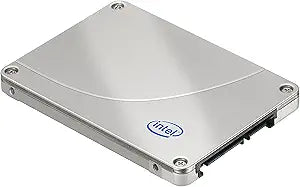
Intel SSDSA2M160G2LE X25-M 160GB SATA Solid State Drive
Intel X25-M 160GB SSD delivers reliable solid-state performance with a proven SATA interface for faster system responsiveness.
Check availability
Affiliate Disclosure: Studio Supplies may earn a commission from qualifying purchases made through links on this page, at no additional cost to you. This helps support our editorial team.
Notice a mistake? Let Us Know
Overview
Key Features
2.5-inch Form Factor SATA 3Gb/s,160GB Capacity
Sequential Read 250 MB/s, Sequential Write,100 MB/s
Random Read (8GB Span) 35000 IOPS, Random Write 8600 IOPS
Random Read (100% Span) 35000 IOPS, Random Write 300 IOPS
Latency Read 65 µs, Latency Write 85 µs, Operating Temperature 0°C to 70°C
Specifications
Brand
Intel
Model
SSDSA2M160G2LE
Series
X25-M
Form Factor
2.5"
Interface
SATA 3Gb/s
Capacity
160GB
Pros & Cons
👍 Pros
- Solid-state design with no moving parts provides greater durability and silent operation
- 160GB capacity is sufficient for an operating system drive and essential applications
- 2.5-inch form factor fits standard laptop bays and desktop adapters
- Intel-built controller offers proven reliability and consistent performance
👎 Cons
- SATA 3Gb/s interface limits maximum throughput compared to newer SATA III or NVMe drives
- 160GB capacity is relatively small by modern standards for users with large file libraries
- Older generation SSD technology delivers lower read/write speeds than current drives
Frequently Asked Questions
What is the storage capacity of the Intel X25-M SSDSA2M160G2LE?
The Intel X25-M provides 160GB of solid-state storage capacity.
What interface does the Intel X25-M use?
It uses a SATA 3Gb/s (SATA II) interface, which is compatible with standard SATA connections found in most desktops and laptops.
What form factor is the Intel X25-M?
The drive uses a standard 2.5-inch form factor, making it suitable for laptops and desktop systems with 2.5-inch drive bays or adapters.
Is the Intel X25-M a good upgrade from a traditional hard drive?
Yes, replacing a mechanical hard drive with the X25-M will deliver noticeably faster boot times, quicker application launches, and improved overall system responsiveness.
Related Products


