

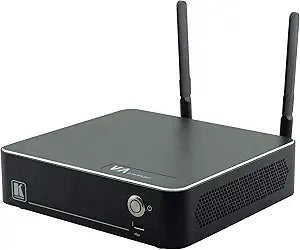


Kramer
Kramer VIA-CAMPUS2 Wireless Presentation System
Kramer VIA-CAMPUS2 enables wireless multi-user presentation and real-time collaboration from any device to any display.
$1,499.00*
View on Amazon
✓ In Stock on Amazon.com
*Price sourced from Amazon.com. Last updated:Jul 14, 2026.Price and availability are subject to change.
Affiliate Disclosure: Studio Supplies may earn a commission from qualifying purchases made through links on this page, at no additional cost to you. This helps support our editorial team.
Notice a mistake? Let Us Know
Overview
Key Features
Wireless Presentation and Collaboration Device
Specifications
Model
VIA-CAMPUS2
Type
Wireless Presentation and Collaboration Solution
Brand
Kramer
Pros & Cons
👍 Pros
- Supports simultaneous wireless screen sharing from multiple participants at once
- Cross-platform compatibility covers Windows, Mac, iOS, Android, and Chromebook
- Eliminates the need for cables and adapters when switching between presenters
- Designed for both meeting rooms and classroom environments with enterprise-grade reliability
👎 Cons
- Higher price point compared to basic wireless display adapters like Chromecast or Miracast dongles
- Requires network infrastructure and configuration, making setup more involved than plug-and-play solutions
- Limited publicly available specification details make it harder to evaluate before purchase
- Dedicated app provides the best experience, meaning some setup is still needed on participant devices
Frequently Asked Questions
How many users can present simultaneously on the VIA-CAMPUS2?
The VIA-CAMPUS2 supports multiple simultaneous presenters, allowing several participants to share their screens to a single display at the same time for side-by-side collaboration.
What devices are compatible with the VIA-CAMPUS2?
It supports wireless connectivity from laptops, tablets, and smartphones across Windows, macOS, iOS, Android, and Chromebook platforms via its dedicated app or built-in protocols like AirPlay and Miracast.
Does the VIA-CAMPUS2 require software installation on user devices?
Users can connect through a downloadable app for full functionality, but the system also supports native streaming protocols, allowing many devices to connect without installing additional software.
Is the VIA-CAMPUS2 designed for a specific room size?
It is designed to work in meeting rooms, classrooms, and conference spaces of various sizes — anywhere a shared display is used for group collaboration.
Related Products


