

Lenovo
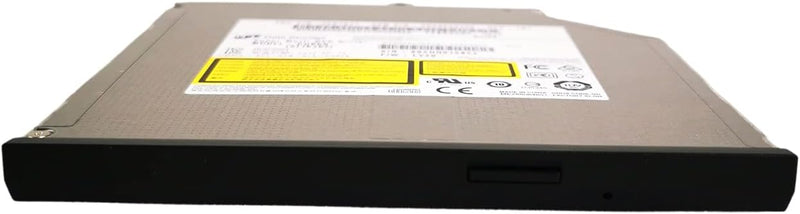
Lenovo 0B47326 Ultrabay Slim DVD-RW Drive
★★★★★
Ultrabay Slim DVD-RW drive that adds full optical disc read/write capability to compatible ThinkPad laptops.
$29.99*
View on Amazon
✓ In Stock on Amazon.com
*Price sourced from Amazon.com. Last updated:Jul 14, 2026.Price and availability are subject to change.
Affiliate Disclosure: Studio Supplies may earn a commission from qualifying purchases made through links on this page, at no additional cost to you. This helps support our editorial team.
Notice a mistake? Let Us Know
Overview
Key Features
Marketing part number 0B47326, Service Part Number (FRU 45N7647) Model: GUBON (ALIK102)
SATA interface Compatible with: ThinkPad T440p, T540p, W540, W541 Complies with DVD forum and DVD-multi-recorder specification
Operates natively in the ThinkPad Ultra bay enhanced media bay Stores large amounts of data and video on DVD and CD media
Records data and video to CD-R, CD-RW, DVD-R, DVD-RW, DVD+R, DVD+RW, DVD-RAM, DVD+R double layer, and DVD-R dual layer media
0.5 MB memory buffer underrun protection for reliable CD and DVD media recording
Specifications
Brand
Lenovo
Model
0B47326
FRU Part Number
45N7647
Type
DVDRW/DVD-RAM Drive
Interface
SATA
Form Factor
Ultrabay Slim (9.5mm)
Compatible Models
ThinkPad T440p, T540p, W540, W541
Recording Formats
CD-R, CD-RW, DVD-R, DVD-RW, DVD+R, DVD+RW, DVD-RAM, DVD+R DL, DVD-R DL
Buffer Size
0.5MB with underrun protection
Pros & Cons
👍 Pros
- Supports a wide range of recording formats including DVD-RAM and dual/double layer discs.
- Slides directly into the ThinkPad Ultrabay slot with no external cables or adapters required.
- 0.5MB buffer underrun protection reduces the risk of failed disc burns.
- Slim 9.5mm form factor keeps the laptop profile thin while adding optical capability.
👎 Cons
- Compatibility is limited to specific ThinkPad models with a 9.5mm serial Ultrabay.
- Occupies the Ultrabay slot, which means you cannot use a secondary battery or hard drive caddy at the same time.
- Optical disc read/write speeds are inherently slow compared to USB flash or external SSD transfers.
- Does not support Blu-ray disc reading or writing.
Frequently Asked Questions
Which ThinkPad models is this drive compatible with?
It is designed for ThinkPad models with a 9.5mm serial Ultrabay media bay, including the T440p, T540p, W540, and W541.
What disc formats can this drive record to?
It supports recording to CD-R, CD-RW, DVD-R, DVD-RW, DVD+R, DVD+RW, DVD-RAM, DVD+R double layer, and DVD-R dual layer media.
Does this drive connect via USB or SATA?
It uses a SATA interface and connects natively through the ThinkPad Ultrabay slot — no external cables or USB adapters are needed.
Does the drive include buffer underrun protection?
Yes. It has a 0.5MB memory buffer with underrun protection, which helps prevent failed burns caused by data interruptions during the recording process.
Can I hot-swap this drive while the laptop is running?
Ultrabay drives on supported ThinkPad models generally support hot-swap, but it is best to safely eject the drive through the operating system before physically removing it to avoid data loss.
Related Products


